
1. Introduction
This manual provides instructions for the OEM RMT-B119A remote control, designed as a replacement or secondary remote for various Sony Blu-ray player models. This remote offers full functionality for controlling your Blu-ray player's features.
Compatible Sony Blu-ray Player Models:
- BDP-BX59
- BDP-S390
- BDP-S590
- BDP-BX110
- BDP-S1100
- BDP-S3100
- BDP-BX310
2. Setup
2.1 Battery Installation
The remote control requires two (2) AAA batteries (not included). Follow these steps to install the batteries:
- Locate the battery compartment cover on the back of the remote control.
- Press down on the tab and slide the cover downwards to open the compartment.
- Insert two AAA batteries, ensuring the positive (+) and negative (-) terminals align correctly with the markings inside the compartment.
- Slide the battery compartment cover back into place until it clicks securely.
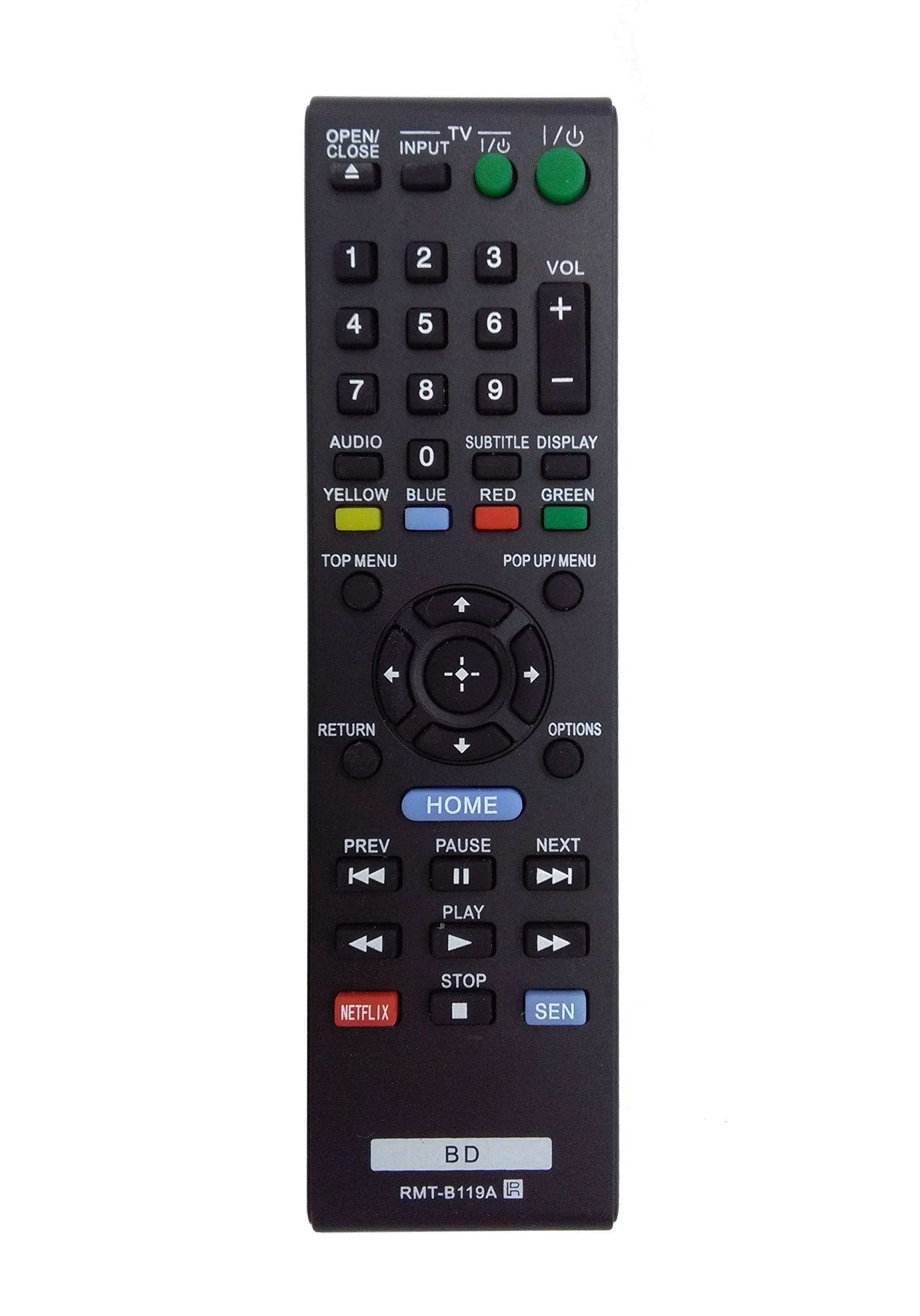
Image: The OEM RMT-B119A remote control, showing the full button layout on the front and a partial view of the open battery compartment on the back, revealing the battery terminals.
3. Operating Instructions
3.1 Remote Control Layout and Button Functions
Familiarize yourself with the buttons on your RMT-B119A remote control. Below is a description of each button's primary function.
Image: The OEM RMT-B119A remote control, displaying all buttons and their labels.
- Power (I/O): Turns the Blu-ray player on or off.
- OPEN/CLOSE (▲): Opens or closes the disc tray.
- INPUT: Switches the input source on the connected TV (if programmed).
- TV: Switches the remote to TV control mode (if programmed).
- Number Pad (0-9): Used for direct track selection, chapter selection, or entering numerical data.
- VOL (+/-): Adjusts the volume level (typically for the connected TV, if programmed).
- AUDIO: Changes the audio track or language during playback.
- SUBTITLE DISPLAY: Toggles subtitle display on or off, or cycles through available subtitle languages.
- YELLOW, BLUE, RED, GREEN: Color-coded function buttons, typically used for specific features within menus or interactive content. Their function varies depending on the disc or menu.
- TOP MENU: Accesses the main menu of the Blu-ray disc.
- POP UP/MENU: Displays the pop-up menu during disc playback.
- Directional Pad (↑↓←→): Navigates through menus and options.
- Center Button (Enter/Select): Confirms a selection or enters a menu item.
- RETURN: Goes back to the previous screen or menu.
- OPTIONS: Displays context-sensitive options or settings.
- HOME: Accesses the Blu-ray player's home menu.
- PREV (◀◀): Skips to the beginning of the current track/chapter or the previous track/chapter.
- PAUSE (▌▌): Pauses playback.
- NEXT (▶▶): Skips to the next track or chapter.
- PLAY (▶): Starts or resumes playback.
- STOP (■): Stops playback.
- NETFLIX: Direct access button for the Netflix streaming service.
- SEN: Direct access button for the Sony Entertainment Network (now PlayStation Video/Music).
- BD: Likely a dedicated button for Blu-ray Disc functions or to switch to Blu-ray mode.
4. Maintenance
To ensure the longevity and proper functioning of your remote control, follow these maintenance guidelines:
- Cleaning: Wipe the remote control with a soft, dry cloth. For stubborn dirt, slightly dampen the cloth with water or a mild, non-abrasive cleaner. Avoid using harsh chemicals or solvents.
- Battery Replacement: Replace batteries when the remote's response becomes sluggish or it stops functioning. Always replace both batteries at the same time with new ones of the same type.
- Storage: Store the remote in a cool, dry place away from direct sunlight, extreme temperatures, and high humidity. If the remote will not be used for an extended period, remove the batteries to prevent leakage.
- Avoid Drops: Protect the remote from physical impact, as drops can damage internal components.
5. Troubleshooting
If you experience issues with your remote control, refer to the following table for common problems and solutions:
| Problem | Possible Cause | Solution |
|---|---|---|
| Remote does not work. | Dead or incorrectly inserted batteries. | Replace batteries with new ones, ensuring correct polarity (+/-). |
| Remote works intermittently. | Low battery power or obstruction. | Replace batteries. Ensure no objects are blocking the remote's signal path to the Blu-ray player. |
| Remote does not control the TV. | Remote not programmed for TV or TV mode not selected. | This remote is primarily for Blu-ray players. TV control functionality may require specific programming not covered by this manual, or may not be supported by this OEM model. |
| Buttons are unresponsive or sticky. | Dirt or debris under buttons. | Clean the remote control surface. Avoid spilling liquids on the remote. |
6. Specifications
- Brand: OEM
- Model Number: RMT-B119A
- Connectivity Technology: Infrared (IR)
- Compatible Devices: Sony Blu-ray Players (specific models listed in Introduction)
- Power Source: 2 x AAA Batteries (not included)
- Maximum Range: Approximately 10 meters (33 feet)
- Special Feature: Ergonomic design
7. Warranty and Support
This OEM RMT-B119A remote control comes with a 30-day warranty from the date of purchase, covering manufacturing defects. Please retain your proof of purchase for warranty claims.
For technical support or warranty inquiries, please contact the retailer or manufacturer directly. Refer to your purchase documentation for specific contact information.


