
ION IPA30
ION Audio iPA30 Job Rocker Portable Bluetooth Speaker Instruction Manual
Model: iPA30
Introduction
The ION Audio iPA30 Job Rocker is a portable, heavy-duty Bluetooth speaker designed for robust environments. It features wireless music streaming, AM/FM radio, and a long-lasting built-in battery. This manual provides essential information for setup, operation, maintenance, and troubleshooting to ensure optimal performance and longevity of your device.
Important Safety Information
WARNING: To reduce the risk of electric shock, do not remove the cover (or back). No user-serviceable parts inside. Refer servicing to qualified service personnel.
Always follow basic safety precautions when using this product, including:
- Read all instructions before using the product.
- Do not use this product near water.
- Clean only with a dry cloth.
- Do not block any ventilation openings. Install in accordance with the manufacturer's instructions.
- Do not install near any heat sources such as radiators, heat registers, stoves, or other apparatus (including amplifiers) that produce heat.
- Do not defeat the safety purpose of the polarized or grounding-type plug. A polarized plug has two blades with one wider than the other. A grounding-type plug has two blades and a third grounding prong. The wide blade or the third prong are provided for your safety. If the provided plug does not fit into your outlet, consult an electrician for replacement of the obsolete outlet.
- Protect the power cord from being walked on or pinched, particularly at plugs, convenience receptacles, and the point where they exit from the apparatus.
- Only use attachments/accessories specified by the manufacturer.
- Unplug this apparatus during lightning storms or when unused for long periods of time.
- Refer all servicing to qualified service personnel. Servicing is required when the apparatus has been damaged in any way, such as power-supply cord or plug is damaged, liquid has been spilled or objects have fallen into the apparatus, the apparatus has been exposed to rain or moisture, does not operate normally, or has been dropped.
Product Overview
The ION Audio iPA30 Job Rocker is engineered for durability and high-fidelity sound in challenging environments. Its robust construction includes heavy-duty steel handles and protective corner bumpers.
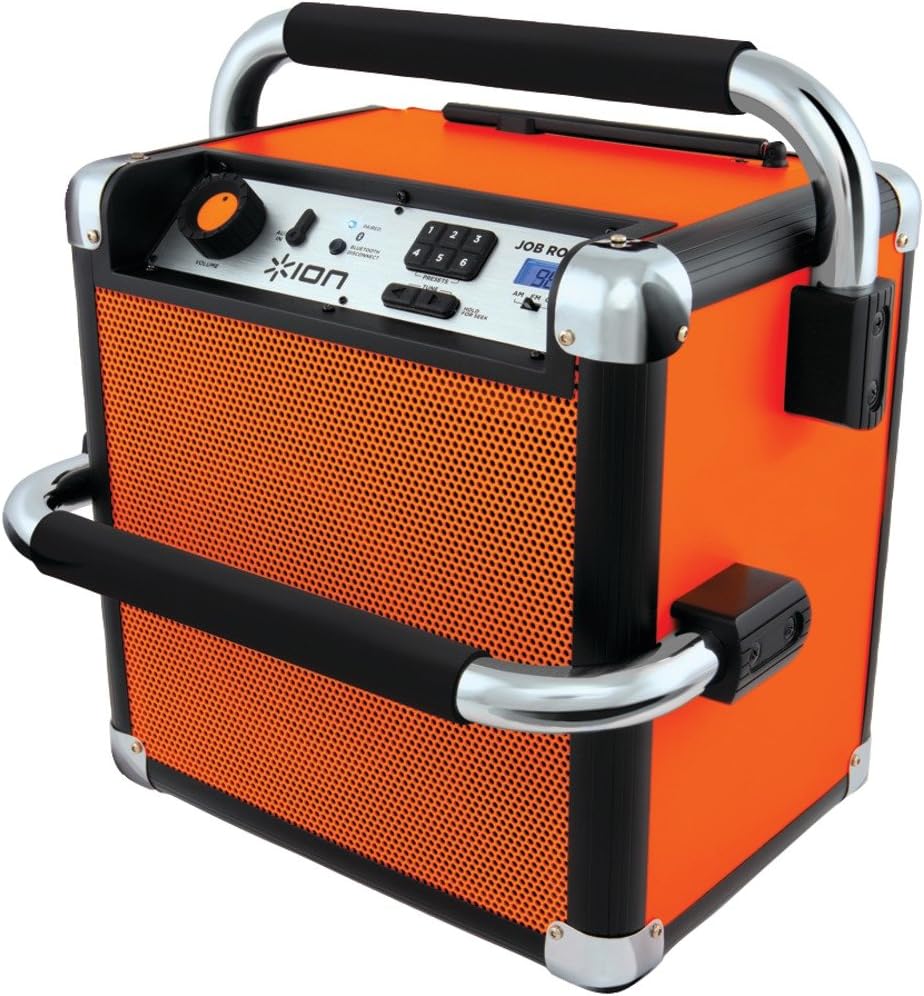
Figure 1: Front view of the ION Audio iPA30 Job Rocker.
Key features include:
- Wireless music streaming via Bluetooth from compatible devices up to 100 feet away.
- Integrated AM/FM radio.
- Built-in rechargeable battery providing up to 50 hours of use.
- Durable wooden cabinet with rugged protective handles and corner bumpers.
- 50 Watts of peak power for high-fidelity sound projection up to 150 feet away.
- Large, rubberized controls for easy operation, even with gloves.

Figure 2: The ION Audio iPA30 Job Rocker in a work environment, highlighting its portability and rugged design.
Setup
1. Initial Charging
Before first use, fully charge the Job Rocker's internal battery. Connect the power cable to the unit's power input and then to a standard electrical outlet. The battery indicator lights on the back of the unit will show charging progress. Allow sufficient time for a full charge to maximize battery life.
2. Powering On/Off
Locate the power switch on the back of the unit. Flip the switch to the 'ON' position to power on the Job Rocker. The display and indicator lights will illuminate. To power off, flip the switch to the 'OFF' position.
3. Bluetooth Pairing
- Ensure your Bluetooth device (e.g., smartphone, tablet) has Bluetooth enabled.
- Power on the Job Rocker. It will automatically enter Bluetooth pairing mode, indicated by a flashing Bluetooth icon on the display.
- On your Bluetooth device, search for available devices and select "ION Job Rocker".
- Once paired, the Bluetooth icon on the Job Rocker's display will stop flashing and remain solid. You can now stream audio wirelessly.
4. Auxiliary Input Connection
For non-Bluetooth devices, use the included 1/8-inch (3.5mm) audio cable. Connect one end to the auxiliary input port on the Job Rocker and the other end to the headphone jack or audio output of your device.
Operating Instructions
1. Adjusting Volume
The main volume knob on the front panel controls the overall output volume. Rotate clockwise to increase volume and counter-clockwise to decrease it. When using Bluetooth, it is recommended to set your source device's volume to about three-quarters maximum and then adjust the main volume on the Job Rocker.
2. Using AM/FM Radio
Extend the rubber antenna on the back of the unit for optimal reception. Use the tuning controls on the front panel to select your desired AM or FM station. The digital display will show the current frequency. You can save favorite stations using the preset buttons.
3. Power Outlets
The Job Rocker includes two AC power outlets on the back. These outlets are active only when the Job Rocker is connected to an external AC power source. They do not draw power from the internal battery. Use these outlets to power or charge other small electronic devices, ensuring the total current draw does not exceed 10 amps.
Maintenance
1. Battery Care
To maintain the longevity of the built-in lead-acid battery, it is recommended to recharge the Job Rocker after each use. Avoid completely draining the battery frequently. If storing the unit for an extended period, ensure it is fully charged and recharge it every 3 months.
2. Cleaning
Clean the exterior of the Job Rocker with a dry, soft cloth. Do not use abrasive cleaners or solvents. Ensure no liquids enter the unit's openings.
3. Storage
Store the Job Rocker in a cool, dry place away from direct sunlight and extreme temperatures. Ensure the power switch is in the 'OFF' position during storage.
Troubleshooting
- No Power: Ensure the power cable is securely connected to both the Job Rocker and a working electrical outlet. Check the power switch on the back of the unit. If operating on battery, ensure the battery is charged.
- No Sound from Bluetooth:
- Verify the Job Rocker is powered on and the Bluetooth icon is solid (indicating a successful connection).
- Check the volume levels on both your Bluetooth device and the Job Rocker.
- Ensure your Bluetooth device is within the 100-foot operating range.
- Try unpairing and re-pairing the Bluetooth connection.
- Poor AM/FM Radio Reception:
- Fully extend and adjust the position of the rubber antenna.
- Move the unit to a different location, as radio reception can be affected by environmental factors (e.g., buildings, electrical interference).
- AC Outlets Not Working: The AC outlets only function when the Job Rocker is plugged into a wall outlet. They do not operate on battery power. Ensure the connected device does not exceed the 10-amp limit.
Specifications
| Brand | ION |
| Model Number | IPA30 |
| Product Dimensions | 12 x 14.5 x 15 inches |
| Item Weight | 20.8 pounds |
| Connectivity Technology | Auxiliary, Bluetooth, USB |
| Special Feature | Portable |
| Tuner Technology | AM/FM |
| Power Source | Battery Powered |
| Radio Bands Supported | AM (520-1710 kHz), FM (87.5-108 MHz) |
| Battery Type | Product Specific (included) |
| Battery Life | Up to 50 hours |
| Audio Output Power | 50 Watts (peak) |

Figure 3: Dimensions of the ION Audio iPA30 Job Rocker.
Warranty and Support
The ION Audio iPA30 Job Rocker comes with a 90-day warranty. For detailed warranty information, troubleshooting assistance, or to contact customer support, please refer to the Safety & Warranty Manual included in the product packaging.
The product package includes:
- Job Rocker unit
- Power Cable
- 1/8-inch (3.5mm) Audio Cable
- Quickstart Guide
- Safety & Warranty Manual
Related documentsIPA30


Ask a question about this manual
Ask about setup, troubleshooting, compatibility, parts, safety, or missing instructions. Manuals+ will review the question and use this page’s manual context to help answer it.