
Introduction
The Taylor TruTemp Pen Style Digital Thermometer (Model 077784351901) is a versatile and durable tool designed for accurate temperature measurement in various culinary applications. Featuring a waterproof design, automatic shut-off, and a wide temperature range, this NSF-listed thermometer is suitable for both home and professional use. Its pen-style design with a protective sheath that doubles as an extension handle makes it convenient for checking temperatures in deep pots or pans.
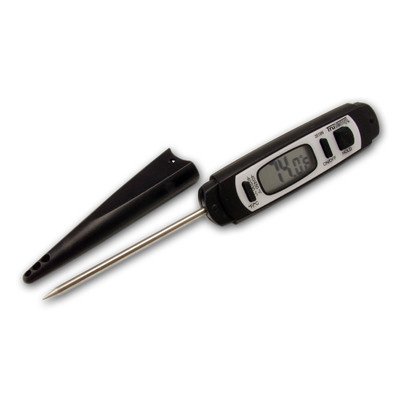
Image: The Taylor TruTemp Pen Style Digital Thermometer, showcasing its compact design.
Setup
- Battery Installation: The thermometer comes with a battery included. To access the battery compartment, locate the small circular cover on the back of the thermometer. Use a coin to gently twist the cover counter-clockwise to open. Insert the battery, ensuring correct polarity, then replace the cover and twist clockwise to secure.
- Initial Power On: Press the "ON/OFF" button to power on the thermometer. The display will illuminate, showing the current temperature.
Note: The thermometer is designed for immediate use after battery installation.
Operating Instructions
- Power On/Off: Press the ON/OFF button to turn the thermometer on or off. The thermometer features an automatic shut-off function to conserve battery life.
- Temperature Unit Selection: Use the °F/°C switch located on the side of the thermometer to toggle between Fahrenheit and Celsius temperature readings.
- Hold Function: Press the HOLD button to freeze the current temperature reading on the display. Press it again to resume live temperature monitoring.
- Temperature Range: The thermometer measures temperatures from -40°F to 450°F (-40°C to 232°C).
- Using the Thermometer:
- Remove the protective sheath from the probe.
- For extended reach, the protective sheath can be snapped onto the back of the thermometer's body, effectively lengthening the handle.
- Insert the stainless steel probe into the center of the food or liquid you wish to measure. Ensure the probe tip is fully immersed and not touching the bottom or sides of the container.
- Wait for the temperature reading on the LCD display to stabilize.
- Once the desired temperature is reached, remove the thermometer and clean the probe.
Video: Demonstration of the Taylor TruTemp Digital Thermometer's features, including its waterproof nature and use in various cooking scenarios.
Maintenance
- Cleaning: The Taylor TruTemp thermometer is waterproof. After each use, wash the probe and body with soap and water in the sink. Dry thoroughly with a soft cloth.
- Do Not Dishwash: To ensure longevity and proper function, do not place the thermometer in a dishwasher.
- Storage: Store the thermometer with its protective sheath in a clean, dry place. The sheath helps protect the probe from damage.
Troubleshooting
- No Display/Faint Display: Check the battery. Replace if necessary, ensuring correct polarity.
- Inaccurate Readings: Ensure the probe is inserted correctly into the food/liquid and not touching the container. Allow sufficient time for the reading to stabilize. If issues persist, the battery may be low.
- Water Damage (despite being waterproof): While waterproof, extreme conditions or prolonged submersion beyond intended use may affect performance. Ensure the battery compartment is securely closed.
Specifications
| Feature | Detail |
|---|---|
| Brand | Taylor |
| Model Number | 077784351901 |
| Special Feature | Waterproof |
| Color | Black |
| Included Components | Battery |
| Outer Material | Plastic |
| Specification Met | NSF |
| Display Type | LCD |
| Product Care Instructions | Wipe Clean |
| Power Source | Battery Powered |
| Temperature Range | -40°F to 450°F (-40°C to 232°C) |
| Reusability | Reusable |
| Immersion Depth | 5 Inches |
| Indoor/Outdoor Usage | Outdoor |
| Product Dimensions | 0.8 x 5 x 8.5 inches |
| Item Weight | 1 pounds |
Warranty and Support
For warranty information or product support, please refer to the manufacturer's official website or contact their customer service directly. Keep your purchase receipt as proof of purchase.
Manufacturer: Taylor
Date First Available: January 29, 2013

