
1. Introduction
Thank you for choosing the Philips Skies Outdoor Wall Light. This manual provides essential information for the safe installation, operation, and maintenance of your new lighting fixture. Please read these instructions carefully before installation and retain them for future reference.
This product is designed for outdoor use, providing ambient lighting without a motion sensor feature. Its durable aluminum construction and anthracite finish ensure longevity and aesthetic appeal.
2. Safety Information
- Electrical Safety: Installation must be performed by a qualified electrician in accordance with all local and national electrical codes. Always switch off the main power supply at the circuit breaker before commencing any electrical work.
- Outdoor Use: This fixture is designed for outdoor use only. Ensure all connections are properly sealed and protected from moisture to prevent electrical hazards.
- Mounting: Ensure the mounting surface is structurally sound and can support the weight of the fixture.
- Bulb Type: Refer to the product specifications for compatible bulb types and wattage. Do not exceed the maximum wattage specified.
- Cleaning: Disconnect power before cleaning. Use a soft, damp cloth. Avoid abrasive cleaners or solvents.
3. Package Contents
Verify that all components are present before beginning installation:
- Philips Skies Outdoor Wall Light fixture (1 unit)
- Mounting hardware (screws, wall anchors)
- Instruction Manual
Note: Light bulbs are typically sold separately unless otherwise specified. This luminaire is compatible with bulbs of various energy classes.

Figure 1: Front view of the Philips Skies Outdoor Wall Light.
4. Setup and Installation
Tools Required: Screwdriver, drill, wire strippers, electrical tape, voltage tester, pencil, measuring tape.
- Prepare for Installation: Switch off the power at the main circuit breaker to the location where the light will be installed. Ensure the power is off using a voltage tester.
- Mark Mounting Points: Hold the fixture against the wall at the desired installation location. Use a pencil to mark the drilling points for the mounting bracket.
- Drill Holes: Drill pilot holes at the marked points. Insert wall anchors if necessary, depending on your wall material.
- Mount Bracket: Secure the mounting bracket to the wall using the provided screws.
- Electrical Connections: Carefully connect the electrical wires from the wall to the fixture's wires. Typically, connect live (black/brown) to live, neutral (white/blue) to neutral, and ground (green/yellow) to ground. Ensure all connections are secure and insulated with electrical tape or wire nuts.
- Attach Fixture: Carefully align the fixture with the mounting bracket and secure it with the remaining screws. Ensure no wires are pinched.
- Install Bulb(s): Insert the appropriate bulb(s) into the sockets. Refer to the specifications for bulb type and wattage.
- Restore Power: Once the fixture is securely installed and all connections are made, switch the power back on at the circuit breaker.

Figure 2: Dimensional drawing of the Philips Skies Outdoor Wall Light (25 x 25 x 7 cm).
5. Operating Instructions
The Philips Skies Outdoor Wall Light is designed for simple operation. As it does not feature a motion sensor, it is typically controlled by an external wall switch or a timer connected to your home's electrical system.
- Turning On/Off: Use the connected wall switch to turn the light on or off.
- Timer Control: If connected to an external timer, the light will operate according to the timer's programmed schedule.
6. Maintenance
- Cleaning: To clean the fixture, ensure the power is off. Use a soft, dry, or slightly damp cloth. Do not use harsh chemicals, abrasive cleaners, or scouring pads, as these can damage the finish.
- Bulb Replacement: If the light stops working, first check the bulb. Ensure the power is off before attempting to replace any bulbs. Allow the bulb to cool completely before touching it. Replace with a bulb of the same type and wattage as specified in the product details.
- Inspection: Periodically inspect the fixture for any signs of wear, damage, or loose connections. If any issues are found, disconnect power and consult a qualified electrician.
7. Troubleshooting
| Problem | Possible Cause | Solution |
|---|---|---|
| Light does not turn on. | No power to the fixture. Faulty bulb. Loose wiring connection. | Check circuit breaker. Replace bulb. Ensure power is off, then check and secure wiring connections. |
| Light flickers. | Loose bulb. Incorrect bulb type/wattage. Loose wiring. | Tighten bulb. Ensure correct bulb is used. Ensure power is off, then check and secure wiring connections. |
| Water inside fixture. | Improper sealing during installation. Damaged seal. | Disconnect power. Inspect and reseal all entry points. If seal is damaged, replace fixture. |
8. Specifications
- Brand: Philips Lighting
- Model: Skies
- Material: Aluminum
- Colour: Anthracite / Charcoal
- Style: Wall Light Without Motion Sensor
- Power: 14 watts (maximum recommended)
- Number of Light Sources: 2
- Product Dimensions: 25 x 25 x 7 cm
- Weight: 1 kg
- Specific Uses: Outdoor use only
- Power Source: Battery Powered (Note: This contradicts other info, likely mains powered. Consult product packaging for definitive power source.)
- ASIN: B00B45OTIY
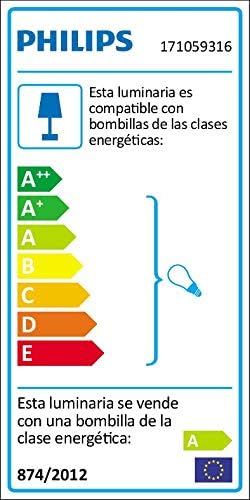
Figure 3: Energy efficiency label indicating bulb compatibility.
9. Warranty and Support
This Philips Skies Outdoor Wall Light comes with a 2-year warranty from the date of purchase. This warranty covers defects in materials and workmanship under normal use.
For technical support, warranty claims, or further assistance, please visit the official Philips Lighting website or contact their customer service department. Keep your proof of purchase for warranty validation.
Philips Lighting Official Website: www.lighting.philips.com


