
BOSS MO-2
BOSS MO-2 Multi Overtone Pedal User Manual
Model: MO-2
Introduction
The BOSS MO-2 Multi Overtone Pedal is an innovative effects unit designed to produce distinctive and expressive tones. Utilizing Multi-Dimensional Processing (MDP) technology, the MO-2 analyzes your guitar's harmonic characteristics to create new voices that enhance and thicken your sound. It offers three distinct modes for diverse tone-shaping and a DETUNE knob for a wide range of modulation effects, from shimmery resonance to organ-like textures.
Setup
Power Supply
The MO-2 pedal can be powered by a 9V battery or an optional PSA series AC adapter. For stable operation and optimal performance, using a BOSS PSA series AC adapter is recommended, especially during extended use.
- Battery Installation: To install a 9V battery, loosen the thumbscrew on the front of the pedal and open the pedal. Connect the battery to the battery snap and place it inside the battery compartment. Close the pedal and secure the thumbscrew.
- AC Adapter Connection: Connect the AC adapter to the 9V DC IN jack on the rear of the pedal. Ensure the adapter is compatible with the pedal's power requirements.
Connecting Your Equipment
Connect your guitar to the INPUT jack on the right side of the pedal. Connect the OUTPUT A (MONO) jack to your amplifier's input. For stereo output, connect both OUTPUT A and OUTPUT B jacks to two separate amplifier inputs or a stereo effects loop.
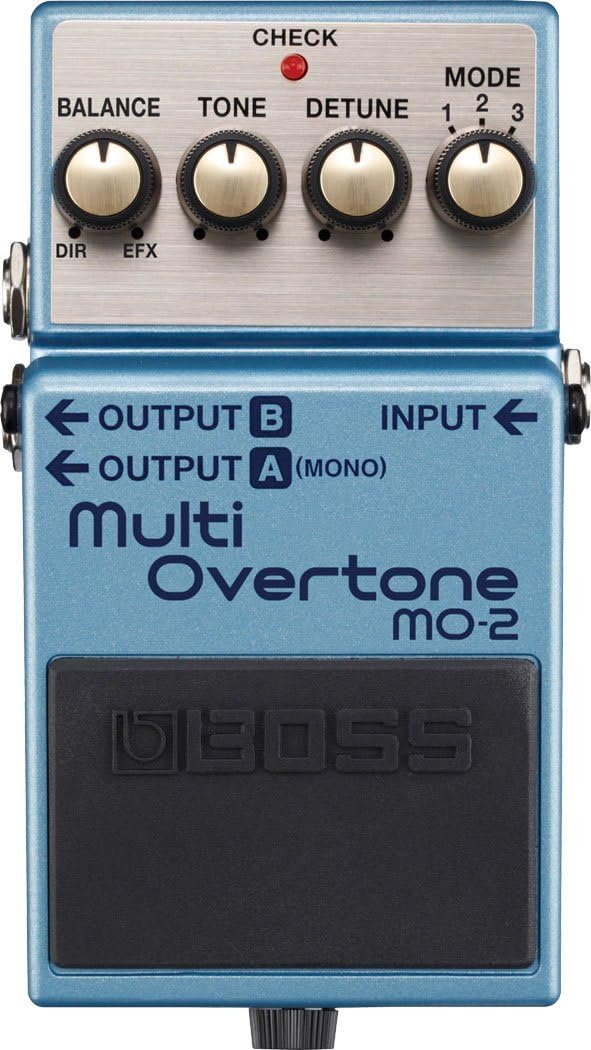
Figure 1: Front view of the BOSS MO-2 Multi Overtone Pedal, showing the input and output connections, and control knobs.
Operating the MO-2
The MO-2 features four primary control knobs and a mode selector switch to shape your sound.

Figure 2: Angled view of the BOSS MO-2 Multi Overtone Pedal, providing a clearer look at the control panel.
Control Knobs
- BALANCE: This knob adjusts the mix between the direct (unaffected) sound and the effect sound. Turning it clockwise increases the effect level.
- TONE: Controls the tone of the overtone effect. Adjusting this knob allows you to brighten or darken the character of the generated overtones.
- DETUNE: This knob introduces a subtle detuning effect to the overtones, creating a chorus-like or shimmering quality. Higher settings result in a more pronounced detune.
- MODE: A rotary switch that selects one of three distinct overtone modes. Each mode offers a unique sonic characteristic:
- Mode 1: Produces a rich, resonant overtone that adds depth and fullness to your sound.
- Mode 2: Generates a more complex overtone with a slightly metallic or bell-like quality.
- Mode 3: Creates a synth-like or organ-like texture, ideal for pads and sustained notes.
Engaging the Effect
Press the pedal switch to toggle the effect on or off. The CHECK indicator light will illuminate when the effect is active.
Maintenance
Battery Replacement
When the CHECK indicator dims or fails to light when the effect is on, the battery is low and should be replaced. Refer to the "Power Supply" section under Setup for battery installation instructions.
Cleaning
Wipe the unit with a soft, dry cloth. Avoid using abrasive cleaners, waxes, or solvents as they may damage the finish.
Storage
When not in use for extended periods, remove the battery to prevent leakage and potential damage to the unit. Store the pedal in a cool, dry place away from direct sunlight and extreme temperatures.
Troubleshooting
| Problem | Possible Cause | Solution |
|---|---|---|
| No sound or weak sound. | Incorrect cable connections, low battery, or faulty cables. | Check all cable connections. Replace the 9V battery or use an AC adapter. Test with different cables. |
| Effect is not engaging. | Pedal switch not fully pressed, or power issue. | Ensure the pedal switch is fully depressed. Check power supply and battery. |
| Unwanted noise or hum. | Interference from other electronic devices, ground loop, or faulty power supply. | Move the pedal away from other electronic devices. Use a high-quality, isolated power supply. Ensure proper grounding. |
| Effect sound is too subtle or too dominant. | BALANCE knob setting. | Adjust the BALANCE knob to achieve the desired mix between direct and effect sound. |
Specifications
| Feature | Detail |
|---|---|
| Item Weight | 1.03 pounds |
| Product Dimensions | 2.87 x 2.32 x 5.08 inches |
| ASIN | B00B20CZIM |
| Item model number | MO-2 |
| Batteries | 2 AA batteries required. |
| Body Material | Metal |
| Color Name | Blue |
| Hardware Interface | 1/4-inch Audio |
| Signal Format | Analog |
| Battery type | Alkaline |
| Voltage | 9 Volts |
| Brand | BOSS |
| Style | Compact |
| Date First Available | January 21, 2013 |
Warranty Information
For detailed warranty information regarding your BOSS MO-2 Multi Overtone Pedal, please refer to the warranty card included with your product or visit the official BOSS website. Warranty terms and conditions may vary by region.
Customer Support
If you require further assistance or have questions not covered in this manual, please contact BOSS customer support or visit their official website for FAQs, software updates, and additional resources.
Official BOSS Website: Visit the BOSS Store on Amazon
Related documentsMO-2


Ask a question about this manual
Ask about setup, troubleshooting, compatibility, parts, safety, or missing instructions. Manuals+ will review the question and use this page’s manual context to help answer it.