
DeskCycle FBA_TT-DSC
DeskCycle Under Desk Bike Pedal Exerciser - Standard Height Model Instruction Manual
Model: FBA_TT-DSC | Brand: DeskCycle
Introduction
This manual provides essential information for the safe and effective use of your DeskCycle Under Desk Bike Pedal Exerciser. Designed for use in home and office environments, this stationary bike allows for physical activity while seated. Please read these instructions thoroughly before assembly and operation.
Setup and Assembly
The DeskCycle arrives partially assembled. Complete assembly typically involves attaching the pedals and stabilizing bars. A wrench is included for this purpose. Ensure all connections are secure before use.
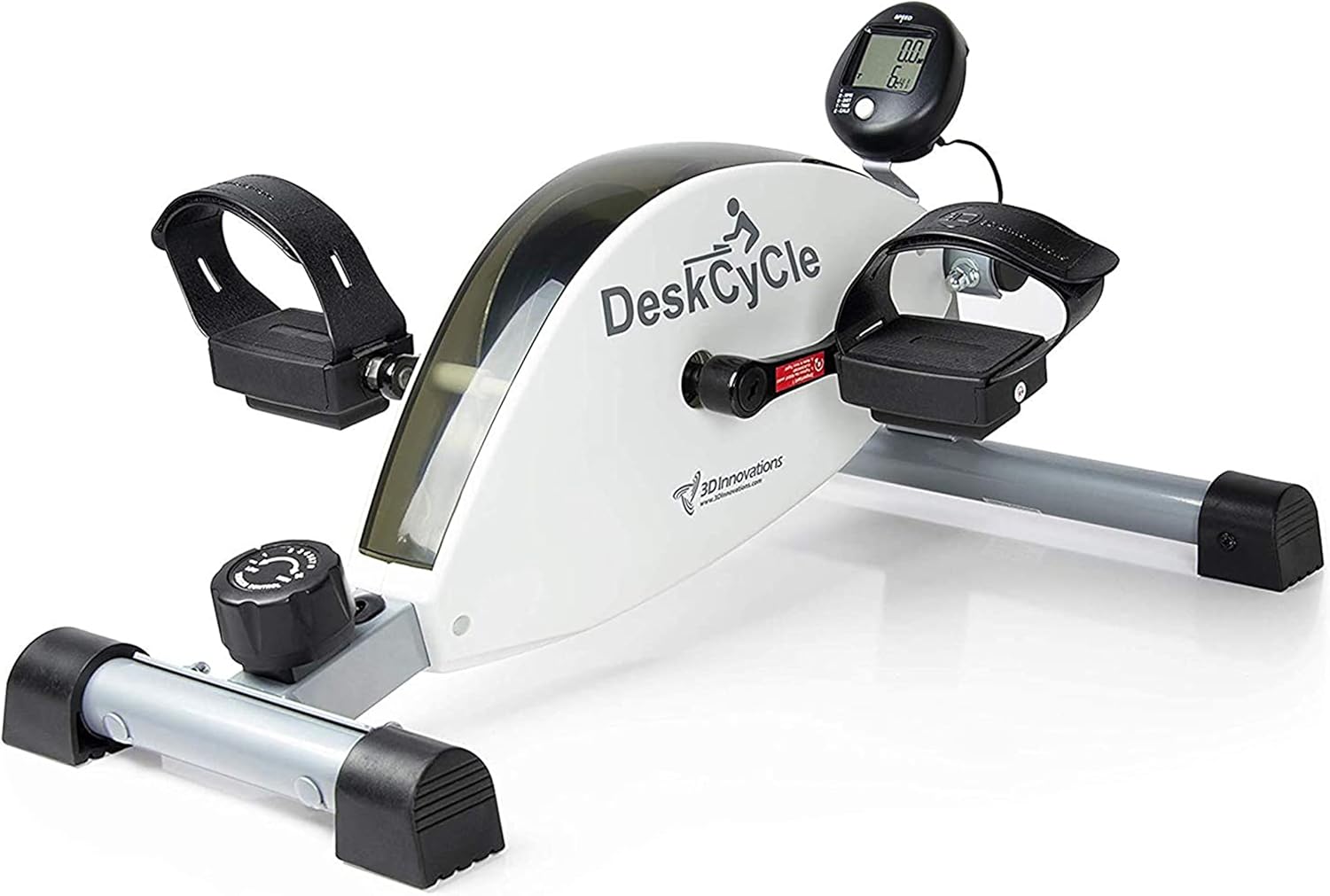
Image: The DeskCycle Under Desk Bike Pedal Exerciser, showing its compact design and main components.
Assembly Steps:
- Unpack Components: Carefully remove all parts from the packaging. Verify all components are present according to the packing list.
- Attach Stabilizer Bars: Securely attach the front and rear stabilizer bars to the main unit using the provided bolts and wrench.
- Install Pedals: Attach the left and right pedals to their respective cranks. Note that pedals are typically threaded differently (left pedal is reverse-threaded). Tighten firmly with the wrench.
- Install LCD Display: Connect the LCD display cable and mount the display unit to the designated slot on the main unit or use the extended cable for desk placement.
- Battery Installation: Insert 2 AA batteries into the LCD display unit.
- Positioning: Place the DeskCycle on a flat, stable surface under your desk. Ensure adequate clearance for your knees and feet.
Video: A user demonstrating the unboxing and assembly process of the DeskCycle, highlighting the ease of setup and components.
Operating Instructions
The DeskCycle is designed for simple and intuitive operation, allowing you to integrate physical activity into your daily routine seamlessly.
Using the Pedal Exerciser:
- Seating Position: Sit comfortably in your chair with the DeskCycle positioned directly in front of you. Ensure your knees have enough clearance under your desk.
- Foot Placement: Place your feet onto the pedals. Use the adjustable Velcro straps to secure your feet firmly to prevent slipping during exercise.
- Pedaling Direction: The DeskCycle supports both forward and backward pedaling, allowing for varied muscle engagement.
- Resistance Adjustment: The unit features a tension control knob with 8 resistance settings. Turn the knob clockwise to increase resistance for a more challenging workout, or counter-clockwise to decrease it for lighter exercise.
- Monitoring Progress: The detachable LCD display tracks rotations per minute (RPM), distance traveled, calories burned, and time elapsed. Press the button on the display to cycle through these metrics.

Image: The DeskCycle showing the resistance adjustment knob and the digital display for tracking workout metrics.
Video: A user demonstrating the operation of the DeskCycle, including foot placement, pedaling, and adjusting resistance levels.
Key Features
- Adjustable Resistance: Offers 8 resistance settings, providing up to 39 lbs of resistance for varied workout intensity.
- Smooth Operation: Equipped with a high-inertia flywheel that spins 14 times per pedal stroke, ensuring a fluid and realistic cycling experience.
- Quiet Performance: Features silent magnetic resistance and sealed bearings, allowing for discreet use without disturbing others.
- Progress Tracking: Includes a detachable LCD display to monitor rotations per minute, distance, calories burned, and workout duration.
- Durable Construction: Built with steel components and sealed bearings for long-lasting, maintenance-free use.
- Secure Pedals: Strap-in pedals ensure your feet remain stable during exercise.

Image: Visual representation of the DeskCycle's core features: premium components, silent magnetic resistance, and 8 resistance levels.
Maintenance
The DeskCycle is designed for minimal maintenance due to its durable construction and sealed components.
- Cleaning: Wipe down the unit regularly with a damp cloth to remove dust and sweat. Avoid using abrasive cleaners.
- Inspection: Periodically check all bolts and connections to ensure they remain tight. Re-tighten if necessary.
- Battery Replacement: Replace the 2 AA batteries in the LCD display when the screen dims or stops functioning.
- Storage: Store the DeskCycle in a dry, cool place when not in use.
Troubleshooting
If you encounter any issues with your DeskCycle, refer to the following common solutions:
- Unit Slides During Use: Ensure the DeskCycle is placed on a non-slip surface. The unit's rubber feet are designed to provide stability. Consider using a non-slip mat if on a very smooth floor.
- Pedals Feel Loose: Re-tighten the pedal screws with the provided wrench. Ensure they are securely fastened to the crank arms.
- LCD Display Not Working: Check if the 2 AA batteries are correctly installed and have sufficient charge. Replace batteries if needed. Ensure the display cable is securely connected.
- Unusual Noise: Inspect the unit for any loose parts or obstructions. Ensure all assembly bolts are tight. If the noise persists, contact customer support.
Specifications
| Feature | Detail |
|---|---|
| Brand | DeskCycle |
| Model Name | FBA_TT-DSC |
| Dimensions (LxWxH) | 24 x 20 x 10 inches |
| Item Weight | 23 Pounds |
| Maximum Weight Recommendation | 500 Pounds |
| Resistance Levels | 8 (Magnetic Resistance) |
| Power Source | Battery Powered (2 AA batteries required for display) |
| Material | Alloy Steel |
| UPC | 757183267590, 791090764520, 744288056730 |
Warranty and Support
The DeskCycle Under Desk Bike Pedal Exerciser comes with a standard one-year warranty. For support, questions, or to address any problems, please contact the manufacturer, 3D Innovations.
- Manufacturer: 3D Innovations
- Website: www.DeskCycle.com (for usage tips, calorie calculator, accessories, and more)
- Warranty Period: 1 Year Standard Warranty
Related documentsFBA_TT-DSC


Ask a question about this manual
Ask about setup, troubleshooting, compatibility, parts, safety, or missing instructions. Manuals+ will review the question and use this page’s manual context to help answer it.