
Auna NR-620
Auna NR-620 Compact Stereo System User Manual
Model: NR-620
Brand: Auna
Introduction
The Auna NR-620 is a versatile stereo system designed to combine traditional audio playback methods with modern digital capabilities. This compact unit features a turntable, CD player, FM/AM radio, cassette deck, and USB/SD inputs for MP3 playback and recording. Its classic wooden design integrates seamlessly into various home environments, offering a comprehensive audio experience.
This manual provides detailed instructions for the setup, operation, and maintenance of your Auna NR-620 system. Please read it thoroughly before use to ensure proper functionality and longevity of the device.

Figure 1: Auna NR-620 Compact Stereo System with the turntable lid open, showcasing its multi-functional design.
Product Features
The Auna NR-620 offers a wide array of features for comprehensive audio playback and recording:
- Multi-functional system with CD player, FM/AM radio, USB/SD input, turntable, and cassette deck.
- USB and SD inputs for direct MP3 playback from compatible storage devices and memory cards.
- Direct MP3 encoding function: Record audio from CD, turntable, or cassette directly to MP3 files on a USB or SD device. Supports recording from USB to SD and SD to USB.
- Line output for connection to an external amplifier or other audio equipment.
- Smooth belt-driven turntable with a straight tonearm and replaceable cartridge, supporting 33, 45, and 78 RPM records.
- Integrated stereo speakers for immediate audio playback.
- Classic 1950s style design with a durable wooden casing.

Figure 2: Front view of the Auna NR-620, showing the central control panel and speaker grilles.
Setup
- Unpacking: Carefully remove the unit from its packaging. Retain the packaging materials for future transport or storage.
- Placement: Place the Auna NR-620 on a stable, flat surface away from direct sunlight, heat sources, and excessive dust or moisture. Ensure adequate ventilation around the unit.
- Power Connection: Connect the power cord to the AC inlet on the rear of the unit, then plug it into a standard 220V AC wall outlet.
- Antenna Connection: For optimal FM/AM radio reception, extend the included wire antenna on the rear of the unit. Position it for the best signal.
- External Audio Connection (Optional): If connecting to an external amplifier or powered speakers, use an RCA cable (not included) to connect the "LINE OUT" jacks on the rear of the NR-620 to the corresponding audio input jacks on your external audio device.

Figure 3: Rear panel of the Auna NR-620, illustrating connection points for power, line out, and antenna.
Operating Instructions
General Operation
- Power On/Off: Rotate the POWER/VOL. knob clockwise to turn the unit on and adjust the volume. Rotate counter-clockwise until it clicks to turn off.
- Source Selection: Use the SOURCE button on the front panel or the remote control to switch between PHONO (Turntable), CD, USB/SD, TAPE (Cassette), and RADIO (FM/AM) modes.
- X-BASS: Toggle the X-BASS switch to enhance bass output.

Figure 4: Detailed view of the front control panel, including the display, function buttons, and USB/SD card slots.
Turntable Operation (PHONO)
- Lift the turntable lid.
- Place a record on the turntable platter.
- Select the appropriate speed (33, 45, or 78 RPM) using the speed selector switch. For 45 RPM records, place the included adapter on the spindle.
- Move the tonearm clip to release the tonearm.
- Gently lift the tonearm using the cueing lever and position the stylus over the desired track of the record.
- Lower the cueing lever to gently place the stylus onto the record. Playback will begin.
- At the end of the record, the tonearm will automatically return to its rest position (if Auto Stop is enabled on the rear). Lift the tonearm, return it to its rest, and secure it with the clip.
CD Player Operation
- Press the SOURCE button to select CD mode.
- Press the OPEN/CLOSE button to open the CD tray.
- Place a CD (CD, CD-R, CD-RW, MP3 CD) with the label side facing up into the tray.
- Press the OPEN/CLOSE button again to close the tray. The unit will read the disc.
- Use the PLAY/PAUSE, STOP, SKIP/SEARCH (forward/backward) buttons to control playback.
Cassette Deck Operation (TAPE)
- Press the SOURCE button to select TAPE mode.
- Insert a cassette tape into the cassette slot on the side of the unit. Playback will start automatically.
- To stop playback, press the STOP/EJECT button. To fast forward, press the F.FWD button. There is no rewind function; manually flip the tape or use an external device to rewind.
- To eject the tape, press the STOP/EJECT button fully.

Figure 5: Side view of the Auna NR-620, highlighting the cassette tape slot.
Radio Operation (FM/AM)
- Press the SOURCE button to select RADIO mode.
- Select FM or AM band using the FM/AM switch.
- Rotate the TUNING knob to manually tune to your desired radio station.
- For FM stereo reception, ensure the FM-ST switch is set to "ST". If reception is poor, switch to "MONO" for clearer sound.
USB/SD Playback
- Insert a USB flash drive into the USB port or an SD/MMC card into the SD card slot on the front panel.
- Press the SOURCE button to select USB/SD mode. The unit will automatically detect and begin playing MP3 files.
- Use the PLAY/PAUSE, STOP, SKIP/SEARCH, and FOLDER UP/DOWN buttons to navigate and control playback.
MP3 Recording (Digitization)
The Auna NR-620 allows you to record audio from CD, Turntable, or Cassette directly to MP3 files on a connected USB drive or SD card. You can also transfer files between USB and SD.
- Insert a USB drive or SD card into the respective slot. Ensure it has sufficient free space.
- Select the desired source for recording (CD, PHONO, or TAPE).
- Start playback of the source material (e.g., play a record, start a CD track, or play a cassette).
- Press the REC button on the front panel or remote control. The recording indicator will light up, and recording will begin.
- To stop recording, press the REC button again. The recording will be saved as an MP3 file in a folder named "RECORD" on your USB drive or SD card.
- Note: Each press of the REC button will create a new MP3 file. To digitize individual tracks from a record or cassette, you will need to manually start and stop recording for each track.
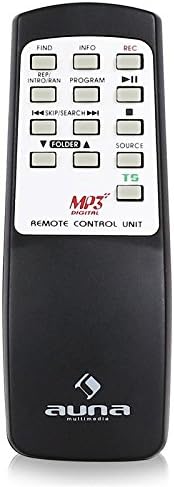
Figure 6: The remote control unit, providing convenient access to playback and recording functions.
Maintenance
- Cleaning:
- Wipe the unit with a soft, dry cloth. Do not use abrasive cleaners, waxes, or solvents.
- For the turntable stylus, use a soft brush to gently clean dust from the tip, brushing from back to front.
- Clean the CD lens periodically with a specialized CD lens cleaner disc.
- Stylus Replacement: The turntable stylus has a limited lifespan. If sound quality deteriorates, replace the stylus. Consult Auna's official website or authorized dealers for compatible replacement styli.
- Cassette Head Cleaning: Periodically clean the cassette deck's playback head with a cotton swab lightly dampened with isopropyl alcohol.
- Storage: When not in use for extended periods, unplug the unit and store it in a cool, dry place, ideally in its original packaging.
Troubleshooting
| Problem | Possible Cause | Solution |
|---|---|---|
| No power | Power cord not connected; Power outlet not active. | Ensure power cord is securely plugged in; Try a different outlet. |
| No sound from speakers | Volume too low; Incorrect source selected; External amplifier not connected/powered (if used). | Increase volume; Select correct source; Check external amplifier connections and power. |
| Turntable not spinning or poor sound | Speed setting incorrect; Stylus dirty or worn; Tonearm not properly lowered. | Check RPM speed selector; Clean or replace stylus; Ensure cueing lever is down. |
| CD not playing or skipping | Disc dirty or scratched; Disc inserted incorrectly; CD lens dirty. | Clean disc; Insert disc label-side up; Clean CD lens. |
| Poor radio reception | Antenna not extended or positioned correctly; Weak signal. | Extend and reposition antenna; Try FM-ST switch in MONO mode. |
| USB/SD playback issues | Incompatible file format; USB/SD device not properly inserted or corrupted. | Ensure files are MP3 format; Reinsert USB/SD device; Try a different USB/SD device. |
| MP3 recording not working | USB/SD device full or not detected; Source not playing. | Check USB/SD space; Ensure device is detected; Start source playback before pressing REC. |
Specifications
| Brand | Auna |
| Model Name | NR-620 |
| Product Dimensions | 46 x 42 x 30 cm (18.1 x 16.5 x 11.8 inches) |
| Product Weight | 9.25 kg (20.39 lbs) |
| Voltage | 220 Volts |
| Power Consumption | 80 Watts |
| Output Power | 4 Watts |
| Power Source Type | AC (Alternating Current) |
| Turntable Speeds | 33, 45, 78 RPM |
| Supported Audio Formats | MP3 (for USB/SD) |
| Compatible Media Types | CD, CD-R, CD-RW, Cassette, Vinyl Records, USB, SD/MMC |
| Radio Bands Supported | AM, FM |
| Connector Type | USB, RCA Line Out |
| Material Type | Wood |
| Remote Control Included | Yes |
Warranty and Support
Auna products are designed and manufactured to the highest quality standards. For information regarding warranty coverage, technical support, or service, please refer to the warranty card included with your product or visit the official Auna website. Please have your model number (NR-620) and purchase details ready when contacting support.
For further assistance, you may also contact your local retailer or distributor.
Related documentsNR-620


Ask a question about this manual
Ask about setup, troubleshooting, compatibility, parts, safety, or missing instructions. Manuals+ will review the question and use this page’s manual context to help answer it.