
Introduction
The Dyson Hot + Cool fan heater is engineered to provide efficient whole-room heating in winter and powerful personal cooling in summer. Utilizing advanced Air Multiplier technology, it projects air across long distances for effective temperature regulation. This manual provides essential information on the operation, maintenance, and features of your Dyson AM05 Hot + Cool fan heater.

Image: The Dyson AM05 Hot + Cool Fan Heater in Iron/Blue color, showcasing its sleek, bladeless design.
Safety Information
Your Dyson AM05 Hot + Cool fan heater is designed with safety in mind. Please read and understand all safety instructions before use.
- Automatic Cut-Off: The machine is equipped with an automatic cut-off feature that activates if the unit is tipped over, enhancing safety.
- No Burning Smell: Unlike conventional heaters, the heating elements in the Dyson AM05 never exceed 392°F (200°C). This prevents dust from burning on the elements, eliminating the common burning smell associated with many fan heaters.
- Bladeless Design: The absence of fast-spinning blades and visible heating elements removes the need for a safety grille, making the device safer and easier to clean.
What's in the Box
Upon unboxing your Dyson AM05 Hot + Cool fan heater, you should find the following components:
- Base Unit
- Loop Amplifier
- Remote Control (curved and magnetized for storage)
- Operating Manual (this document)
Setup
- Unpack: Carefully remove all components from the packaging.
- Assemble: Place the loop amplifier securely onto the base unit. Ensure it clicks into place if applicable (refer to quick start guide for specific assembly steps if provided separately).
- Position: Place the fan heater on a stable, flat surface, ensuring adequate clearance from walls and other objects for optimal airflow.
- Power Connection: Plug the power cord into a suitable electrical outlet (120 Volts).
- Remote Control: Insert the required CR2 battery into the remote control. The remote can be stored magnetically on top of the machine when not in use.
Operating Instructions
General Operation
The Dyson AM05 offers precise control over heating and cooling functions, airflow, and oscillation.
Heating Function
For heating, the machine projects warm air across the room. The two PTC ceramic plates heat the air as it is projected. You can set the target temperature precisely.

Image: The Dyson AM05 projecting warm air, illustrating its long-range heat projection capability in a room setting.
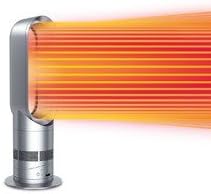
Image: A close-up illustration of the Dyson AM05 demonstrating long-range heat projection with orange airflow lines.
Cooling Function
In cooling mode, the AM05 generates high airflow and air velocity to cool you effectively, drawing in up to 6 gallons of air per second.
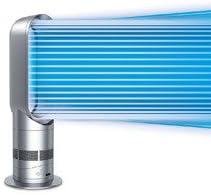
Image: A close-up illustration of the Dyson AM05 demonstrating powerful airflow for cooling with blue airflow lines.
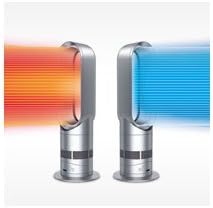
Image: A side-by-side comparison showing the Dyson AM05 emitting warm air (orange) and cool air (blue).
Controls and Settings
The AM05 offers complete control over its functions, either via the controls on the base of the machine or the magnetic remote control.
- Temperature Control: Set your desired temperature from 33°F to 99°F (0.5°C to 37°C) to the degree. The intelligent thermostat will maintain this temperature automatically.
- Airflow Velocity: Precisely adjust the airflow velocity using the controls.
- Oscillation: An independent motor allows the unit to oscillate smoothly, distributing heat or cooling air throughout the room.
- Tilt Function: The machine can be tilted to direct airflow precisely where needed. It pivots on its own center of gravity, staying in position without clamping.

Image: A hand demonstrating the tilting mechanism of the Dyson AM05, showing how the loop amplifier can be angled.

Image: A digital display showing '23°', indicating the precise temperature setting capability of the Dyson AM05.
Key Features
- Air Multiplier Technology: Air is drawn into the base by an energy-efficient motor. This airflow is then accelerated through an annular aperture and channeled over an airfoil-shaped ramp. Surrounding air is induced and entrained into the airflow, amplifying it to create a powerful, uninterrupted stream of smooth air.
- Fastest Whole-Room Heating: Engineered for long-range heat projection, ensuring quick and even heating of the entire room.
- Powerful Cooling Fan: Delivers high airflow and air velocity for effective personal cooling, unlike many conventional fan heaters with low airflow.
- No Worrying Burning Smell: Heating elements are designed to never exceed 392°F (200°C), preventing dust from burning and eliminating unpleasant odors.
Image: An icon depicting wavy lines with a cross through them, symbolizing the absence of a burning smell.
- Energy Efficient: Heats rooms quickly and evenly, and intelligently maintains temperature by automatically switching heat on and off, potentially lowering energy bills.
Maintenance
The Dyson AM05 Hot + Cool fan heater is designed for easy maintenance due to its bladeless design and lack of a protective grille.
- Cleaning: Simply wipe down the surfaces with a dry or damp cloth. There are no grilles or blades to disassemble for cleaning. Ensure the unit is unplugged before cleaning.
- Dust Removal: Regularly wipe the air intake vents at the base of the machine to prevent dust buildup, which can affect performance.
Troubleshooting
If you experience issues with your Dyson AM05 Hot + Cool fan heater, consider the following common solutions:
- No Power: Ensure the power cord is securely plugged into a working electrical outlet. Check if the circuit breaker has tripped.
- Unit Not Operating: If the unit was tipped over, it might have activated the automatic cut-off. Place it upright and ensure it is stable.
- Insufficient Heating/Cooling:
- Verify the temperature setting is appropriate for your desired comfort.
- Check for any obstructions around the air intake or outlet.
- Ensure the room size is within the effective range for the unit.
- Remote Control Not Working: Check and replace the CR2 battery in the remote control. Ensure there are no obstructions between the remote and the unit.
For persistent issues, please refer to the warranty and support section for contact information.
Specifications
| Feature | Detail |
|---|---|
| Brand | Dyson |
| Model Number | AM05 Hot + Cool - Iron/Blue |
| Color | Iron/Blue |
| Product Dimensions | 6.7"D x 8.5"W x 25.2"H |
| Item Weight | 5.2 pounds |
| Form Factor | Pedestal |
| Voltage | 120 Volts |
| Number of Speeds | 3 |
| Fuel Type | Electric |
| Mounting Type | Tabletop Mount |
| Recommended Uses | Cooling, Heating |
| Warranty | 2-year parts and labor |
| UPC | 879957009295, 885609004006 |
Warranty and Support
All Dyson machines undergo rigorous testing. The Dyson AM05 Hot + Cool fan heater comes with a 2-year parts and labor warranty.
For warranty claims, technical support, or further assistance, please contact Dyson customer service. Refer to the official Dyson website or your purchase documentation for the most current contact information.
Note: Keep your proof of purchase for warranty validation.
Official Product Videos
No official seller videos were found in the provided product data for embedding in this manual.


