
1. Introduction
This manual provides detailed instructions for the safe and effective use of your Fujifilm Finepix S4800 digital camera. The Finepix S4800 is a versatile digital camera featuring a 16-megapixel CCD sensor, a powerful 30x optical zoom lens with Optical Image Stabilization (OIS), and a 3-inch LCD screen. It offers quick autofocus in 0.3 seconds and a battery life of approximately 320 photos.
2. Safety Information
Please read these safety instructions carefully before using your camera to prevent injury to yourself or others and to avoid damage to the product. Keep this manual in a safe place for future reference.
- Do not disassemble, repair, or modify the camera.
- Do not expose the camera to water or moisture.
- Use only recommended batteries and accessories.
- Keep the camera away from strong magnetic fields or excessive heat.
- Clean the camera with a soft, dry cloth. Avoid using harsh chemicals.
3. Package Contents
Verify that all the following items are included in your camera package:
- Fujifilm Finepix S4800 Digital Camera
- USB Cable
- Shoulder Strap
- Lens Cap
- CD-ROM (Software/Drivers)
- User Manual (this document)
- AA Batteries (may be included depending on region)
4. Camera Parts and Controls
Familiarize yourself with the various parts and controls of your Finepix S4800 camera.
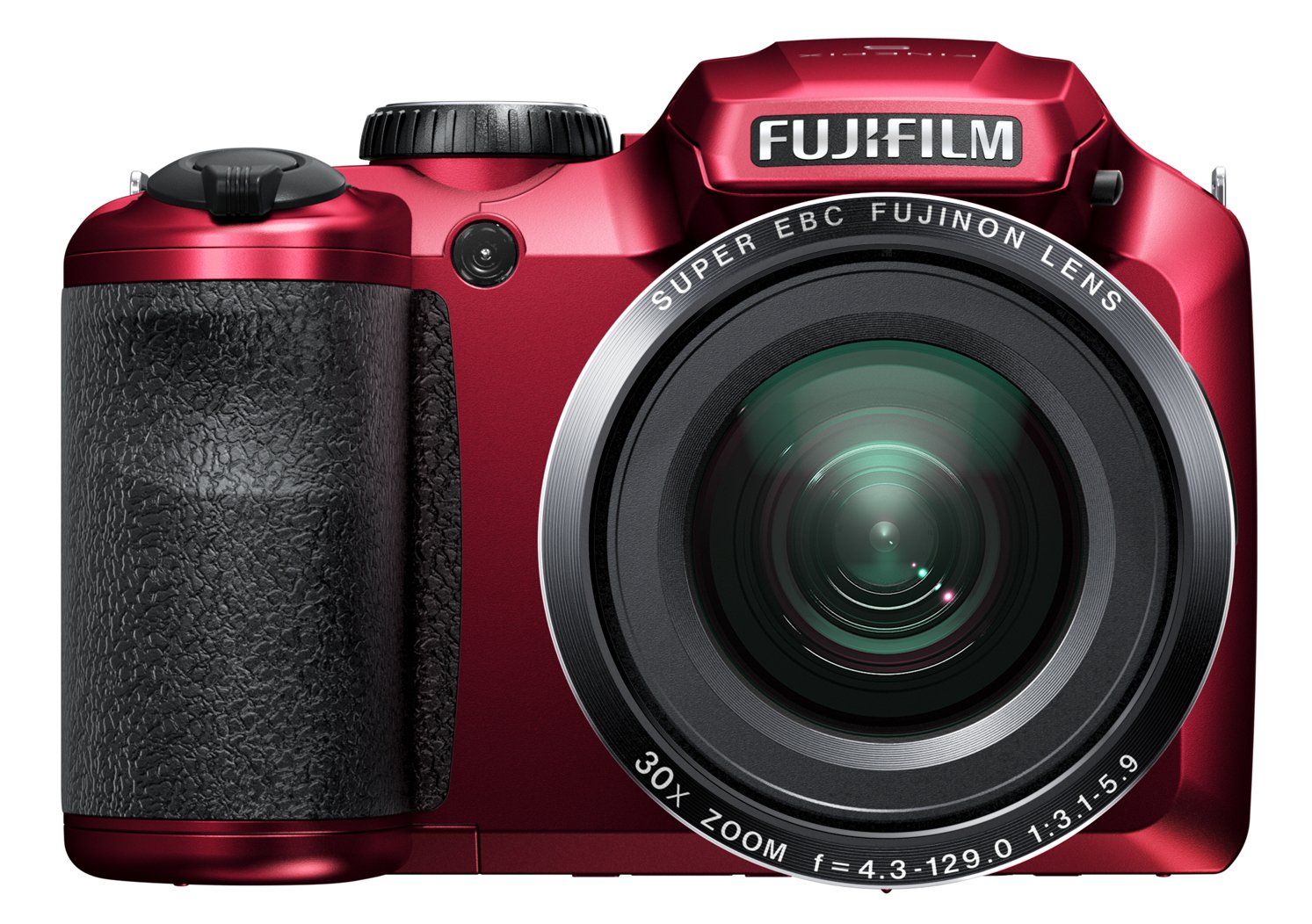
Figure 4.1: Front view of the Fujifilm Finepix S4800 digital camera, showing the lens, flash, and ergonomic grip.
Front View:
- Lens: 30x optical zoom lens.
- Flash: Built-in flash for low-light conditions.
- Grip: Ergonomic grip for stable handling.
Top View:
- Shutter Button: Press halfway to focus, fully to take a picture.
- Zoom Lever: Controls the optical zoom.
- Mode Dial: Selects shooting modes (e.g., Auto, Program, Manual, Video).
- Power Button: Turns the camera on or off.
Rear View:
- LCD Monitor: 3-inch display for framing shots and reviewing images.
- Electronic Viewfinder (EVF): For framing shots.
- Playback Button: Enters playback mode.
- Menu/OK Button: Accesses menus and confirms selections.
- Directional Pad: Navigates menus and selects options.
- Display/Back Button: Changes display information or returns to previous screen.
5. Setup
5.1. Installing Batteries
- Open the battery compartment cover located at the bottom of the camera.
- Insert four AA-type batteries, ensuring correct polarity (+/-) as indicated inside the compartment.
- Close the battery compartment cover securely.
5.2. Inserting a Memory Card
- Open the memory card slot cover, usually located on the side or bottom of the camera.
- Insert an SD/SDHC/SDXC memory card with the label facing the correct direction until it clicks into place.
- Close the memory card slot cover.
5.3. Initial Settings (Date and Time)
- Turn on the camera using the Power button.
- The date and time setting screen will appear automatically on first use.
- Use the directional pad to set the correct date, time, and time zone.
- Press the MENU/OK button to confirm the settings.
6. Operating the Camera
6.1. Turning On/Off
- To turn on the camera, press the POWER button. The lens will extend.
- To turn off the camera, press the POWER button again. The lens will retract.
6.2. Basic Photography (Auto Mode)
- Set the Mode Dial to AUTO.
- Frame your shot using the LCD monitor or electronic viewfinder.
- Press the shutter button halfway down to focus. The focus frame will turn green when focus is achieved.
- Press the shutter button fully down to take the picture.
6.3. Using the Zoom
The camera features a 30x optical zoom. Use the zoom lever located around the shutter button:
- Push the zoom lever towards T (Telephoto) to zoom in.
- Push the zoom lever towards W (Wide-angle) to zoom out.
6.4. Shooting Modes
Rotate the Mode Dial to select different shooting modes:
- P (Program AE): Camera sets aperture and shutter speed for optimal exposure.
- S (Shutter-Priority AE): You set shutter speed, camera sets aperture.
- A (Aperture-Priority AE): You set aperture, camera sets shutter speed.
- M (Manual): You set both aperture and shutter speed.
- Scene Position (SP): Select from various scene modes (e.g., Portrait, Landscape, Sport).
- Video: Records video clips.
6.5. Video Recording
- Set the Mode Dial to VIDEO.
- Press the dedicated video recording button (if available) or the shutter button to start recording.
- Press the button again to stop recording.
7. Playback and Viewing Images
- Press the PLAYBACK button to enter playback mode.
- Use the directional pad (left/right) to scroll through your photos and videos.
- To view video, select a video file and press the MENU/OK button to start playback.
- Press the PLAYBACK button again or the shutter button to return to shooting mode.
8. Connecting to a Computer or TV
8.1. Connecting to a Computer (USB)
- Turn off the camera.
- Connect the camera to your computer using the supplied USB cable.
- Turn on the camera. It should be recognized as a removable disk or prompt for connection mode.
- Transfer photos and videos to your computer.
8.2. Connecting to a TV (HDMI)
The Fujifilm Finepix S4800 supports HDMI connectivity.
- Ensure both the camera and TV are turned off.
- Connect the camera's HDMI output port to an HDMI input port on your TV using an HDMI cable (sold separately).
- Turn on the TV and select the correct HDMI input.
- Turn on the camera. Images and videos will be displayed on the TV screen.
9. Maintenance and Care
- Cleaning the Camera Body: Wipe with a soft, dry cloth. For stubborn dirt, use a cloth lightly dampened with water and then wipe dry.
- Cleaning the Lens: Use a lens blower to remove dust, then gently wipe with a lens cleaning cloth. Avoid touching the lens with your fingers.
- Storage: When not in use for extended periods, remove the batteries and store the camera in a cool, dry place away from direct sunlight and humidity.
- Battery Care: Do not expose batteries to heat or fire. Dispose of used batteries according to local regulations.
10. Troubleshooting
| Problem | Possible Cause | Solution |
|---|---|---|
| Camera does not turn on. | Batteries are dead or incorrectly inserted. | Replace batteries with fresh ones or reinsert them correctly. |
| Pictures are blurry. | Camera shake, subject too close, or incorrect focus. | Hold the camera steady, ensure proper distance to subject, or allow camera to focus before fully pressing shutter. |
| Flash does not fire. | Flash mode is off or battery level is low. | Check flash settings. Replace or recharge batteries. |
| Memory card error. | Card is full, corrupted, or incorrectly inserted. | Delete unnecessary files, format the card (this will erase all data), or reinsert the card. Try a different card. |
11. Specifications
| Feature | Detail |
|---|---|
| Model Name | Finepix S4800 |
| Sensor | 16 Megapixel CCD |
| Optical Zoom | 30x |
| Digital Zoom | 7x |
| Focal Length (Equivalent) | 24mm - 720mm |
| Maximum Aperture | f/5.9 |
| LCD Screen | 3-inch |
| Autofocus Speed | 0.3 seconds |
| Maximum Shutter Speed | 8 seconds |
| Continuous Shooting Speed | 10.00 fps |
| Self-Timer | 5 seconds |
| Connectivity | HDMI, USB |
| Power Source | 4x AA Batteries (approx. 320 photos) |
| Dimensions (L x W x H) | 11.43 x 7.97 x 9.7 cm |
| Weight | 426 grams |
12. Warranty and Support
For information regarding warranty coverage, technical support, or service, please refer to the warranty card included with your product or visit the official Fujifilm website. Keep your proof of purchase for warranty claims.


