
Introduction
The Kinivo BTX350 is a portable digital wireless Bluetooth speaker designed for streaming audio from Bluetooth-capable devices such as smartphones, tablets, and computers. It features a compact design, a class-D amplifier for high output sound, and a passive subwoofer for enhanced bass. This manual provides detailed instructions for setting up, operating, and maintaining your BTX350 speaker.
Safety Information
- Do not expose the speaker to water or moisture. This device is not waterproof.
- Avoid extreme temperatures, direct sunlight, or high humidity.
- Do not disassemble or attempt to repair the speaker yourself. This may void the warranty and pose a safety risk.
- Use only the provided charging cable or a certified equivalent.
- Keep out of reach of children.
Package Contents
Verify that all items are present in your package:
- Kinivo BTX350 Wireless Bluetooth Speaker with built-in rechargeable lithium-ion battery
- USB Charging Cable
- 3.5mm Audio Cable
- User Manual (this document)
Product Overview
Familiarize yourself with the speaker's components and controls.
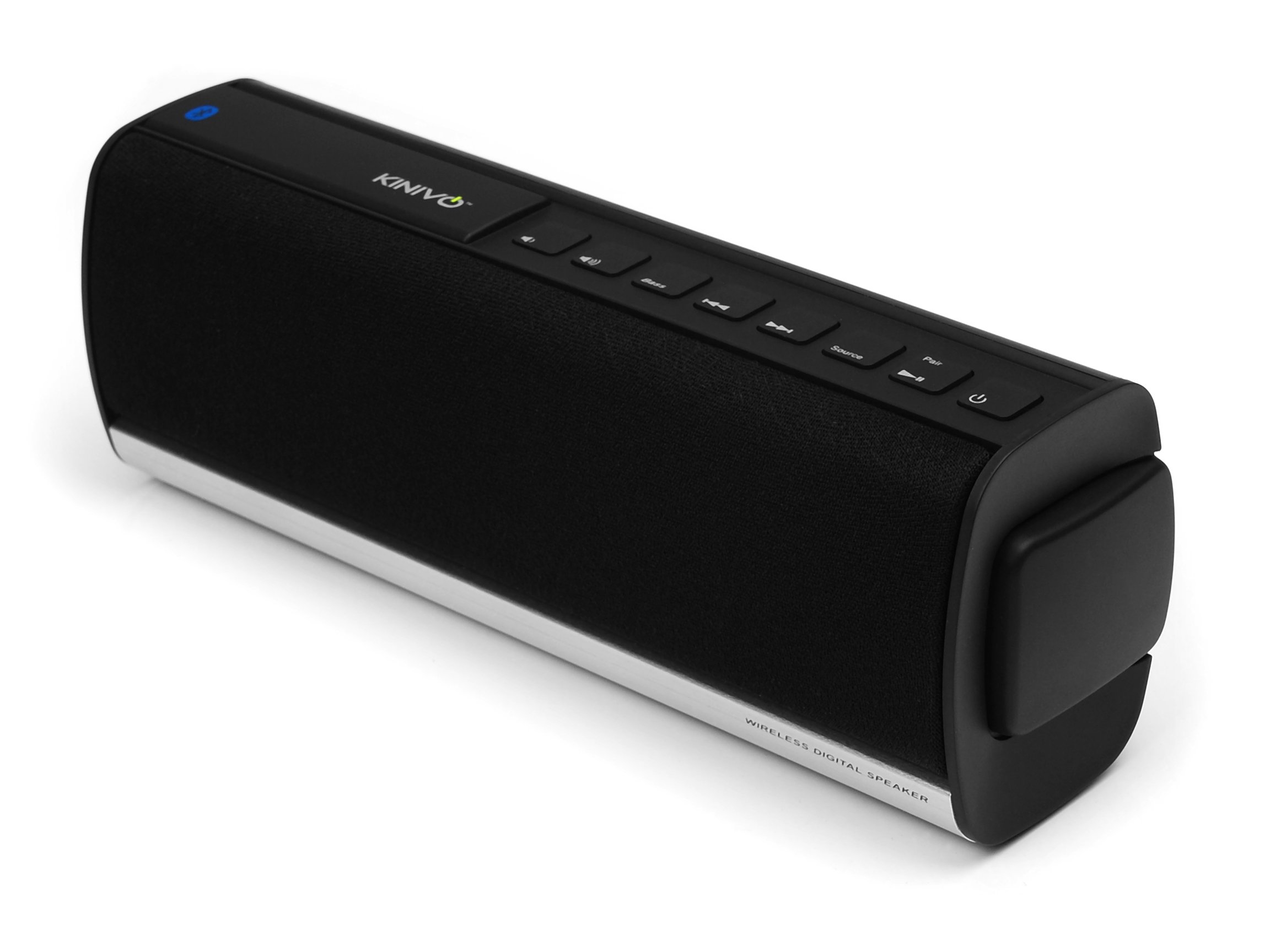
Image 1: Top-down view of the Kinivo BTX350 speaker, highlighting the control buttons and the Kinivo logo. The speaker features a black grille and a sleek, rectangular design.
The top panel of the speaker features several control buttons:
- Power Button: Turns the speaker on or off.
- Volume Down (-): Decreases the audio volume.
- Volume Up (+): Increases the audio volume.
- Previous Track: Skips to the beginning of the current track or the previous track.
- Play/Pause: Plays or pauses the audio playback.
- Next Track: Skips to the next track.
- Bass Boost: Activates or deactivates the bass enhancement feature.
- Source Button: Switches between Bluetooth and 3.5mm auxiliary input modes.
- Pair Button: Initiates Bluetooth pairing mode.
The rear panel typically contains the charging port and the 3.5mm auxiliary input port.
Setup
1. Charging the Speaker
- Connect the small end of the provided USB charging cable to the charging port on the speaker.
- Connect the large end of the USB cable to a USB power adapter (not included) or a computer's USB port.
- The charging indicator light will illuminate, typically red, during charging.
- Once fully charged (approximately 3-4 hours), the indicator light will change or turn off. A full charge provides up to 5 hours of wireless music playback.
2. Powering On/Off
- To power on, press and hold the Power Button until you hear an audible tone and the indicator light illuminates.
- To power off, press and hold the Power Button again until you hear an audible tone and the indicator light turns off.
Operating Instructions
1. Bluetooth Pairing
Pairing connects your speaker wirelessly to a Bluetooth-enabled device.

Image 2: The Kinivo BTX350 speaker positioned beside a smartphone, demonstrating its use as a portable audio output device.
- Ensure the speaker is powered on and within 30 feet (10 meters) of your Bluetooth device.
- Press the Pair Button on the speaker. The Bluetooth indicator light will flash, indicating it is in pairing mode.
- On your Bluetooth device, navigate to its Bluetooth settings and enable Bluetooth.
- Search for available devices. Select "Kinivo BTX350" from the list.
- Once paired, the speaker will emit an audible confirmation tone, and the Bluetooth indicator light will stop flashing and remain solid.
- If prompted for a password, enter "0000".
- The speaker will automatically attempt to reconnect to the last paired device when powered on.
2. Connecting via 3.5mm Audio Cable
For non-Bluetooth devices, use the provided 3.5mm audio cable.
- Connect one end of the 3.5mm audio cable to the AUX input port on the speaker.
- Connect the other end of the cable to the headphone jack or audio output of your device.
- Press the Source Button on the speaker to switch to AUX input mode. The indicator light will change to reflect the active source.
3. Controlling Playback
- Volume Control: Use the Volume Up (+) and Volume Down (-) buttons on the speaker to adjust the playback volume.
- Track Navigation: Use the Previous Track and Next Track buttons to skip between songs.
- Play/Pause: Press the Play/Pause button to start or stop audio playback.
- Bass Boost: Press the Bass Boost button to toggle the bass enhancement feature on or off.
Maintenance
- Clean the speaker with a soft, dry cloth. Do not use liquid cleaners or aerosols.
- Store the speaker in a cool, dry place away from direct sunlight and extreme temperatures.
- If not used for extended periods, charge the battery periodically to maintain its lifespan.
Troubleshooting
| Problem | Possible Solution |
|---|---|
| Speaker does not power on. | Ensure the battery is charged. Connect the speaker to a power source using the USB charging cable. |
| Cannot pair with Bluetooth device. | Ensure the speaker is in pairing mode (flashing Bluetooth indicator). Make sure Bluetooth is enabled on your device and it is within range. Try restarting both devices. |
| No sound or distorted sound. | Check the volume levels on both the speaker and your connected device. Ensure the correct source (Bluetooth or AUX) is selected. If using AUX, ensure the cable is fully inserted. For Bluetooth, try re-pairing the device. |
| Short battery life. | Ensure the speaker is fully charged before use. Battery performance can decrease over time with usage. |
Specifications
| Feature | Detail |
|---|---|
| Model Number | BTX350 |
| Connectivity | Bluetooth (A2DP), 3.5mm AUX input |
| Amplifier | Class-D |
| Drivers | 2 x 40mm suspension cone drivers with passive subwoofer |
| Battery | Built-in rechargeable lithium-ion |
| Battery Life | Up to 5 hours (wireless music) |
| Charging | USB charging cable |
| Product Dimensions | 8 inches (W) x 3 inches (H) x 2.25 inches (D) (approx. 20.3cm x 7.6cm x 5.7cm) |
| Item Weight | 1.3 pounds (approx. 0.59 kg) |
Warranty and Support
The Kinivo BTX350 is backed by a 1-year limited hardware warranty. For any questions, technical assistance, or warranty claims, please contact Kinivo customer support via email. Refer to the official Kinivo website for the most current contact information.


