
1. Introduction
The Mohu Sky 60 HDTV Attic/Outdoor Antenna is designed to provide access to over-the-air television channels. This amplified antenna solution offers multi-directional reception, eliminating the need for constant readjustment for optimal signal strength. It is suitable for both attic and outdoor installations.
2. Package Contents
Verify that all components are present before beginning installation:
- Mohu Sky 60 Antenna Unit
- Mounting Kit (for roof or attic installation)
- 30-foot High-Performance Coaxial Cable
- Amplifier with Dual Powering Options (USB or power cube)

Image: The retail packaging for the Mohu Sky 60 antenna, illustrating the antenna unit, mounting hardware, coaxial cable, and amplifier.
3. Setup and Installation
3.1. Antenna Placement
Optimal antenna placement is crucial for reception. Consider the following:
- Height: The higher the antenna, the better the signal reception.
- Location: Install the antenna in an attic or outdoors on a roof.
- Obstructions: Minimize obstructions between the antenna and broadcast towers. Avoid placing the antenna near large metal objects, which can reflect and shield the signal.
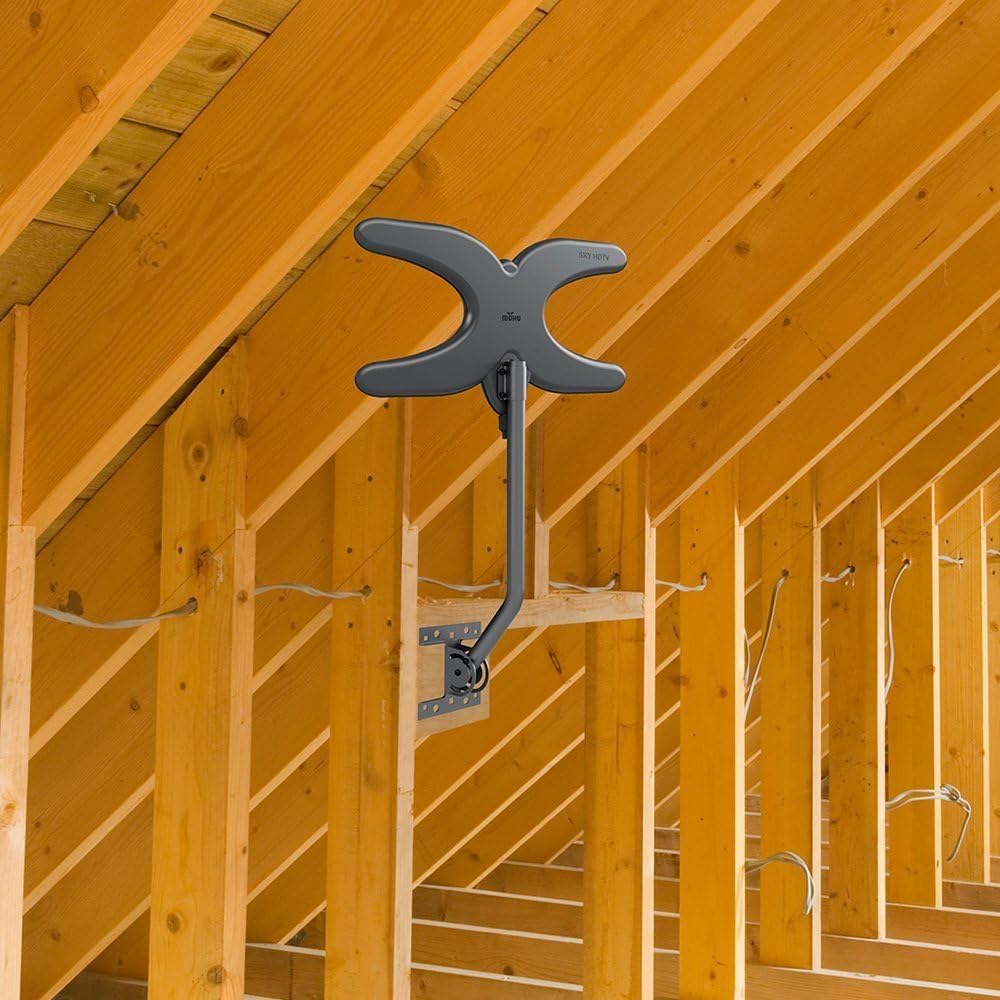
Image: The Mohu Sky 60 antenna installed on a rooftop, demonstrating an outdoor placement option.

Image: The Mohu Sky 60 antenna installed within an attic space, showing an indoor placement option.
3.2. Mounting the Antenna
Use the provided mounting kit to secure the antenna. Follow these general steps:
- Assemble the antenna unit with the mounting pole.
- Attach the mounting bracket to a secure surface (e.g., roof fascia, attic rafter) using appropriate fasteners.
- Secure the antenna pole to the mounting bracket.

Image: The Mohu Sky 60 antenna assembly, including the main antenna body, mounting pole, and base bracket.
3.3. Connecting the Antenna
Connect the antenna to your television using the coaxial cable and amplifier:
- Connect one end of the 30-foot coaxial cable to the antenna's output port.
- Connect the other end of the coaxial cable to the amplifier's input.
- Connect a shorter coaxial cable (not included) from the amplifier's output to the 'Antenna In' or 'RF In' port on your television.
- Power the amplifier using either the USB cable connected to a TV's USB port or the provided power cube plugged into a wall outlet.
3.4. Scanning for Channels
After connecting the antenna, perform a channel scan on your television:
- Access your TV's menu and navigate to the 'Channel Setup' or 'Tuner Setup' section.
- Select 'Antenna' or 'Air' as the input source.
- Initiate an 'Auto Scan' or 'Auto Program' for channels. This process may take several minutes.
- Once the scan is complete, your TV will display the available over-the-air channels.

Image: The back of the Mohu Sky 60 antenna box, detailing the easy installation steps for both attic and outdoor setups.
4. Operating the Antenna
The Mohu Sky 60 antenna operates continuously once installed and connected. Your television's tuner will receive signals from the antenna. Periodically re-scan for channels, especially if you notice a change in available channels or signal quality, as broadcast frequencies can change.
5. Maintenance
The Mohu Sky 60 antenna requires minimal maintenance:
- Regular Checks: Periodically inspect outdoor installations for secure mounting and cable integrity, especially after severe weather.
- Cleaning: Gently clean the antenna surface with a soft, damp cloth if dust or debris accumulates. Do not use harsh chemicals or abrasive materials.
- Cable Management: Ensure coaxial cables are not kinked or damaged, as this can affect signal quality.
6. Troubleshooting
If you experience issues with your Mohu Sky 60 antenna, consider the following troubleshooting steps:
- No Channels or Poor Reception:
- Re-scan for Channels: Always perform a channel scan after any changes to the antenna setup or if reception degrades.
- Check Connections: Ensure all coaxial cable connections are secure at the antenna, amplifier, and television.
- Antenna Placement: Experiment with slight adjustments to the antenna's position or height. Even small changes can significantly impact signal reception. Ensure it is not obstructed by metal.
- Amplifier Power: Verify the amplifier is properly powered (USB or power cube).
- TV Tuner: Some older or lower-quality TV tuners may struggle with digital signals. Consider an external digital tuner if issues persist.
- Interference: Keep the antenna away from other electronic devices (e.g., refrigerators, washing machines, robots) that can generate electromagnetic interference.
Video: This video provides general antenna signal troubleshooting tips, including advice on placement and avoiding interference.
7. Specifications
| Feature | Specification |
|---|---|
| Model Number | MH-110585 |
| Brand | Mohu |
| Color | Black |
| Maximum Range | 75 Miles |
| Impedance | 75 Ohms |
| Item Weight | 3 Pounds |
| Dimensions (Approx.) | 23" (H) x 11" (W) x 3" (D) |

Image: The Mohu Sky 60 antenna with key dimensions indicated for reference.
8. Warranty and Support
For warranty information and technical support, please refer to the manufacturer's official website or contact their customer service directly. Keep your proof of purchase for warranty claims.


