
Redi-Remote Replacement Remote Control User Manual
Model: RTSVCJB010CREMO
Introduction
This manual provides comprehensive instructions for the Redi-Remote Replacement Remote Control, model RTSVCJB010CREMO. This remote is designed as a direct replacement for specific JBL units, ensuring full functionality without the need for complex programming. It is compatible with JBL models ESC200, SVCJB010CREMO, and 901121.
Please read this manual carefully before using your new remote control to ensure proper setup and operation.
Setup
Battery Installation
Your Redi-Remote requires 4 AAA batteries (included) for operation. Follow these steps to install them:
- Locate the battery compartment on the back of the remote control.
- Slide the battery compartment cover downwards to open it.
- Insert 4 AAA batteries, ensuring the positive (+) and negative (-) terminals align correctly with the markings inside the compartment.
- Slide the battery compartment cover back into place until it clicks securely.
Initial Use
This Redi-Remote is pre-programmed and requires no additional setup or coding. It is ready for use immediately after battery installation.
- Point the remote control directly at your JBL unit (ESC200, SVCJB010CREMO, or 901121).
- Press the desired function button (e.g., Power, Volume Up) to begin operation.
Operating Your Remote
The Redi-Remote is designed to replicate all essential functions of your original JBL remote control. It will control only the specific unit it is designed for and cannot be programmed to control auxiliary devices.
Basic Functions
The upper half of the remote control provides access to frequently used functions:
- Power: Turns the unit on or off.
- Volume Up/Down: Adjusts the audio level.
- Mute: Silences the audio output.
- Input/Source: Selects the audio input source.
Accessing Additional Buttons
The lower half of the remote control, containing additional function buttons, is concealed by a sliding cover. To access these buttons:
- Locate the cover on the lower front of the remote.
- Gently slide the cover downwards to reveal the hidden buttons.
- After use, you may slide the cover back up to protect the buttons.
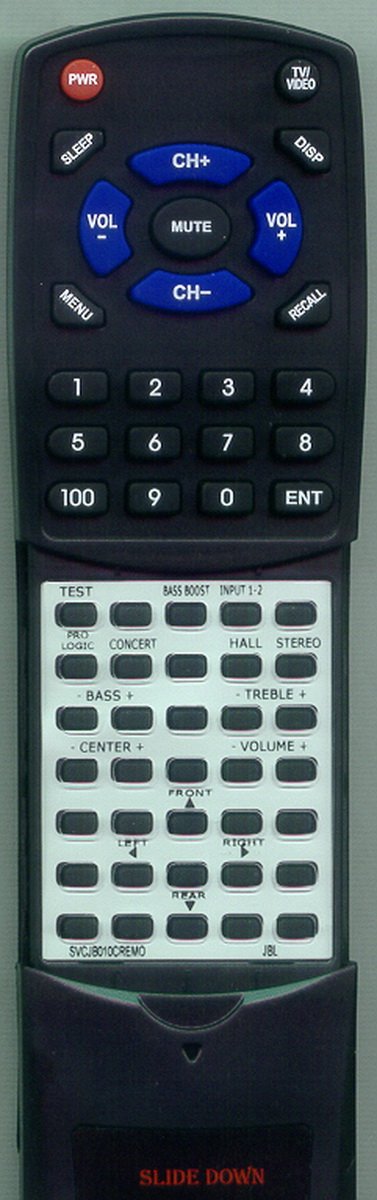
Image: Redi-Remote Replacement Remote Control. This image displays the overall design of the remote, including the sliding cover for additional buttons.
Maintenance
Battery Replacement
Replace the batteries when the remote's performance diminishes or it stops responding. Always replace all 4 AAA batteries at the same time with new ones.
- Open the battery compartment as described in the Setup section.
- Remove the old batteries.
- Insert new AAA batteries, observing correct polarity (+/-).
- Close the battery compartment cover.
Cleaning
To clean your remote control:
- Use a soft, dry cloth to wipe the surface of the remote.
- For stubborn dirt, slightly dampen the cloth with water or a mild, non-abrasive cleaner.
- Avoid using harsh chemicals or abrasive materials, as these can damage the remote's finish or internal components.
Troubleshooting
If you experience issues with your Redi-Remote, please refer to the following common solutions:
| Problem | Solution |
|---|---|
| Remote is not responding. |
|
| Some buttons are not working. |
|
If the problem persists after trying these solutions, please contact customer support.
Specifications
| Feature | Detail |
|---|---|
| Model Number | RTSVCJB010CREMO |
| Product Dimensions | 7 x 2.5 x 1 inches |
| Item Weight | 4.5 ounces |
| Batteries Required | 4 AAA batteries (included) |
| Compatible Devices | JBL ESC200, SVCJB010CREMO, 901121 (Stereo System) |
| Connectivity Technology | Infrared |
| Special Feature | No Programming Required |
| Max Number of Supported Devices | 1 |
Support and Warranty
For any concerns or issues with your Redi-Remote Replacement Remote Control after purchase, please contact the seller directly. The seller for this product is RemotesPro.
While specific warranty details are not provided in this manual, it is recommended to retain your proof of purchase for any potential support inquiries.