
MFJ MFJ-828
MFJ-828 Digital SWR/Wattmeter/Frequency Counter User Manual
Model: MFJ-828
1. Introduction
The MFJ-828 is a versatile Digital SWR/Wattmeter and Frequency Counter designed for amateur radio and RF applications. It provides accurate measurements of Forward Power, Reflected Power, SWR, and Frequency across a wide range from 1.8 MHz to 54 MHz, handling power levels up to 1500 Watts. This manual provides essential information for the proper setup, operation, and maintenance of your MFJ-828 unit.
2. Safety Information
Please read and understand all safety instructions before operating the MFJ-828. Failure to do so may result in damage to the unit, other equipment, or personal injury.
- Power Supply: Ensure the correct DC power supply (not included) is used. Incorrect voltage or polarity can damage the unit.
- RF Exposure: Always observe proper RF safety guidelines when transmitting. High RF power can cause burns or other injuries.
- Ventilation: Do not block ventilation openings. Ensure adequate airflow around the unit to prevent overheating.
- Environment: Operate the unit in a dry environment, away from moisture, extreme temperatures, and direct sunlight.
- Servicing: Refer all servicing to qualified personnel. Do not attempt to open or repair the unit yourself.
3. Package Contents
Carefully unpack your MFJ-828 and verify that all items are present and undamaged. If any items are missing or damaged, contact your dealer immediately.
- MFJ-828 Digital SWR/Wattmeter/Frequency Counter Unit
- User Manual (this document)
- Note: A 12V DC power supply is required for operation and is typically sold separately.
4. Setup
Follow these steps to set up your MFJ-828 for operation:
- Placement: Place the MFJ-828 on a stable, flat surface, ensuring adequate ventilation around the unit.
- Antenna Connection: Connect your antenna system to the "ANTENNA" (or "OUTPUT") SO-239 connector on the rear panel of the MFJ-828.
- Transceiver Connection: Connect your transceiver's RF output to the "TRANSCEIVER" (or "INPUT") SO-239 connector on the rear panel of the MFJ-828. Use high-quality coaxial cables with appropriate connectors.
- Power Connection: Connect a suitable 12V DC power supply (not included) to the DC input jack on the rear panel. Ensure correct polarity. The unit requires a stable 12V DC supply.
- Initial Power On: Press the POWER button on the front panel to turn on the unit. The digital display should illuminate.
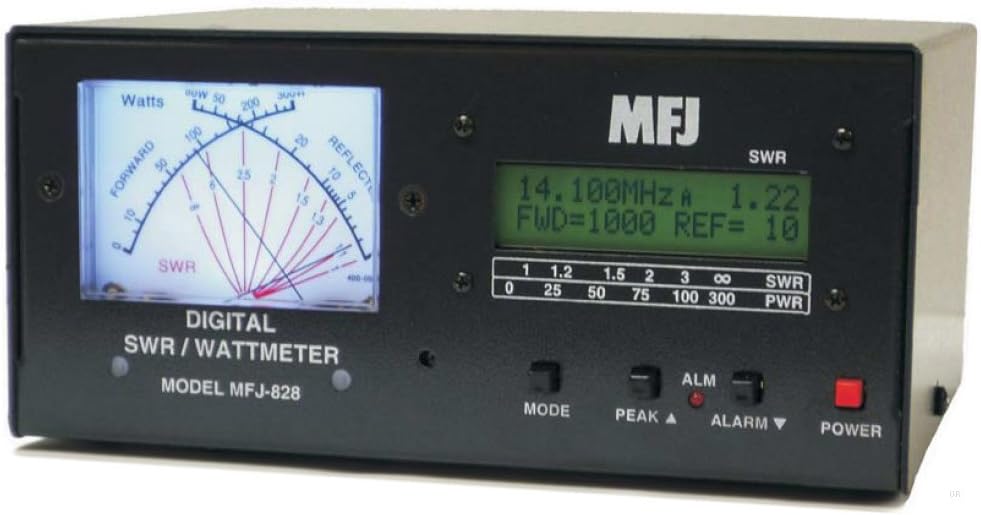
Figure 4.1: Front view of the MFJ-828 Digital SWR/Wattmeter/Frequency Counter, showing the analog SWR/Wattmeter display on the left and the digital LCD display on the right. The digital display shows frequency, forward power (FWD), and reflected power (REF) readings. Below the digital display are buttons for MODE, PEAK, and ALARM, and a POWER button.
5. Operating Instructions
The MFJ-828 provides both analog and digital readouts for SWR, power, and frequency.
5.1. Power On/Off
- To turn on the unit, press the POWER button.
- To turn off the unit, press the POWER button again.
5.2. Reading SWR and Power
The MFJ-828 displays SWR and power on both the analog meter and the digital LCD.
- Analog Meter: The large analog meter on the left provides a quick visual indication of Forward Power (Watts) and SWR. The SWR scale is typically located at the bottom of the meter.
- Digital Display: The LCD on the right provides precise digital readings.
- Frequency: Displays the operating frequency in MHz.
- FWD (Forward Power): Shows the forward power in Watts.
- REF (Reflected Power): Shows the reflected power in Watts.
- SWR: Displays the Standing Wave Ratio numerically.
5.3. MODE Button
The MODE button cycles through different display modes or measurement parameters on the digital screen. Consult the specific mode functions by pressing the button and observing the display changes.
5.4. PEAK Button
The PEAK button (often labeled "PEAK ▲") is used to activate or reset the peak hold function for power readings. When active, the display will hold the highest power reading detected until reset or a higher peak is measured. This is particularly useful for CW (Morse Code) or SSB (Single Sideband) transmissions to capture peak power.
5.5. ALARM Button
The ALARM button (often labeled "ALARM ▼") is used to set or clear SWR or power alarms. When an alarm is set, the unit may beep or display an error message if SWR or power exceeds a predefined threshold. Refer to the manufacturer's detailed instructions for setting alarm thresholds.
6. Maintenance
Proper maintenance ensures the longevity and accuracy of your MFJ-828.
- Cleaning: Use a soft, dry cloth to clean the exterior of the unit. Do not use abrasive cleaners or solvents.
- Storage: When not in use for extended periods, store the unit in a cool, dry place, away from direct sunlight and extreme temperatures.
- Connections: Periodically check all coaxial and power connections to ensure they are secure and free from corrosion.
7. Troubleshooting
If you encounter issues with your MFJ-828, refer to the following common problems and solutions:
| Problem | Possible Cause | Solution |
|---|---|---|
| Unit does not power on. | No power supply connected, incorrect power supply, faulty power cable, unit not switched on. | Ensure 12V DC power supply is connected and functional. Check power cable. Press the POWER button. |
| Incorrect SWR/Power readings. | Loose coaxial connections, faulty cables, incorrect power range selected (if applicable), unit malfunction. | Check all RF connections. Test with known good cables. Ensure proper operation of transceiver and antenna. |
| Frequency counter erratic (e.g., during CW). | Nature of CW signal (pulsed), internal processing limitations. | This behavior may be inherent to the design for certain signal types. Focus on average readings or use for continuous signals. |
| "Oops error" or beeping at high power. | Exceeding the maximum power handling capacity (1500W). | Reduce transmit power. The unit is designed for a maximum of 1500 Watts. |
If the problem persists after attempting these solutions, contact MFJ customer support or your dealer for further assistance.
8. Specifications
| Feature | Detail |
|---|---|
| Model | MFJ-828 |
| Frequency Range | 1.8 to 54 MHz |
| Maximum Power Handling | 1500 Watts |
| Display Type | Analog Meter and Digital LCD |
| Power Input | 12V DC (Power supply not included) |
| Connectors | SO-239 (UHF Female) |
| Dimensions (Approx.) | 14 x 10 x 5 inches (Package Dimensions) |
| Weight (Approx.) | 6.61 pounds |
| Color | Black |
9. Warranty and Support
MFJ Enterprises, Inc. products are typically covered by a limited warranty. For specific warranty terms and conditions, please refer to the warranty card included with your product or visit the official MFJ website. For technical support, service, or parts, please contact MFJ customer service directly. Have your model number (MFJ-828) and purchase information ready when contacting support.
Contact information can usually be found on the manufacturer's website or on the product packaging.
Related documentsMFJ-828


Ask a question about this manual
Ask about setup, troubleshooting, compatibility, parts, safety, or missing instructions. Manuals+ will review the question and use this page’s manual context to help answer it.