
Introduction
This manual provides instructions for the proper setup, operation, and maintenance of your Heil ICM Microphone. The Heil ICM is designed for use with older Icom radio models, offering clear audio transmission. Please read this manual thoroughly before using the microphone to ensure optimal performance and longevity.
Setup
Follow these steps to connect your Heil ICM Microphone to your Icom radio:
- Identify the Radio Connector: The Heil ICM Microphone features an 8-pin round connector designed for older Icom radio models. Ensure your radio has a compatible 8-pin microphone input.
- Connect the Microphone: Carefully align the 8-pin connector of the microphone with the microphone input port on your Icom radio. Push firmly until it clicks into place. Do not force the connection.
- PTT Interface: A 1/4-inch female pigtail exits the 8-pin connector. This allows for an external Push-To-Talk (PTT) interface, if desired. Connect a compatible PTT switch to this pigtail.
- Modular Adapter (Optional): If your Icom radio uses an 8-pin modular (RJ-45) connector instead of the 8-pin round connector, an additional adapter (Heil HSTA-IM) is required. Connect the HSTA-IM adapter to the microphone's 8-pin round connector, then connect the adapter's modular end to your radio.
- Initial Radio Settings: Before transmitting, consult your Icom radio's manual for recommended microphone input level settings and audio processing adjustments. Start with conservative settings and adjust as needed for clear audio.
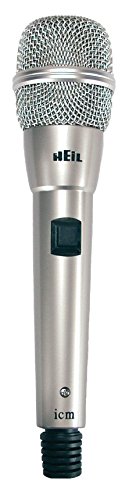
Image: The Heil ICM Microphone, showing its 8-pin connector and the 1/4-inch PTT pigtail. This microphone is designed for direct connection to compatible Icom radios.
Operating Instructions
The Heil ICM Microphone is straightforward to operate:
- Power On Radio: Ensure your Icom radio is powered on and properly configured for microphone input.
- Push-To-Talk (PTT): The microphone features a soft-touch PTT button on its body. Press and hold this button to transmit. Release the button to receive. If an external PTT switch is connected to the 1/4-inch pigtail, use that switch for transmission.
- Speaking into the Microphone: For optimal audio quality, speak clearly and consistently into the microphone. Maintain a consistent distance from the microphone element, typically a few inches, to avoid audio level fluctuations.
- Audio Monitoring: If your radio supports it, monitor your transmitted audio to ensure clarity and proper modulation. Adjust microphone gain settings on your radio as necessary.
Maintenance
Proper care will extend the life and performance of your Heil ICM Microphone:
- Cleaning: Use a soft, dry cloth to wipe down the microphone body. Avoid using liquid cleaners or solvents, as these can damage the finish or internal components.
- Storage: When not in use, store the microphone in a clean, dry environment, away from extreme temperatures and direct sunlight. Protect the connector from dust and physical damage.
- Cable Care: Avoid sharp bends or kinks in the microphone cable. Do not pull on the cable to disconnect the microphone; always grasp the connector itself.
Troubleshooting
If you encounter issues with your Heil ICM Microphone, consider the following:
- No Audio Transmission:
- Ensure the microphone's 8-pin connector is fully seated in the radio's port.
- Verify that the PTT button is being pressed or that an external PTT switch is functioning correctly.
- Check your radio's microphone gain settings; they might be set too low or muted.
- Confirm the radio is in transmit mode and not in a receive-only state.
- Distorted or Low-Quality Audio:
- Adjust the microphone gain on your radio. Too high or too low gain can cause distortion or weak audio.
- Ensure you are speaking at a consistent distance from the microphone.
- Check for any radio audio processing settings (e.g., compression, equalization) that might be affecting the sound.
- Inspect the microphone cable and connectors for any visible damage.
- Intermittent Operation:
- Wiggle the microphone connector gently to see if the connection is loose.
- Check for any damage to the microphone cable, especially near the connectors.
If these steps do not resolve the issue, contact Heil Sound customer support or your authorized dealer for further assistance.
Specifications
| Feature | Specification |
|---|---|
| Brand | Heil Sound |
| Model Name | ICM |
| Connectivity Technology | Auxiliary |
| Connector Type | 8-pin, 1/4 inch TRS |
| Polar Pattern | Unidirectional |
| Item Weight | 1.5 Pounds (0.68 kg) |
| Package Dimensions | 11 x 4.5 x 2.5 inches (27.9 x 11.4 x 6.35 cm) |
| UPC | 701630971905 |
| Included Components | Microphone |
Official Product Videos
No official product videos from the seller are available for embedding at this time.
Support and Warranty
For technical support, service, or warranty inquiries regarding your Heil ICM Microphone, please contact Heil Sound directly or refer to their official website. Warranty terms and conditions may vary and are typically provided with the product packaging or available from the manufacturer.
You can often find contact information and support resources on the Heil Sound Store on Amazon or their corporate website.


