
1. Introduction
This manual provides essential information for the proper setup, operation, and maintenance of your Heil Sound CC-1-IM Icom Modular Microphone Cable. This cable is designed to connect Heil Sound microphones equipped with an XLR 4-pin female connector to Icom transceivers, incorporating a 1/4 inch jack for Push-To-Talk (PTT) functionality.
Please read this manual thoroughly before using the product to ensure optimal performance and longevity.
2. Product Overview
The Heil Sound CC-1-IM is an 8-foot microphone cable featuring specific connectors for Icom radio compatibility. It includes:
- An Icom modular connector for direct connection to compatible Icom transceivers.
- An XLR 4-pin female connector for connecting to Heil Sound microphones.
- A 1/4 inch (6.35mm) jack for external PTT control.
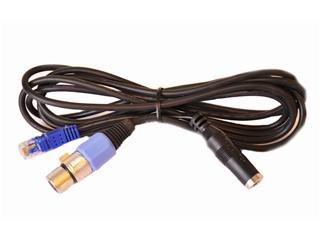
Image showing the Heil Sound CC-1-IM cable, featuring the Icom modular connector, the XLR 4-pin female connector, and the 1/4 inch PTT jack.
3. Setup
Follow these steps to properly connect your Heil Sound CC-1-IM microphone cable:
- Connect to Microphone: Locate the XLR 4-pin male connector on your Heil Sound microphone. Align the pins of the microphone with the XLR 4-pin female connector of the CC-1-IM cable and push firmly until it clicks into place. Ensure a secure connection.
- Connect to Radio: Locate the modular microphone input jack on your Icom transceiver. Insert the Icom modular connector of the CC-1-IM cable into this jack until it locks.
- Connect PTT (Optional): If you are using an external PTT switch, insert its 1/4 inch (6.35mm) plug into the 1/4 inch jack on the CC-1-IM cable. This allows for external control of the Push-To-Talk function.
Verify all connections are secure before powering on your radio or microphone.
4. Operating Instructions
Once the cable is correctly installed, the operation is straightforward:
- Ensure your microphone and radio are powered on and configured according to their respective manuals.
- To transmit, activate the PTT function using either the PTT button on your Heil Sound microphone or the external PTT switch connected to the 1/4 inch jack on the CC-1-IM cable.
- Speak clearly into the microphone at an appropriate distance for optimal audio quality.
- Release the PTT to return to receive mode.
Always refer to your Icom transceiver's manual for specific microphone input settings and adjustments.
5. Maintenance
Proper care will extend the life of your Heil Sound CC-1-IM cable:
- Cleaning: Gently wipe the cable and connectors with a soft, dry cloth to remove dust and dirt. Avoid using harsh chemicals or abrasive cleaners.
- Storage: When not in use, coil the cable loosely. Avoid sharp bends, kinks, or wrapping the cable tightly, as this can damage the internal wiring. Store in a cool, dry place away from direct sunlight and extreme temperatures.
- Inspection: Periodically inspect the cable for any signs of wear, cuts, fraying, or damage to the connectors. If damage is observed, discontinue use and consider replacement.
6. Troubleshooting
If you encounter issues with your CC-1-IM cable, consider the following:
- No Audio Transmission:
- Ensure all cable connections (microphone to cable, cable to radio) are fully seated and secure.
- Verify your microphone is functioning correctly (test with another cable if possible).
- Check your Icom transceiver's settings for microphone input, gain, and PTT activation.
- PTT Not Activating:
- Confirm the 1/4 inch PTT plug is fully inserted into the jack on the CC-1-IM cable.
- Test the external PTT switch for functionality.
- Ensure the radio's PTT settings are correctly configured.
- Intermittent Connection/Poor Audio:
- Inspect the entire length of the cable for any visible damage, such as cuts or crimps.
- Check the connectors for bent pins or corrosion.
- Ensure the connectors are clean and free of debris.
If problems persist after performing these checks, contact Heil Sound customer support for further assistance.
7. Specifications
| Model Number | CC-1-IM |
| Brand | Heil Sound |
| Cable Length | 8 Feet |
| Connector Type (Microphone) | XLR 4-Pin Female |
| Connector Type (Radio) | Icom Modular |
| PTT Connector | 1/4 Inch (6.35mm) Jack |
| Compatible Devices | Microphones (Heil Sound with XLR 4-pin male), Icom Transceivers |
| Special Feature | Braided |
| Package Dimensions | 8 x 2.5 x 1 inches |
| Item Weight | 5.2 ounces |
8. Warranty and Support
For detailed warranty information regarding your Heil Sound CC-1-IM cable, please refer to the official Heil Sound website or the documentation included with your purchase. Warranty terms and conditions may vary.
If you require technical assistance, troubleshooting beyond this manual, or have questions about your product, please contact Heil Sound customer support directly. Contact information can typically be found on the Heil Sound official website.