
1. Introduction
The MFJ-4245MV is a switching power supply designed to provide a stable and reliable 45-amp DC output. It is suitable for powering various electronic equipment, including amateur radio devices, in both home and mobile setups. This manual provides essential information for the safe and efficient operation of your MFJ-4245MV power supply.
2. Safety Information
Please read and understand all safety instructions before operating the power supply. Failure to follow these instructions may result in electric shock, fire, or damage to the unit or connected equipment.
- Indoor Use Only: This power supply is designed for indoor use in a dry environment. Do not expose it to rain or moisture.
- Ventilation: Ensure adequate ventilation around the unit. Do not block ventilation openings.
- Power Source: Connect the power supply only to a grounded AC 120V outlet.
- Overload Protection: Do not exceed the rated output current of 45 amps. The unit has built-in overload protection, but continuous overloading can cause damage.
- Disconnect Power: Always disconnect the AC power cord before making or changing any connections to the DC output terminals.
- Servicing: Refer all servicing to qualified service personnel. Do not attempt to open or repair the unit yourself.
3. Product Features
The MFJ-4245MV power supply offers the following key features:
- High Power Output: Provides 45 amps continuous at 13.8V DC, suitable for high-performance devices.
- Compact and Lightweight Design: Facilitates easy integration into various setups.
- Variable Voltage Control: Adjustable output voltage from 9 to 15 volts DC for diverse operating conditions.
- Low Ripple Noise: Ensures clean DC power, minimizing interference in sensitive electronic systems.
- Overload and Short Circuit Protection: Built-in safeguards for the power supply and connected devices.
- Built-in Cooling Fan: Efficient fan system to maintain optimal operating temperature.
- Digital Voltmeter/Ampermeter: Integrated display for real-time monitoring of output voltage and current.
- Versatile Input: Compatible with standard AC 120V household outlets.
4. Package Contents
Upon unpacking, please verify that all items are present:
- MFJ-4245MV Switching Power Supply
- AC Power Cord
- User Manual (this document)
5. Setup
5.1 Unpacking and Placement
Carefully remove the power supply from its packaging. Place the unit on a stable, level surface. Ensure there is sufficient space around the unit for proper airflow, especially around the cooling fan vents located on the sides or rear of the chassis.
5.2 Front Panel Overview
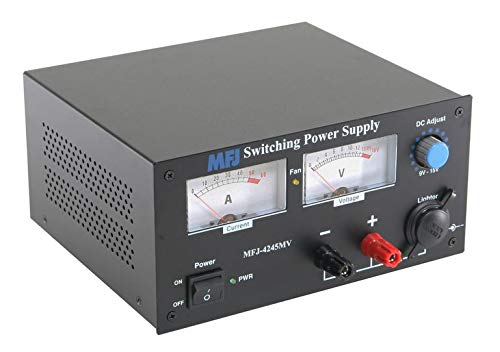
Figure 1: Front panel of the MFJ-4245MV power supply. This image displays the current (A) and voltage (V) meters, the power ON/OFF switch, the DC Adjust knob for voltage control (9V-15V), and the main 40A output terminals (red for positive, black for negative). A lower current 7A output terminal and a lighter socket are also visible.
5.3 Connecting to AC Power
- Ensure the power supply's ON/OFF switch is in the "OFF" position.
- Connect the supplied AC power cord to the AC input receptacle on the rear of the power supply.
- Plug the other end of the AC power cord into a standard grounded AC 120V wall outlet.
5.4 Connecting DC Load
The MFJ-4245MV provides two sets of DC output terminals and a lighter socket:
- Main Terminals (40A): These are the large red (positive) and black (negative) binding posts. Use these for high-current applications.
- Auxiliary Terminals (7A): These are smaller terminals, typically located below the main terminals, for lower current devices.
- Lighter Socket: A standard automotive-style lighter socket for compatible accessories.
To connect your equipment:
- Ensure the power supply is OFF and unplugged from AC power.
- Connect the positive (+) lead from your equipment to the red terminal and the negative (-) lead to the black terminal. Ensure connections are secure to prevent arcing or poor contact.
- For the lighter socket, simply insert the compatible plug from your device.
- Double-check all connections for correct polarity before proceeding.
6. Operating Instructions
6.1 Powering On/Off
- After connecting your equipment, plug the AC power cord into the wall outlet.
- Flip the "Power" switch on the front panel to the "ON" position. The power indicator light (PWR) should illuminate.
- To turn off the power supply, flip the "Power" switch to the "OFF" position.
6.2 Adjusting Output Voltage
The MFJ-4245MV features a variable voltage control knob labeled "DC Adjust" on the front panel. This allows you to adjust the output voltage from 9V to 15V DC.
- Turn the "DC Adjust" knob clockwise to increase the voltage and counter-clockwise to decrease it.
- Monitor the voltage meter on the front panel to set the desired output voltage for your connected equipment.
- Always ensure the voltage setting matches the requirements of your connected device to prevent damage.
6.3 Monitoring Output
The front panel includes two analog meters:
- Current (A) Meter: Displays the total current being drawn by your connected equipment in Amperes.
- Voltage (V) Meter: Displays the output voltage in Volts.
Regularly monitor these meters during operation to ensure your equipment is functioning within safe parameters and to detect any potential issues.
7. Maintenance
7.1 Cleaning
To clean the exterior of the power supply, disconnect it from AC power and use a soft, dry cloth. Do not use liquid cleaners or solvents, as they may damage the finish or internal components.
7.2 Ventilation and Fan
Periodically check the ventilation openings for dust accumulation. Use a soft brush or compressed air to gently clear any obstructions. Ensure the cooling fan operates freely when the unit is powered on. A noisy fan might indicate dust buildup or a failing component, which should be addressed by qualified service personnel.
7.3 Fuse Replacement
The power supply contains internal fuses for protection. If the unit fails to power on or experiences a sudden shutdown, a fuse may have blown. Fuse replacement should only be performed by qualified service personnel to ensure the correct type and rating of fuse is used and to avoid electric shock.
8. Troubleshooting
This section addresses common issues you might encounter with your MFJ-4245MV power supply.
| Problem | Possible Cause | Solution |
|---|---|---|
| No power / Unit does not turn on. | AC power cord not connected, wall outlet faulty, power switch off, internal fuse blown. | Check AC cord connection. Test wall outlet with another device. Ensure power switch is ON. If fuse is suspected, contact service personnel. |
| Low or no DC output voltage. | DC Adjust knob set too low, overload protection activated, faulty connection to equipment. | Adjust DC Adjust knob. Reduce load on power supply. Check DC output connections for proper contact and polarity. |
| Overload protection activates (unit shuts down or output drops). | Connected equipment draws too much current, short circuit in connected equipment or wiring. | Disconnect equipment and check for short circuits. Reduce the load to below 45 amps. Reconnect equipment one by one to identify the faulty device. |
| Excessive fan noise. | Dust accumulation in fan, fan malfunction. | Clean fan vents. If noise persists or is excessive, contact service personnel. |
If you encounter a problem not listed here or if the suggested solutions do not resolve the issue, please contact MFJ customer support.
9. Specifications
| Feature | Detail |
|---|---|
| Brand | MFJ |
| Model Number | MFJ-4245MV |
| Input Voltage | AC 120V |
| Output Voltage | Adjustable 9-15V DC |
| Output Current (Continuous) | 45 Amps |
| Maximum Power | 611 Watts |
| Output Wattage | 552 Watts |
| Item Dimensions (L x W x H) | 10 x 10 x 5 inches |
| Connector Type | Barrel Connector (for AC input), Binding Posts (for DC output), Lighter Socket (for DC output) |
| Color | Black |
| UPC | 658392806528 |
10. Warranty Information
The MFJ-4245MV Switching Power Supply comes with a 1-year limited warranty from the date of purchase. This warranty covers defects in materials and workmanship under normal use. It does not cover damage resulting from misuse, abuse, unauthorized modification, improper installation, or acts of nature. Please retain your proof of purchase for warranty claims. The warranty does not cover damage to equipment connected to the power supply.
11. Customer Support
For technical assistance, troubleshooting, or warranty service, please contact MFJ customer support. Refer to the official MFJ website or your product packaging for the most current contact information.
Online Resources: www.mfjenterprises.com


