
Introduction
The Dremel 3000 is a versatile multitool designed for a wide range of applications, including carving, engraving, milling, grinding, cleaning, polishing, cutting, and sanding. Its compact design and variable speed control make it an essential tool for precision tasks in various materials.
This kit includes the Dremel 3000 Multitool, 15 high-quality Dremel accessories, and a protective case, providing everything needed to begin your projects. The tool features a 130W motor and a soft grip to reduce vibration, ensuring comfortable and controlled operation.

Figure 1: The Dremel 3000 Multitool kit, including the tool, various accessories, and a blue protective case.
Setup
Unpacking and Inspection
Carefully remove all components from the packaging. Verify that all items listed in the product contents are present and undamaged. The kit typically includes the Dremel 3000 tool, 15 accessories, and a neoprene case.

Figure 2: Product packaging indicating the Dremel 3000's variable speed feature and inclusion of 15 accessories.
Power Connection
The Dremel 3000 operates on a corded electric power source. Ensure the tool is connected to a 230V power supply. The plug format is a C - 2 pin Europlug. Always ensure the power switch is in the "off" position before plugging in the tool.
Accessory Installation
The Dremel 3000 features the EZ Twist nose cap, allowing for quick and easy accessory changes without the need for a separate wrench. To install an accessory:
- Unscrew the EZ Twist nose cap.
- Press and hold the shaft lock button to prevent the shaft from rotating.
- Insert the accessory shank into the collet.
- Tighten the collet nut by rotating the EZ Twist nose cap until the accessory is securely held. Do not overtighten.
- Release the shaft lock button.
For accessories utilizing the EZ SpeedClic system, changing discs and points is even faster, requiring no tools. Simply twist and lock the accessory into place.

Figure 3: Detail view of the Dremel 3000 with a wire brush accessory, illustrating the rotational action.
Operating Instructions
Variable Speed Control
The Dremel 3000 features a variable speed control, allowing you to adjust the rotational speed from 10,000 RPM to 33,000 RPM. This enables precise control for different materials and applications. Use lower speeds for polishing, cleaning, and working with delicate materials, and higher speeds for cutting, grinding, and carving harder materials.
Recommended Applications
The Dremel 3000 is suitable for a wide array of tasks:
- Carving and Engraving: Ideal for intricate designs on wood, metal, and glass.
- Milling: Creating grooves and shaping materials.
- Cutting: Precision cutting of various materials using appropriate cutting discs.
- Sanding: Smoothing surfaces and removing material.
- Grinding and Sharpening: Shaping and sharpening tools or materials.
- Cleaning and Polishing: Restoring shine and removing rust or dirt.

Figure 4: The Dremel 3000 equipped with a cutting disc, demonstrating its readiness for cutting tasks.

Figure 5: The Dremel 3000 actively cutting a metal rod, illustrating its capability for precise material removal.
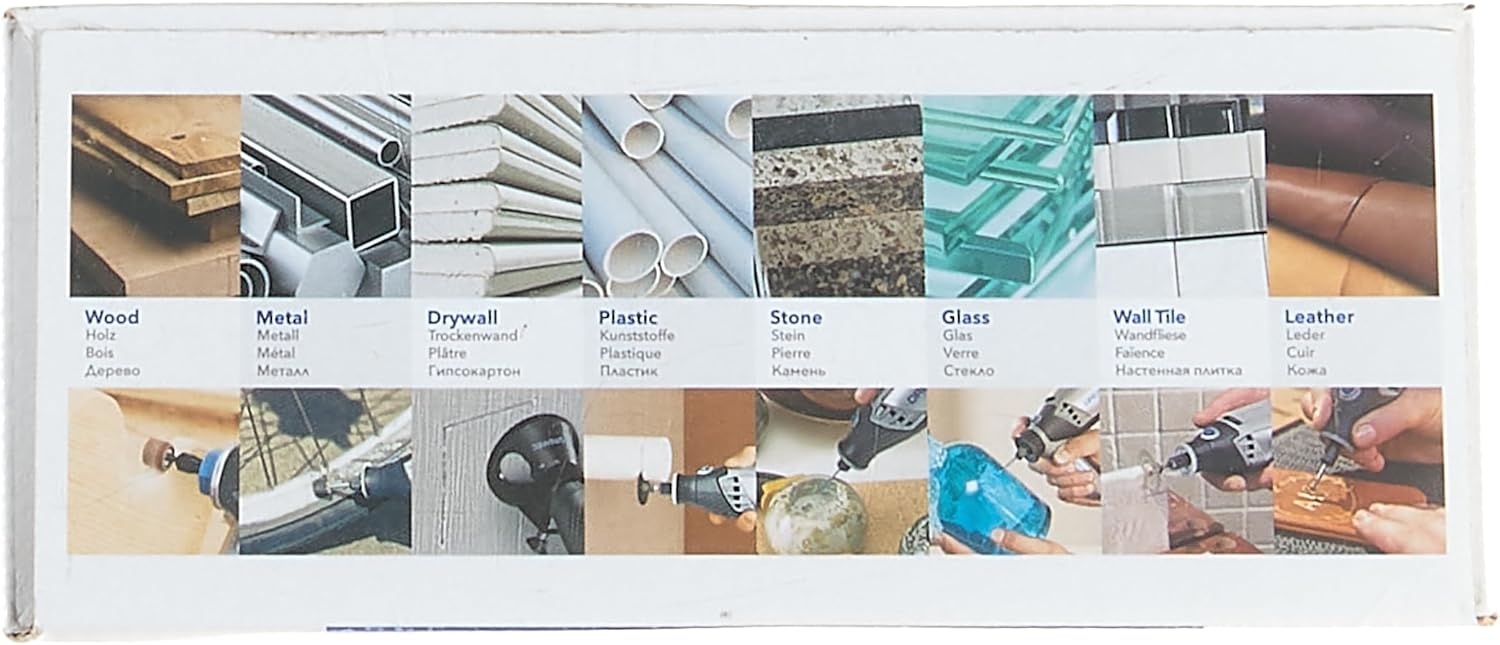
Figure 6: The Dremel 3000 packaging illustrating the diverse range of materials it can be used with, such as wood, metal, drywall, plastic, stone, glass, wall tile, and leather.
Safety Guidelines
Always wear appropriate personal protective equipment (PPE), including safety glasses, gloves, and a dust mask, when operating the tool. Ensure your work area is well-lit and clear of obstructions. Do not operate the tool near flammable liquids or gases. Always unplug the tool before changing accessories or performing maintenance.
Maintenance
Cleaning
After each use, unplug the tool and clean the exterior with a soft, damp cloth. Use a small brush or compressed air to clear dust and debris from the ventilation openings. Do not use harsh chemicals or abrasive cleaners.
Storage
Store the Dremel 3000 and its accessories in the provided protective case in a dry, secure location, away from direct sunlight and extreme temperatures. Keep out of reach of children.
Troubleshooting
- Tool does not start:
- Check if the power cord is securely plugged into a working outlet.
- Ensure the power switch is in the "on" position.
- Verify that the power outlet is functional by testing it with another device.
- Tool overheats:
- Ensure the ventilation openings are not blocked by dust or debris. Clean them if necessary.
- Avoid applying excessive pressure during operation, which can strain the motor.
- Allow the tool to cool down if it becomes excessively hot.
- Excessive vibration or noise:
- Check that the accessory is properly installed and securely tightened in the collet.
- Ensure the accessory is not bent or damaged. Replace if necessary.
- Verify that the collet and collet nut are clean and free of debris.
If problems persist, contact Dremel customer support for assistance.
Specifications
| Feature | Specification |
|---|---|
| Brand | Dremel |
| Model Number | F0133000JC |
| Nominal Input Power | 130 W |
| Voltage | 230 V |
| Idle Speed | 10,000 - 33,000 rpm |
| Weight | 0.55 kg (1.21 lbs) |
| Power Source | Corded Electric |
| Dimensions (L x W x H) | 13.19 x 7.09 x 2.95 inches |
| Included Components | Dremel 3000 Multitool, 15 Accessories, Neoprene Case |
| Special Feature | Variable Speed |

Figure 7: The Dremel 3000 packaging displaying a comparison table of Dremel models and a list of included accessories by type (cleaning/polishing, sanding, cutting, grinding/sharpening, miscellaneous).
Warranty and Support
For warranty information, please refer to the documentation included with your Dremel 3000 Multitool or visit the official Dremel website. For technical support, replacement parts, or additional accessories, please contact Dremel customer service or visit their official brand store online.
You can find more information and support at the Dremel Store on Amazon.


