
1. Introduction
Thank you for choosing the Gewiss GW82206 EXTRO 100W E27 Incandescent Fixture. This manual provides essential information for the safe installation, operation, and maintenance of your new lighting fixture. Please read these instructions carefully before installation and retain them for future reference.
2. Important Safety Information
To ensure safe operation and prevent damage, please observe the following safety precautions:
- Disconnect Power: Always disconnect power at the main circuit breaker or fuse box before installing, servicing, or cleaning the fixture.
- Qualified Electrician: Installation should be performed by a qualified electrician in accordance with all local and national electrical codes.
- Correct Bulb Type: Use only incandescent bulbs with an E27 base and a maximum wattage of 100W. Do not exceed the specified wattage.
- Avoid Moisture: Do not install this fixture in excessively damp or wet locations unless specifically rated for such environments.
- Handle with Care: Light bulbs can become hot. Allow them to cool before touching or replacing.
- Secure Mounting: Ensure the fixture is securely mounted to a structurally sound surface.
3. Installation Instructions
Follow these steps to install your Gewiss GW82206 EXTRO fixture:
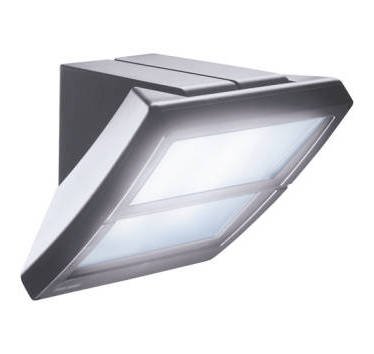
Figure 1: Gewiss GW82206 EXTRO 100W E27 Incandescent Fixture. This image shows the overall design of the lighting unit, including its housing and E27 bulb socket.
- Prepare for Installation: Turn off the main power supply to the installation area at the circuit breaker.
- Mount the Fixture: Securely attach the fixture's mounting bracket to the wall or ceiling using appropriate screws and anchors (not included, unless specified). Ensure the mounting surface can support the weight of the fixture.
- Wire the Fixture: Connect the electrical wires from the fixture to the corresponding wires from your electrical supply. Typically, this involves connecting live (L), neutral (N), and ground (GND) wires. Refer to local electrical codes for proper wiring procedures.
- Secure the Fixture Body: Once wiring is complete, carefully attach the main body of the fixture to the mounting bracket, ensuring all connections are secure and no wires are pinched.
- Install the Bulb: Screw an E27 incandescent bulb (max 100W) into the fixture's socket. Do not overtighten.
- Restore Power: Turn the main power supply back on at the circuit breaker.
- Test Operation: Activate the light switch to ensure the fixture is working correctly.
4. Operation
The Gewiss GW82206 EXTRO fixture operates via a standard wall switch connected to its electrical supply. Simply toggle the switch to turn the light on or off.
5. Maintenance and Care
- Cleaning: Disconnect power before cleaning. Wipe the fixture with a soft, dry cloth. Do not use abrasive cleaners or solvents, as they may damage the finish.
- Bulb Replacement:
- Turn off the power supply to the fixture.
- Allow the old bulb to cool completely before touching.
- Carefully unscrew the old bulb counter-clockwise.
- Screw in a new E27 incandescent bulb (max 100W) clockwise until snug. Do not overtighten.
- Restore power and test.
6. Troubleshooting
If you encounter issues with your fixture, refer to the table below:
| Problem | Possible Cause | Solution |
|---|---|---|
| Light does not turn on. | No power supply. Bulb is faulty or loose. Incorrect wiring. | Check circuit breaker. Replace or tighten bulb. Consult a qualified electrician to check wiring. |
| Light flickers. | Loose bulb. Loose wiring connection. Faulty bulb. | Tighten bulb. Consult a qualified electrician to check wiring. Replace bulb. |
| Bulb burns out quickly. | Incorrect wattage bulb. Poor ventilation. Voltage fluctuations. | Ensure bulb is 100W E27 or less. Ensure fixture is not enclosed in a way that traps heat. Consult an electrician to check household voltage. |
If problems persist, contact customer support.
7. Technical Specifications
- Brand: Gewiss
- Model Number: GW82206
- Bulb Type: E27 Incandescent (Max 100W)
- ASIN: B00AMHR3Q0
- Manufacturer: Gewiss
- Date First Available: April 19, 2022
- Discontinued by Manufacturer: No
8. Warranty Information
Gewiss products are manufactured to high-quality standards. This product is covered by a limited warranty against defects in materials and workmanship. The specific terms and duration of the warranty may vary by region. Please retain your proof of purchase for warranty claims. For detailed warranty information, please refer to the official Gewiss website or contact customer support.
9. Customer Support
If you have any questions, require technical assistance, or need to report a problem, please contact Gewiss customer support through their official website or the contact information provided with your purchase. Please have your model number (GW82206) and proof of purchase ready when contacting support.
Official Website: www.gewiss.com


