
Introduction
This manual provides detailed instructions for the safe and efficient operation of your Lauson CL139 Turntable. Please read this manual thoroughly before using the device to ensure proper function and to prevent damage. Keep this manual for future reference.
What's in the Box
Carefully unpack all items and ensure the following components are present:
- Lauson CL139 Turntable Unit
- Remote Control
- Integrated Amplifier
- Integrated Speakers
- Power Cable
- Instruction Manual (this document)
Product Features
The Lauson CL139 is a versatile audio system designed for various playback and recording needs:
- CD/MP3/USB/SD Player
- Belt-drive Turntable System with 33/45/78 RPM Speed Selector
- Integrated Amplifier and Speakers
- Output Power: 2 x 1.5 W RMS
- CD/USB/SD with 32 Programmable Memories
- Repeat Function: One, All, Random, Intro
- LCD Display with Blue Backlight
- Analog FM Radio
- Bass Boost Function
- Direct Recording (Encoding) from Vinyl/CD to USB/SD
- Direct Recording from USB to SD and vice versa
- Remote Control Included
Setup
- Unpacking: Remove the unit and all accessories from the packaging. Retain the packaging for future transport or storage.
- Placement: Place the unit on a stable, level surface away from direct sunlight, heat sources, and excessive dust or moisture. Ensure adequate ventilation around the unit.
- Power Connection: Connect the power cable to the AC inlet on the back of the unit and then to a standard wall outlet.
- External Audio Connection (Optional): If you wish to connect the unit to an external amplifier or speakers, use the appropriate audio output ports on the back of the unit. Refer to the external device's manual for connection details.
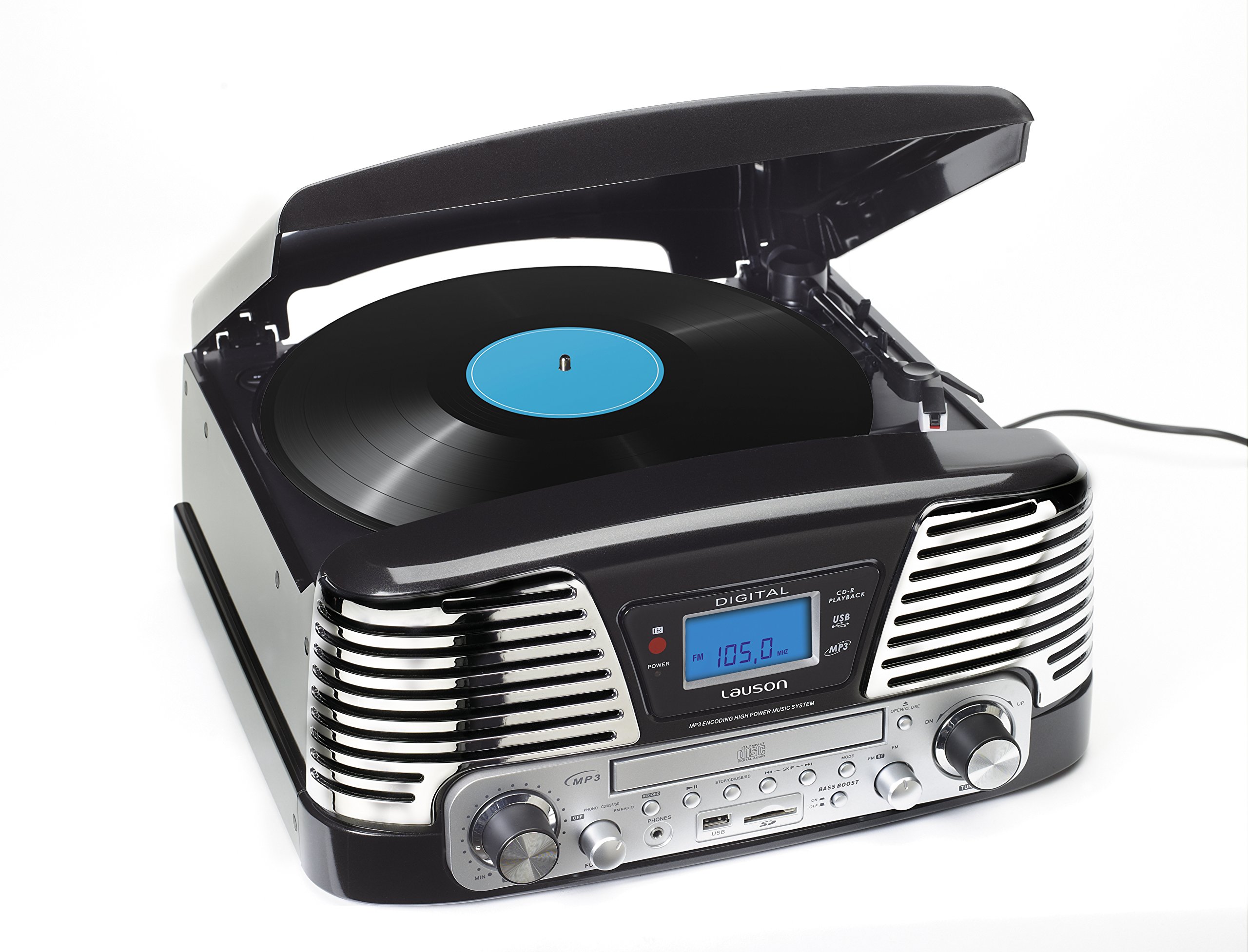
This image shows the Lauson CL139 multi-function turntable, featuring its main controls, record player, CD tray, and display panel.
Operating Instructions
Turntable Operation
- Power On: Press the Power button to turn on the unit.
- Select Mode: Use the Function/Mode button to select 'PHONO' mode.
- Place Record: Open the dust cover and carefully place a vinyl record on the turntable platter.
- Select Speed: Set the speed selector switch (33/45/78 RPM) to match the record's speed. For 45 RPM records, place the included adapter on the spindle.
- Start Playback: Gently lift the tonearm using the cueing lever and position the stylus over the desired track on the record. Lower the cueing lever to allow the stylus to descend onto the record.
- Adjust Volume: Use the Volume knob to adjust the sound level.
- End Playback: At the end of the record, the turntable may stop automatically. Manually lift the tonearm using the cueing lever and return it to the tonearm rest. Secure the tonearm with the clip.
CD/MP3 Playback
- Select Mode: Press the Function/Mode button to select 'CD' mode.
- Insert CD: Gently insert a CD into the CD slot with the label side facing up. The CD will load automatically.
- Playback: The CD will begin playing automatically. Use the Play/Pause, Skip Forward/Backward buttons to control playback.
- Repeat Function: Press the Repeat button to cycle through repeat options (e.g., repeat one track, repeat all tracks).
USB/SD Playback
- Select Mode: Press the Function/Mode button to select 'USB' or 'SD' mode.
- Insert Media: Insert a USB flash drive into the USB port or an SD card into the SD card slot.
- Playback: The unit will automatically detect and begin playing compatible audio files (MP3). Use the Play/Pause, Skip Forward/Backward buttons to control playback.
FM Radio Operation
- Select Mode: Press the Function/Mode button to select 'RADIO' mode.
- Tune Station: Use the tuning knob to manually search for desired FM radio stations.
- Antenna: Extend the FM wire antenna on the back of the unit for improved reception. Adjust its position for optimal signal.
Recording Function (Encoding)
The CL139 allows direct recording from vinyl records or CDs to a USB drive or SD card.
- Prepare Source: Select the desired source (PHONO or CD) and begin playback of the audio you wish to record.
- Insert Recording Media: Insert a USB drive or SD card into its respective slot. Ensure it has sufficient free space.
- Start Recording: Press the 'RECORD' button (usually indicated by a red dot or 'REC'). The recording indicator will illuminate.
- Stop Recording: Press the 'RECORD' button again to stop the recording. The recorded file will be saved to the USB drive or SD card.
- USB to SD / SD to USB Recording: To record between USB and SD, ensure both are inserted. Select the source (USB or SD) and then press the 'RECORD' button. The unit will prompt you to select the destination (the other media).
Maintenance
- Cleaning the Unit: Wipe the unit with a soft, dry cloth. Do not use abrasive cleaners, waxes, or solvents.
- Stylus Care: The stylus (needle) is a delicate component. Handle the tonearm with care. Clean the stylus periodically with a soft brush designed for stylus cleaning, brushing from back to front.
- Stylus Replacement: A worn stylus can damage records and degrade sound quality. Replace the stylus when sound quality deteriorates. Contact Lauson customer support for information on obtaining replacement styli.
- Dust Cover: Keep the dust cover closed when not in use to protect the turntable from dust.
Troubleshooting
| Problem | Possible Cause | Solution |
|---|---|---|
| No power | Power cable not connected; Power outlet not active | Ensure power cable is securely connected; Test outlet with another device |
| No sound | Volume too low; Incorrect mode selected; External speakers not connected/powered | Increase volume; Select correct source mode (PHONO, CD, USB, SD, RADIO); Check external speaker connections and power |
| Turntable skips records | Unit not on a stable surface; Record is warped or dirty; Stylus is worn or dirty | Place unit on a firm, level surface; Clean record; Clean or replace stylus |
| CD/USB/SD not playing | Incorrect media format; Media inserted incorrectly; Media is damaged | Ensure media contains compatible MP3 files; Reinsert media correctly; Try different media |
| Poor radio reception | FM antenna not extended or positioned correctly | Extend and adjust the FM wire antenna for better signal |
| Recording not working | USB/SD card full; Incorrect recording procedure; Media not compatible | Ensure USB/SD has free space; Follow recording steps carefully; Try different USB/SD media |
Specifications
| Feature | Detail |
|---|---|
| Brand | Lauson |
| Model | CL139 |
| Dimensions (L x W x H) | 380 x 350 x 180 mm (approx. 42.4 x 40.6 x 22.8 cm packaged) |
| Weight | 3 kg |
| Power Source | Electric with cable |
| Output Power | 2 x 1.5 W RMS |
| Turntable Speeds | 33, 45, 78 RPM |
| Motor Type | Belt Drive |
| Supported Media | CD, MP3, USB, SD Card, Vinyl Records |
| Radio Tuner | AM/FM Analog Radio |
| Connectivity | USB, SD Card Slot, Audio Output (for external amplifier/speakers) |
| Special Functions | Recording from Vinyl/CD to USB/SD, Bass Boost, 32 Programmable Memories |
| Included Components | Remote control, integrated amplifier, integrated speakers |
| Material | Plastic |
| Color | Black |
Warranty and Support
This product is covered by a manufacturer's warranty. For specific warranty terms and conditions, please refer to the documentation provided with your purchase or contact Lauson customer support. For technical assistance or service inquiries, please visit the official Lauson website or contact their customer service department.
