1. Introduction
This manual provides detailed instructions for the installation, programming, operation, and maintenance of your Schlage Z-Wave Connect Century Touchscreen Deadbolt. This keyless door lock integrates advanced security features with smart home connectivity, offering convenience and enhanced protection for your home.
The Schlage Touchscreen Deadbolt features a durable, fingerprint-resistant touchscreen and built-in alarm technology, providing Grade 1 residential security. It is designed to work with Z-Wave compatible home automation systems such as SmartThings, Wink, Iris, and Nexia, allowing for remote control and monitoring.
2. Product Overview

This image displays the complete Schlage Z-Wave Connect Century Touchscreen Deadbolt. On the left is the exterior unit featuring a bright chrome finish, a backlit touchscreen keypad for code entry, and a traditional keyhole. On the right is the interior unit, also in bright chrome, with a thumbturn for manual locking/unlocking and a battery cover.

The exterior component of the Schlage Z-Wave Connect Touchscreen Deadbolt is shown installed on a white door, providing a visual reference for its appearance when mounted. The touchscreen keypad is visible, blending with the door's aesthetic.
Key Features:
- ANSI Grade 1 Highest Residential Security: Certified for superior strength and durability.
- Durable Resistive Touchscreen: Features a matte finish to resist fingerprints and smudges, maintaining security.
- Strong Motorized Bolt: Automatically locks and unlocks upon user code entry.
- Built-in Alarm Technology: Senses door movement and alerts homeowners with an audible alarm.
- Anti-Pick Shield: Provides protection against lock tampering.
- Z-Wave Connectivity: Works with compatible smart home hubs (e.g., SmartThings, Wink, Iris, Nexia) for remote access and control.
- Voice Control Compatibility: Works with Alexa (hub required, sold separately).
- Operating Temperatures: Outside escutcheon: -35°C to 66°C; Inside escutcheon: -10°C to 49°C.
3. Installation
The Schlage Z-Wave Connect Touchscreen Deadbolt is designed for easy installation without the need for wiring. It is recommended to follow the detailed instructions provided in the packaging for your specific door type and configuration. Ensure proper alignment of all components for optimal performance.
For visual guidance, refer to official Schlage installation videos or guides available on the manufacturer's website.
4. Setup and Programming
4.1 Programming the Touchscreen

This image provides a guide for programming the touchscreen deadbolt. It details indicators like the Red X for programming problems, Green Check Mark for successful programming, and the Programming Indicator. It also lists programming descriptions for adding/deleting user codes, changing code length, enabling vacation mode, and disabling the beeper.
The default user codes are located on the back of the alarm assembly and on the back of this guide. To program new user codes or modify settings, follow the steps outlined in the programming guide. The touchscreen provides visual feedback (Red X for errors, Green Check Mark for success) during the programming process.
4.2 User Code Management
- Add User Code: User codes unlock the deadbolt. Codes can be 4-8 digits long. All codes must be unique.
- Delete User Code: Removes one user code at a time.
- Change Programming Code: Used to put the lock into Programming Mode. It is 6 digits long.
- Change User Code Length: Changes the default 4-digit user code length to 4-8 digits. This will delete all existing user codes.
4.3 Special Modes
- Enable Vacation Mode: Prevents all user codes from unlocking the deadbolt. Ideal for extended periods away from home.
- Disable Vacation Mode: Returns the lock to normal operation.
- Enable/Disable Beeper: The beeper can be turned off if desired. Beeps will still sound during programming.
- Enable/Disable Lock & Leave: When enabled, press the Outside Schlage Button to lock the deadbolt. When disabled, press the Outside Schlage Button and then enter a user code to lock the deadbolt.
- Auto-Lock: When enabled, the lock will automatically relock 30 seconds after unlocking (default setting).
5. Operating Instructions
5.1 Locking and Unlocking
- To Unlock: Enter a valid user code on the touchscreen. The motorized bolt will retract.
- To Lock: Press the Schlage button on the touchscreen. If Auto-Lock is enabled, the deadbolt will automatically extend after 30 seconds.
5.2 Built-in Alarm Technology
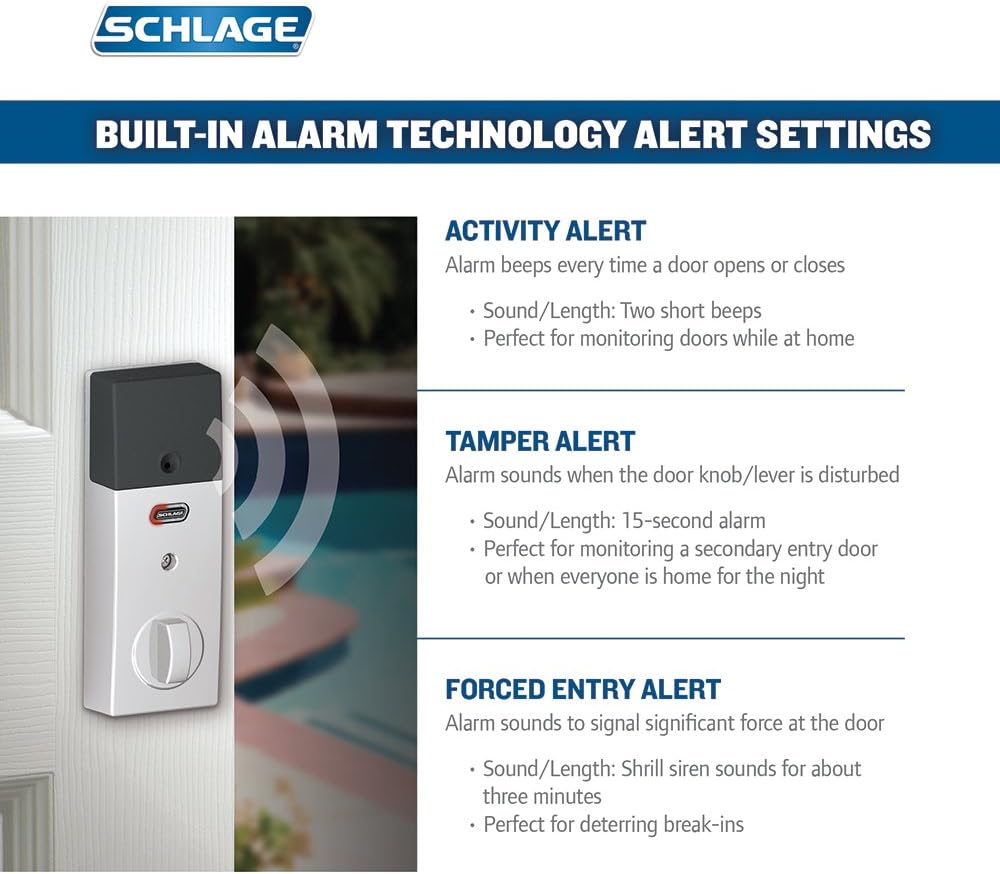
This diagram illustrates the three types of alerts provided by the built-in alarm technology: Activity Alert (two short beeps when door opens/closes), Tamper Alert (15-second alarm when door knob/lever is disturbed), and Forced Entry Alert (shrill siren for about three minutes upon significant force to the door).
The deadbolt features three distinct alarm modes to enhance security:
- Activity Alert: The alarm beeps twice every time the door opens or closes. Useful for monitoring door activity while at home.
- Tamper Alert: A 15-second alarm sounds if the door knob or lever is disturbed. Suitable for monitoring secondary entry points or when everyone is home for the night.
- Forced Entry Alert: A shrill siren sounds for approximately three minutes if significant force is applied to the door. Designed to deter break-ins.
Refer to the full programming guide for instructions on how to enable and configure these alarm settings.
6. Smart Home Integration

This image depicts a smartphone screen displaying an application for controlling the Schlage Touchscreen Deadbolt via Z-Wave technology. It highlights features such as remote lock/unlock, programming guest codes, receiving alerts, and monitoring door status, emphasizing the convenience of smart home integration.
The Schlage Z-Wave Connect Deadbolt is compatible with various Z-Wave certified smart home systems, including SmartThings, Wink, Iris, and Nexia. Integration with a compatible hub allows for:
- Remote locking and unlocking of your door.
- Programming and managing user codes from your smartphone.
- Receiving text alerts when specific codes are entered or when alarm triggers occur.
- Integration with other smart devices for comprehensive home automation.
To connect your deadbolt to a Z-Wave system, refer to the specific instructions provided by your smart home hub manufacturer for device pairing.
7. Maintenance
7.1 Battery Replacement
The deadbolt requires 4 AA batteries (included). The average battery life is approximately 8760 hours. Replace batteries when the low battery indicator appears on the touchscreen or when the lock's operation becomes sluggish. Use high-quality alkaline batteries for optimal performance.
7.2 Cleaning
Clean the touchscreen and exterior components with a soft, damp cloth. Avoid abrasive cleaners or solvents, as these can damage the finish and touchscreen functionality.
8. Troubleshooting
- Lock Not Responding: Check battery levels. Replace batteries if low. Ensure the lock is properly installed and all connections are secure.
- Programming Issues: If a Red X appears during programming, re-enter the programming code and try again. Ensure user codes are 4-8 digits and unique.
- Motorized Bolt Not Operating Smoothly: Check for any obstructions in the door frame or strike plate. Ensure the deadbolt is properly aligned.
- Z-Wave Connectivity Problems: Ensure your Z-Wave hub is within range and properly configured. Refer to your hub's instructions for device pairing and troubleshooting.
- Alarm Not Functioning: Verify that the alarm settings are correctly configured according to the programming guide.
If issues persist, consult the comprehensive troubleshooting guide available on the Schlage support website or contact customer support.
9. Specifications
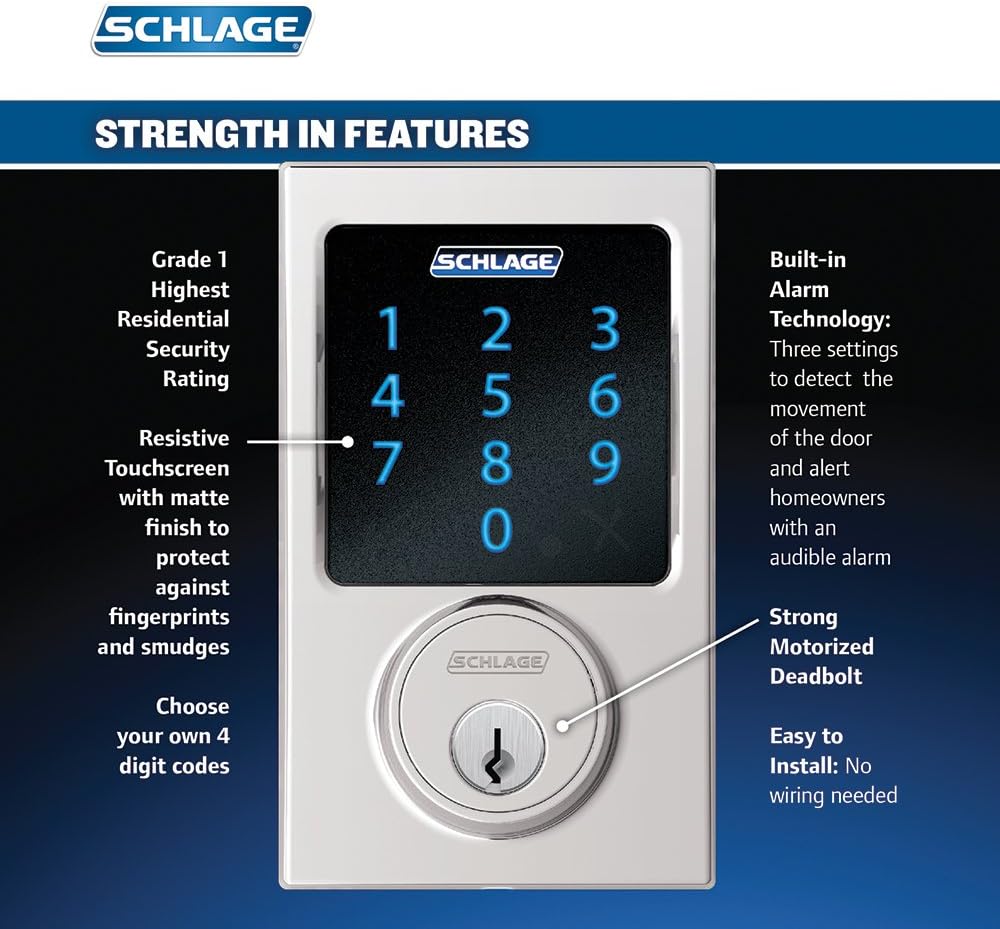
This graphic emphasizes the key features of the Schlage Touchscreen Deadbolt: ANSI Grade 1 Highest Residential Security Rating, a durable resistive touchscreen with a matte finish to prevent fingerprints, a strong motorized deadbolt, and built-in alarm technology with three settings to detect door movement and alert homeowners.
| Feature | Detail |
|---|---|
| Brand | SCHLAGE |
| Model Number | BE469NXCEN625 |
| Lock Type | Deadbolt |
| Special Features | Alarm, Keyless, Touchscreen |
| Material | Chrome |
| Finish Type | Bright Chrome |
| Color | Bright Chrome |
| Item Dimensions (L x W x H) | 4.5 x 5.13 x 9.25 inches |
| Item Weight | 3.8 Pounds |
| Connectivity Protocol | Z-Wave |
| Controller Type | Amazon Alexa, Nexia, SmartThings, Vera, Wink |
| Control Method | Voice |
| Batteries Required | 4 AA batteries (included) |
| Average Battery Life | 8760 Hours |
| UPC | 043156312313 |

This table compares various Schlage electronic deadbolt models, including the BE469 Touchscreen Deadbolt. It outlines differences in deadbolt throw (motorized vs. manual), presence of built-in alarm, Z-Wave connectivity, entry method (fingerprint-resistant touchscreen vs. wear-resistant buttons), ANSI grading, wiring requirements, and available styles.
10. Warranty and Support
10.1 Warranty Information
The Schlage Z-Wave Connect Century Touchscreen Deadbolt comes with a Lifetime Limited Mechanical & Finish Warranty and a 1-Year Warranty on electronics. For specific terms and conditions, please refer to the warranty documentation included with your product or visit the official Schlage website.
10.2 Customer Support
For technical assistance, troubleshooting, or warranty claims, please contact Schlage customer support. Contact information can typically be found on the manufacturer's website or in the product packaging.