
1. Introduction
The Xtreme Bluetooth Wireless Music Receiver allows you to wirelessly stream audio from your Bluetooth-enabled devices to any car or home stereo system with an auxiliary input. Enjoy your music without the need for direct cable connections.
Key Features:
- Bluetooth v2.0 A2DP for reliable wireless audio streaming.
- Wireless range up to 33 feet (10 meters).
- Converts any 3.5mm auxiliary input into a Bluetooth receiver.
- Rechargeable via included USB cable.
- Compatible with all Bluetooth-enabled devices (smartphones, tablets, etc.).
2. Package Contents
- Xtreme Bluetooth Wireless Music Receiver
- USB Charging Cable
3. Setup and Connection
3.1 Charging the Receiver
- Connect the small end of the included USB charging cable to the charging port on the Bluetooth receiver.
- Connect the larger end of the USB cable to a USB power source (e.g., computer USB port, USB wall adapter, car USB charger).
- The indicator light on the receiver will illuminate during charging and turn off when fully charged.
- Allow approximately 2-3 hours for a full charge.
3.2 Pairing with a Bluetooth Device
- Ensure the receiver is charged.
- Press and hold the multi-function button on the receiver until the indicator light flashes blue and red alternately. This indicates pairing mode.
- On your Bluetooth-enabled device (smartphone, tablet), go to the Bluetooth settings menu.
- Scan for available devices. You should see "Xtreme Receiver" or a similar name appear in the list.
- Select the receiver from the list to pair. Once paired, the indicator light on the receiver will flash blue slowly or remain solid blue.
- If prompted for a password, enter "0000".
3.3 Connecting to an Audio System
The Xtreme Bluetooth Wireless Music Receiver can be connected to any audio system with a 3.5mm auxiliary input.
3.3.1 Car Stereo Connection
- Locate the 3.5mm auxiliary input jack in your car stereo. This is often labeled "AUX".
- Plug the 3.5mm jack of the Bluetooth receiver directly into the car's auxiliary input.
- Set your car stereo's input source to AUX.
- Ensure your Bluetooth device is paired with the receiver.
- Play music on your Bluetooth device; audio will now stream through your car speakers.
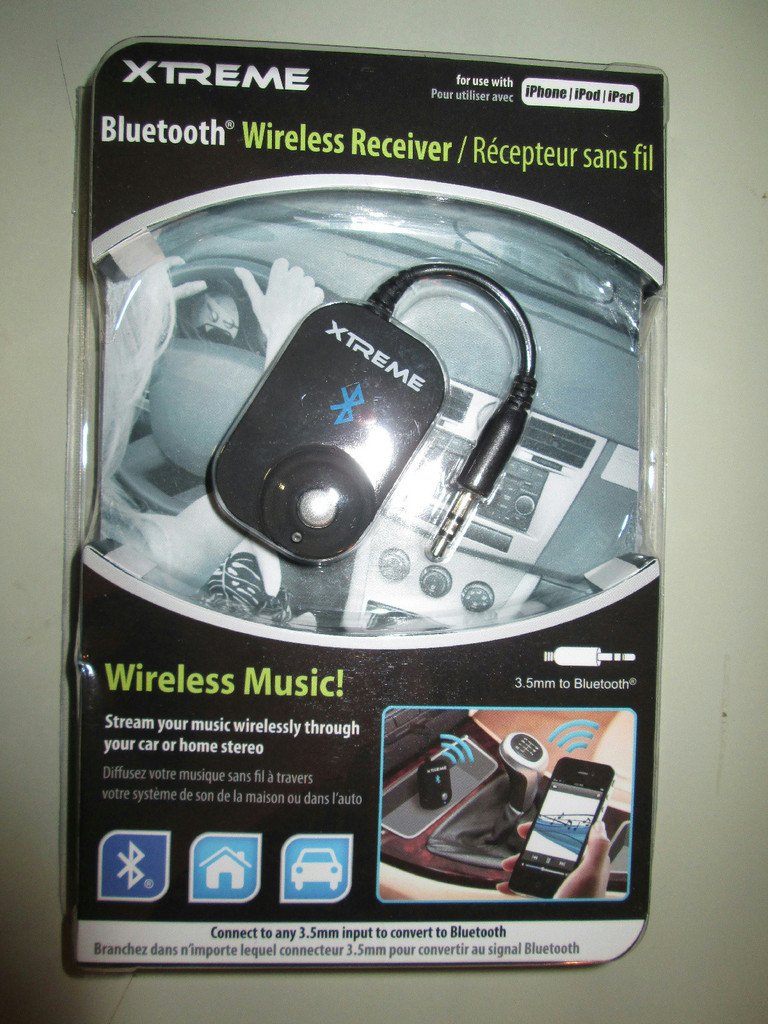
Image: The Xtreme Bluetooth Wireless Music Receiver plugged into a car's auxiliary port, with a smartphone wirelessly connected and playing music. This illustrates how to use the receiver in a vehicle.
3.3.2 Home Stereo Connection
- Locate the 3.5mm auxiliary input jack on your home stereo system, portable speaker, or headphones.
- Plug the 3.5mm jack of the Bluetooth receiver directly into the audio input.
- Set your audio system's input source to AUX.
- Ensure your Bluetooth device is paired with the receiver.
- Play music on your Bluetooth device; audio will now stream through your home stereo or speakers.
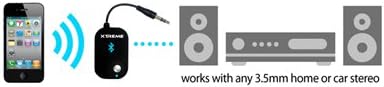
Image: A visual representation of a smartphone transmitting audio wirelessly to the Xtreme Bluetooth receiver, which is then connected via its 3.5mm jack to a home stereo system, enabling wireless audio playback.
4. Operating Instructions
4.1 Power On/Off
- Power On: Press and hold the multi-function button for approximately 3 seconds until the blue indicator light flashes.
- Power Off: Press and hold the multi-function button for approximately 5 seconds until the red indicator light flashes briefly, then turns off.
4.2 Playing Music
- Once paired and connected to an audio system, simply start playing music on your Bluetooth-enabled device.
- The audio will automatically stream through the connected stereo system.
- Control music playback (play/pause, skip tracks, volume) directly from your paired Bluetooth device.
5. Maintenance
- Keep the device dry. Moisture can damage internal circuits.
- Do not expose to extreme temperatures.
- Clean the device with a soft, dry cloth. Avoid harsh chemicals or abrasive cleaners.
- Store in a cool, dry place when not in use for extended periods.
6. Troubleshooting
| Problem | Possible Solution |
|---|---|
| Device will not power on. | Ensure the device is fully charged. Connect it to a USB power source using the provided cable. |
| Cannot pair with my Bluetooth device. |
|
| No sound after pairing and connecting. |
|
| Poor audio quality or intermittent connection. |
|
7. Specifications
| Brand | XTREME |
| Model Number | B00AFYYRL4 |
| Connectivity Technology | Bluetooth, USB |
| Bluetooth Version | v2.0 A2DP |
| Wireless Range | Up to 33 feet (10 meters) |
| Power Source | USB Cable (Rechargeable) |
| Audio Output Type | 3.5mm Headphone/Speaker Jack |
| Item Weight | 1.6 ounces |
| Color | Black |
| Compatible Devices | Smartphones, Tablets, and other Bluetooth-enabled audio source devices. |
8. Warranty and Support
For warranty information and customer support, please refer to the documentation included with your purchase or contact Xtreme customer service directly. Details are typically available on the manufacturer's official website.
Manufacturer: Xtreme
