
1. Introduction
This manual provides essential information for the safe and correct installation, operation, and maintenance of your Porter Cable 879182 Replacement Power Cord. Please read these instructions thoroughly before proceeding with any installation or use to ensure proper function and safety.
2. Safety Information
Always observe basic safety precautions when working with electrical components. Failure to follow these instructions may result in electric shock, fire, or serious injury.
- Disconnect Power: Always ensure the power tool is disconnected from its power source before attempting any installation or maintenance.
- Qualified Personnel: Installation should ideally be performed by a qualified technician or individuals with experience in electrical wiring.
- Inspect Components: Before installation, inspect the new cord for any signs of damage, such as cuts, frayed wires, or bent prongs. Do not use if damaged.
- Proper Wiring: Ensure all wire connections are secure and correctly matched (ground to ground, neutral to neutral, hot to hot).
- Strain Relief: Properly secure the cord's strain relief to prevent tension on the internal wiring connections.
3. Package Contents
Verify that all items are present upon opening the package:
- 1 x Porter Cable 879182 Replacement Power Cord
4. Compatibility
The Porter Cable 879182 Replacement Power Cord is compatible with a wide range of Porter Cable power tools, including but not limited to the following models:
- 314 Type 1, 314 Type 2, 314 Type 3, 314 Type 4, 314 Type 5, 314 Type 6
- 314H Type 1
- 7724 Type 1, 7724 Type 2, 7724 Type 3
- PC7723 Type 1, PC7723 Type 2, PC7723 Type 3
- 100 Type 1, 100 Type 2, 100 Type 3
- 690 Type ALL TYPES
- 9690 Type ALL TYPES
- J-630 Type ALL TYPES
- 330 Type 1
- 352 Type 2, 352 Type 3
- 352VS Type 2, 352VS Type 3
- 505H Type 1, 505H Type 2, 505H Type 3
- 8505 Type 1, 8505 Type 2, 8505 Type 3
- J-351 Type 2, J-351 Type 3
- 6302 Type 4
- 6902 Type 5, 6902 Type 6
- PC1002 Type 1, PC1002 Type 2, PC1002 Type 3
5. Setup and Installation
Follow these general steps to replace the power cord on your compatible Porter Cable tool. Specific tool disassembly may vary.
- Disconnect Power: Ensure the tool is unplugged from any power source.
- Access Wiring: Carefully open the tool's housing or handle to access the internal wiring connections where the power cord attaches.
- Note Wiring Configuration: Before disconnecting, observe and make a note of how the existing wires are connected (e.g., green to ground, white to neutral, black to hot). Taking a photograph can be helpful.
- Remove Old Cord: Disconnect the old power cord's wires from the tool's terminals. Remove the old cord, including its strain relief. Note: You may need to reuse the strain relief from the old cord as the replacement cord may not include one.
- Install New Cord: Route the new 879182 power cord into the tool's housing. Connect the new cord's wires to the corresponding terminals based on your previous observation. Ensure connections are tight and secure.
- Secure Strain Relief: Install and secure the strain relief around the new cord where it enters the tool's housing. This prevents the cord from being pulled out and protects the internal connections.
- Reassemble Tool: Carefully reassemble the tool's housing, ensuring no wires are pinched.
- Test Functionality: Plug the tool into a power outlet and perform a brief test to ensure it operates correctly.
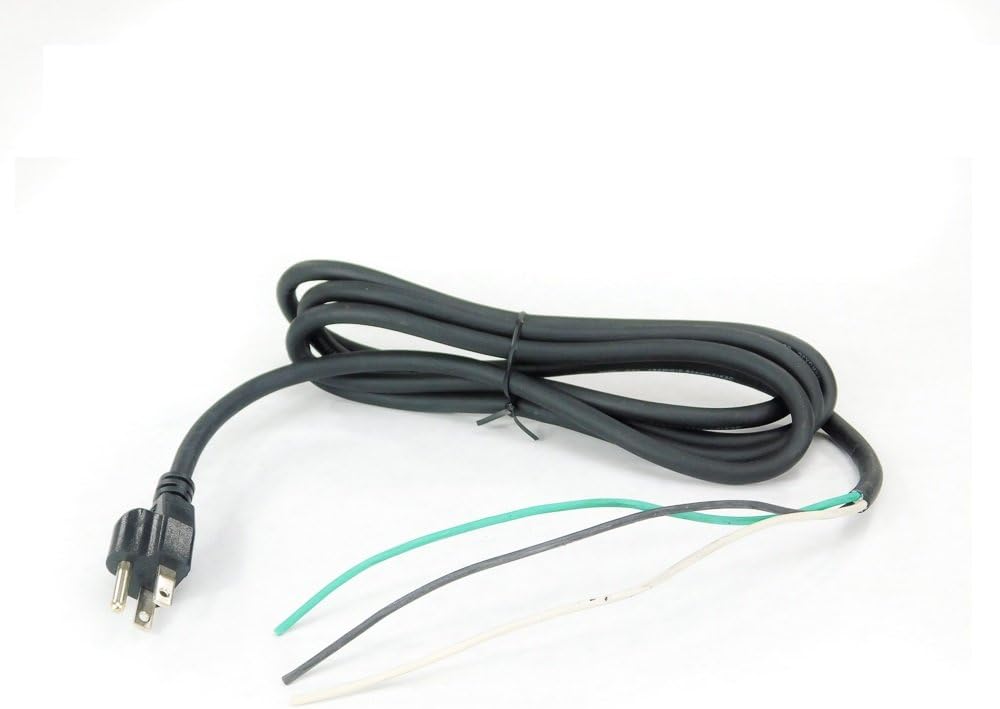
Figure 1: Porter Cable 879182 Replacement Power Cord. This image displays the black, coiled power cord with a standard three-prong Type A male plug on one end. The other end shows three exposed wires: green (ground), white (neutral), and black (hot), prepared for connection to a power tool.
6. Operating
Once the replacement power cord is correctly installed, operate your power tool according to its original instruction manual. Ensure the cord is not kinked, twisted, or placed under excessive strain during use. Always keep the cord away from heat, oil, sharp edges, and moving parts.
7. Maintenance
Regular maintenance of your power cord helps ensure safety and extends its lifespan:
- Inspect Regularly: Periodically check the entire length of the cord for any signs of damage, such as cuts, abrasions, or exposed wires. Pay close attention to the areas near the plug and where the cord enters the tool.
- Proper Storage: When not in use, coil the cord loosely. Avoid tight coiling or wrapping the cord around the tool, which can cause internal wire damage.
- Cleanliness: Keep the cord clean and free from grease, oil, and chemicals that can degrade the insulation material.
- Avoid Overloading: Do not use the cord with tools or applications that exceed its specified wattage or current rating.
8. Troubleshooting
If you encounter issues after installing the replacement cord, consider the following:
- Tool Not Powering On:
- Verify the power outlet is functional.
- Check all wire connections within the tool to ensure they are secure and correctly matched.
- Ensure the tool's power switch is in the 'ON' position.
- Intermittent Power:
- This could indicate a loose connection. Disconnect power and re-check all wiring terminals.
- Inspect the cord for internal breaks, especially if it has been subjected to sharp bends or impacts.
If problems persist after troubleshooting, consult a qualified technician or contact Porter Cable customer support.
9. Specifications
| Attribute | Detail |
|---|---|
| Part Number | 879182 |
| Manufacturer | Porter Cable |
| Item Weight | 7.5 ounces (0.47 Pounds) |
| Product Dimensions | 2.5 x 2.5 x 9 inches |
| Material | Plastic |
| Wattage | 90 watts |
| Plug Format | Type A |
| Color | Black |
| Connector Gender | Male-to-Female |
10. Warranty and Support
For information regarding product warranty or technical support, please refer to the official Porter Cable website or contact their customer service department directly. Keep your purchase receipt as proof of purchase.
