Introduction
This manual provides essential information for the safe and efficient operation of your Vivitar QC902 AC/DC Rapid Charger. Please read this manual thoroughly before using the device and retain it for future reference. This charger is designed to efficiently charge high-capacity rechargeable batteries, offering both AC (wall outlet) and DC (car cigarette lighter) charging capabilities.
Product Overview
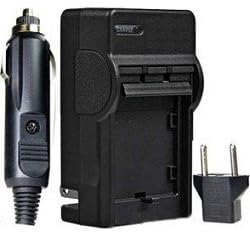
Figure 1: The Vivitar QC902 AC/DC Rapid Charger components. Shown are the main charger unit, the DC car adapter, and the AC wall plug adapter. The main charger unit features a slot for the battery and an LED indicator.
The Vivitar QC902 is a versatile battery charger featuring a compact and lightweight design. It supports charging from standard AC power outlets (110/220V) and DC car cigarette lighters. Key features include rapid charging, automatic battery voltage detection, and an LED indicator for charging status.
Package Contents:
- Vivitar QC902 Rapid Charger Unit
- AC Wall Plug Adapter
- DC Car Charger Adapter
- Instruction Manual (this document)
Setup
Before first use, ensure all components are present and undamaged. The charger is designed for specific battery types, such as the Canon NB-6L or equivalent. Verify battery compatibility before proceeding.
Connecting to Power:
- For AC Wall Outlet Charging:
- Locate the foldable AC prongs on the back of the charger unit.
- Flip out the prongs and plug the charger directly into a standard 110V/220V AC wall outlet.
- For DC Car Charging:
- Connect the DC car charger adapter cable into the designated port on the side of the main charger unit.
- Insert the other end of the DC car charger adapter into your vehicle's 12V cigarette lighter socket.
Operating Instructions
Follow these steps to charge your battery using the Vivitar QC902 Rapid Charger:
- Insert Battery: Carefully insert your compatible rechargeable battery into the charging slot on the main charger unit. Ensure the battery is oriented correctly according to the polarity indicators on the charger.
- Connect Power: Connect the charger to either an AC wall outlet or a DC car cigarette lighter as described in the "Setup" section.
- Monitor Charging: The LED indicator on the charger will illuminate red to indicate that charging is in progress. The charger automatically detects battery voltage and manages the charging process.
- Charging Complete: Once the battery is fully charged, the LED indicator will turn green.
- Remove Battery: Disconnect the charger from the power source, then carefully remove the fully charged battery from the charging slot.
Note: Charging time is approximately 1 hour for most compatible batteries, but may vary depending on battery capacity and discharge level.
Maintenance
Proper maintenance ensures the longevity and optimal performance of your Vivitar QC902 Rapid Charger.
- Cleaning: Disconnect the charger from all power sources before cleaning. Use a soft, dry cloth to wipe the exterior of the charger. Do not use liquid cleaners or solvents.
- Storage: Store the charger in a cool, dry place away from direct sunlight and extreme temperatures. When not in use, it is recommended to disconnect it from the power source.
- Handling: Avoid dropping the charger or subjecting it to strong impacts. Do not attempt to disassemble the charger, as this will void the warranty and may cause damage.
Troubleshooting
If you encounter issues with your Vivitar QC902 Rapid Charger, refer to the following common problems and solutions:
| Problem | Possible Cause | Solution |
|---|---|---|
| LED indicator does not light up. | No power supply; charger not properly connected; faulty power outlet. | Ensure charger is securely plugged into a working power outlet or car socket. Try a different outlet. |
| LED indicator remains green when battery is inserted. | Battery is already fully charged; battery is not inserted correctly; battery is incompatible or faulty. | Verify battery insertion. Ensure battery is compatible. Test with a different, discharged battery if available. |
| Battery does not charge or charges slowly. | Battery is faulty or at end of life; incorrect battery type; charger malfunction. | Ensure battery is compatible and in good condition. If issues persist, contact customer support. |
If the problem persists after attempting these solutions, please contact Vivitar customer support for further assistance.
Specifications
- Model: VIV-QC-902
- Input Voltage: AC 110-240V, 50-60Hz; DC 12V (Car Adapter)
- Output: Automatically detects battery voltage
- Charging Time: Approximately 1 hour (varies by battery capacity)
- LED Indicator: Red (Charging), Green (Fully Charged)
- Dimensions: 5.1 x 4.2 x 1.6 inches (Package Dimensions)
- Weight: 3.2 ounces
- Compatible Batteries: Designed for Canon NB-6L battery or equivalent
Warranty and Support
The Vivitar QC902 AC/DC Rapid Charger comes with a 1-Year Manufacturer Warranty from the date of purchase. This warranty covers defects in materials and workmanship under normal use.
The warranty does not cover damage caused by misuse, accident, unauthorized modification, or improper operation. Please retain your proof of purchase for warranty claims.
Customer Support:
For technical support, warranty claims, or further inquiries, please visit the official Vivitar website or contact their customer service department. Refer to the product packaging or Vivitar's official website for the most current contact information.
Disclaimer: Specifications are subject to change without notice. Vivitar is not responsible for any damage or loss caused by improper use of this product.


