
Schneider Electric CAD32G7
Telemecanique CAD32G7 Control Relay User Manual
Model: CAD32G7 | Brand: Schneider Electric
1. Introduction
This manual provides essential information for the safe and effective installation, operation, and maintenance of the Telemecanique CAD32G7 Control Relay. Please read this manual thoroughly before using the product to ensure proper functionality and to prevent potential hazards.
2. Safety Information
Always observe the following safety precautions:
- Installation and maintenance should only be performed by qualified personnel.
- Disconnect all power sources before working on the relay or associated circuitry.
- Ensure proper grounding to prevent electrical shock.
- Verify correct voltage and current ratings before connecting the relay.
- Do not operate the relay in environments exceeding its specified temperature or humidity limits.
- Use appropriate personal protective equipment (PPE) during installation and maintenance.
3. Product Description and Features
The Telemecanique CAD32G7 is an IEC Control Relay designed for industrial electrical applications. It features a robust construction and reliable performance for controlling various electrical circuits.
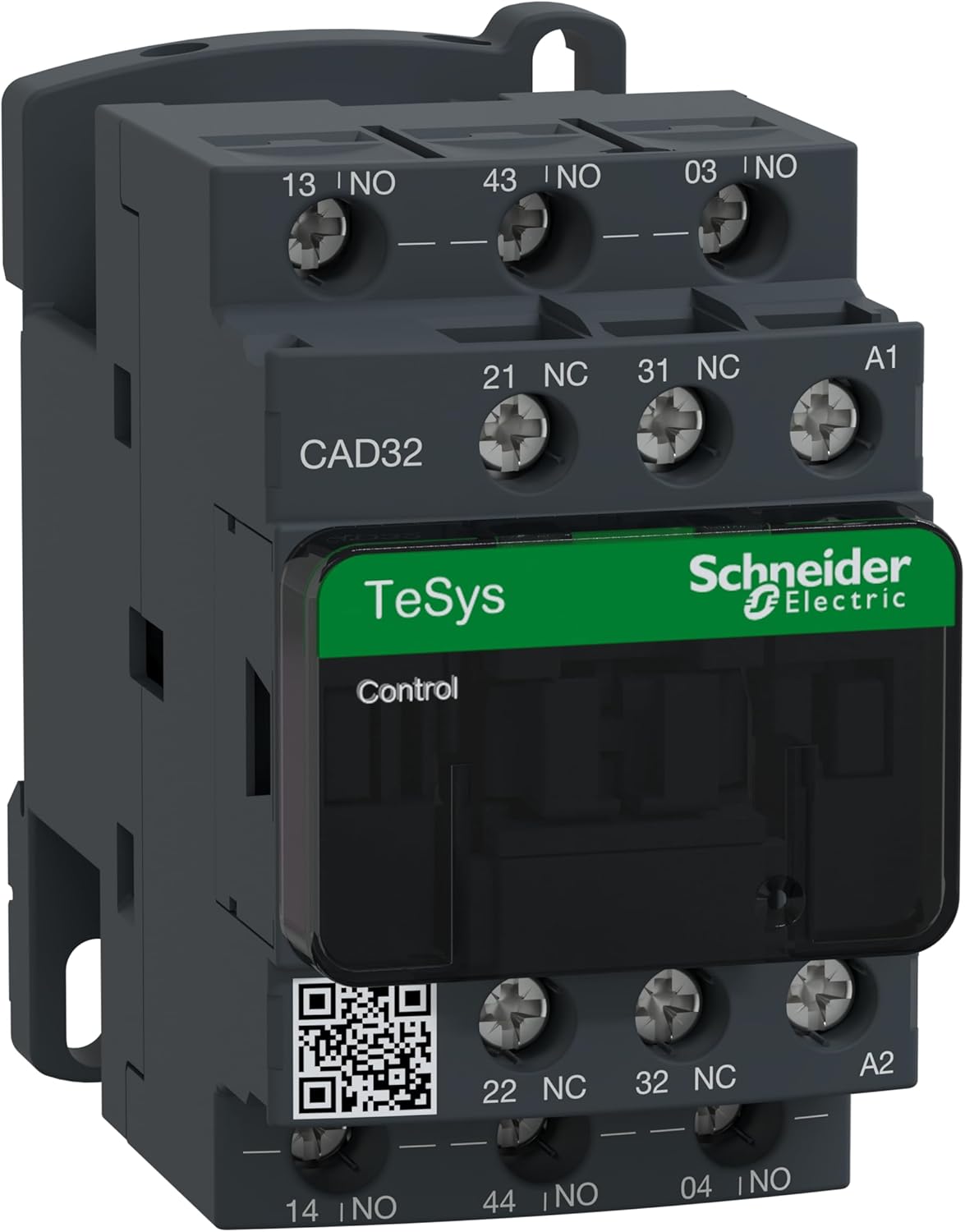
Figure 3.1: Telemecanique CAD32G7 Control Relay. A detailed view of the Telemecanique CAD32G7 control relay, showing its terminals, model number CAD32, TeSys branding, and Schneider Electric logo. The terminals are labeled with numbers and functions (NO for Normally Open, NC for Normally Closed), and coil terminals A1 and A2 are visible.
Key Features:
- IEC Control Relay standard compliance.
- 5-Pole configuration: 3 Normally Open (N.O.) and 2 Normally Closed (N.C.) contacts.
- Rated Voltage: 600V AC at 60 Hz.
- Rated Current: 10 Amps at 600 VAC.
- Coil Voltage: 120V AC at 50/60Hz.
- Mounting: Designed for 35mm DIN Rail installation.
- Terminal Type: Screw Clamp for secure wiring.
- Contacts: Serrated for improved reliability.
- Mechanical Operations: Rated for 30,000,000 mechanical operations.
- Auxiliary Contact Block Mounting: Supports Front Snap-On or Side Snap-On auxiliary contact blocks.
4. Setup and Installation
Follow these steps for proper installation of the CAD32G7 Control Relay:
- Power Disconnection: Ensure all power to the installation area is disconnected and locked out before beginning any work.
- Mounting: The CAD32G7 is designed for mounting on a standard 35mm DIN rail. Align the relay with the DIN rail and press firmly until it clicks into place. Ensure it is securely fastened.
- Wiring Connections:
- Coil Connections (A1, A2): Connect the 120V AC 50/60Hz control voltage to the A1 and A2 screw clamp terminals. Refer to the product labeling for exact terminal locations.
- Contact Connections (NO, NC): Connect the load circuits to the appropriate Normally Open (NO) and Normally Closed (NC) contacts using the screw clamp terminals. The relay has 3 NO and 2 NC contacts. Ensure correct wiring based on your application's schematic.
- Auxiliary Contacts (Optional): If using auxiliary contact blocks, snap them onto the front or side of the relay as per their design. Wire these auxiliary contacts as required by your control system.
- Terminal Tightening: Use an appropriate screwdriver to tighten all screw clamp terminals securely. Do not overtighten, as this can damage the terminals. Refer to the product specifications for recommended torque values if available.
- Verification: Before restoring power, visually inspect all connections to ensure they are correct and secure.
5. Operating Instructions
The CAD32G7 control relay operates by energizing its coil, which in turn changes the state of its contacts.
- Energizing the Coil: When the specified coil voltage (120V AC 50/60Hz) is applied across terminals A1 and A2, the relay coil becomes energized.
- Contact Operation:
- Normally Open (NO) contacts will close, completing the circuit.
- Normally Closed (NC) contacts will open, breaking the circuit.
- De-energizing the Coil: When the coil voltage is removed, the relay coil de-energizes, and the contacts return to their normal (unenergized) state.
Ensure that the control circuit providing power to the coil is properly designed and protected according to electrical standards.
6. Maintenance
Regular maintenance helps ensure the longevity and reliable operation of the CAD32G7 Control Relay.
- Inspection: Periodically inspect the relay for any signs of physical damage, discoloration due to overheating, or loose connections.
- Cleaning: If necessary, gently clean the exterior of the relay with a dry, lint-free cloth. Do not use solvents or abrasive cleaners. Ensure power is disconnected before cleaning.
- Terminal Check: Re-check the tightness of all screw clamp terminals annually or as part of a routine maintenance schedule to prevent loose connections, which can lead to overheating or intermittent operation.
- Environmental Conditions: Ensure the operating environment remains within the specified temperature and humidity ranges to prevent premature wear or failure.
7. Troubleshooting
This section provides guidance for common issues encountered with the CAD32G7 Control Relay.
| Problem | Possible Cause | Solution |
|---|---|---|
| Relay coil does not energize. | No control voltage to A1/A2 terminals, incorrect voltage, open circuit in coil, damaged coil. | Verify 120V AC 50/60Hz at A1/A2. Check wiring for breaks. Test coil resistance (if possible, with power off). Replace relay if coil is faulty. |
| Contacts do not switch. | Coil not energizing (see above), contacts welded/stuck, mechanical obstruction, excessive load. | Ensure coil energizes. Inspect contacts for damage. Verify load current is within relay ratings. Replace relay if contacts are faulty. |
| Relay makes humming noise. | Loose laminations, insufficient coil voltage, foreign object. | Check coil voltage. Inspect for foreign objects. If humming persists and affects operation, consider replacement. |
| Overheating/Discoloration. | Loose terminal connections, excessive current through contacts, incorrect coil voltage, poor ventilation. | Tighten all terminals. Verify load current is within specifications. Ensure proper coil voltage. Improve ventilation around the relay. |
If troubleshooting steps do not resolve the issue, contact Schneider Electric technical support or a qualified electrician.
8. Specifications
| Attribute | Value |
|---|---|
| Model Number | CAD32G7 |
| Product Dimensions | 4.37 x 3.62 x 2.01 inches |
| Item Weight | 12.4 ounces |
| Manufacturer | Schneider Electric |
| ASIN | B00AAGKW66 |
| National Stock Number | 5945-01-565-0989 |
| Date First Available | February 14, 2012 |
| Contact Configuration | 5-Pole (3 N.O., 2 N.C.) |
| Rated Voltage | 600V AC @ 60 Hz |
| Rated Current | 10 Amps @ 600 VAC |
| Coil Voltage | 120V AC @ 50/60Hz |
| Mounting Type | 35mm DIN Rail |
| Terminal Type | Screw Clamp |
| Mechanical Durability | 30,000,000 operations |
9. Warranty and Support
For information regarding the warranty of your Telemecanique CAD32G7 Control Relay, please refer to the official warranty documentation provided by Schneider Electric at the time of purchase or visit the official Schneider Electric website.
For technical support, product inquiries, or service, please contact Schneider Electric directly. You can find contact information and additional resources on their official website or through their Amazon Brand Store.
Ask a question about this manual
Ask about setup, troubleshooting, compatibility, parts, safety, or missing instructions. Manuals+ will review the question and use this page’s manual context to help answer it.