
Important Safety Information
Before beginning any installation or maintenance, please read and understand all safety instructions. Failure to follow these instructions may result in electric shock, fire, or personal injury.
- ALWAYS disconnect power to the range/oven at the circuit breaker or fuse box before servicing.
- Wear appropriate personal protective equipment, such as gloves and safety glasses.
- Ensure the work area is well-lit and clear of obstructions.
- If you are unsure about any step, consult a qualified appliance technician.
- This bake element is UL Certified, ensuring it meets specific safety standards.
Product Overview
The ERP B5103 is a replacement bake element designed for various range models. It is constructed from solid material and is UL Certified for safety and performance.
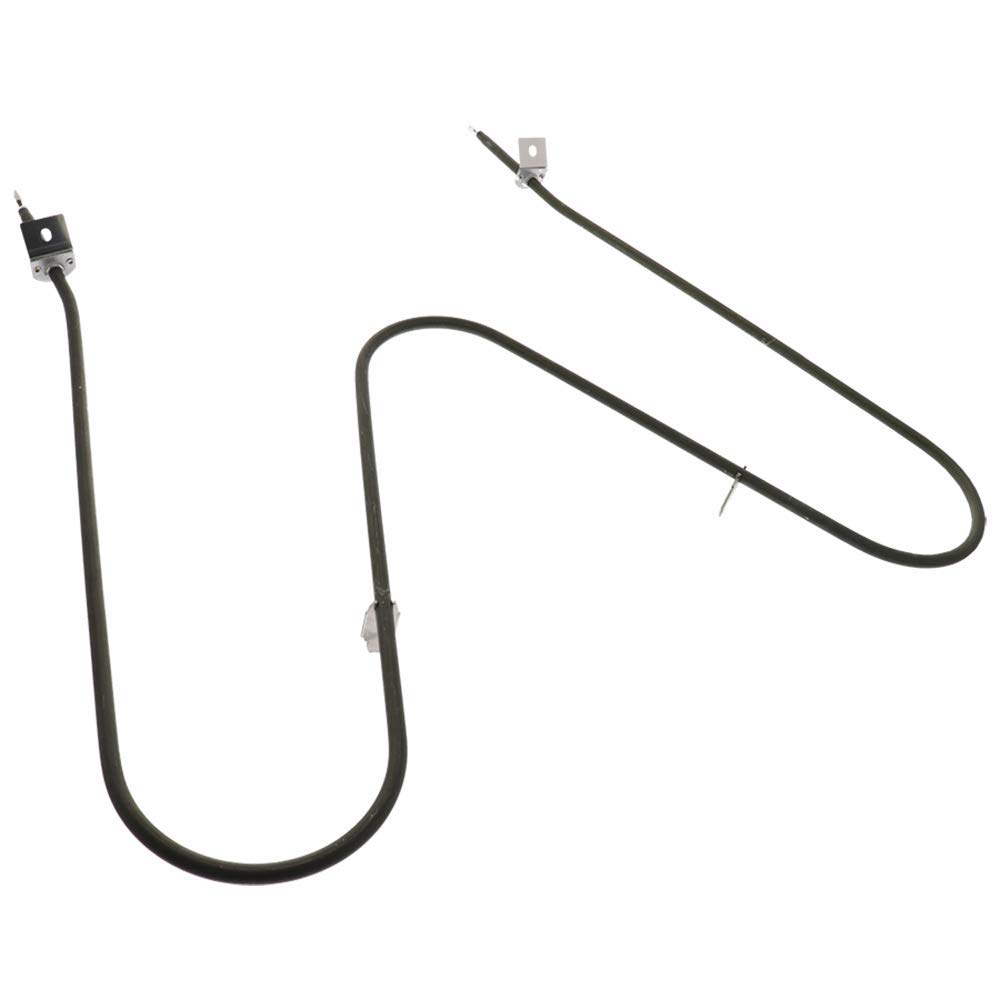
Image: The ERP B5103 Range Bake Element, a U-shaped heating component with electrical terminals at each end.
This element is a direct replacement for several part numbers, including 316075100, 316075102, 316075103, 316075104, 3203534, 501200, CH5103, CH5104, and CH6078. Always verify compatibility with your appliance's model number before installation.
Setup and Installation
Tools Required:
- Screwdriver (Phillips or flathead, depending on oven screws)
- Pliers (optional, for stubborn connections)
- Work gloves
- Flashlight (optional)
Installation Steps:
- Disconnect Power: Locate your home's circuit breaker panel and turn off the power to the range/oven. Verify that the power is off by attempting to turn on the oven light or controls.
- Access the Oven Interior: Open the oven door. Remove any oven racks to provide clear access to the bake element.
- Remove Old Element:
- Locate the screws holding the existing bake element in place, typically at the back of the oven cavity. Unscrew these fasteners.
- Carefully pull the element forward a few inches. This will expose the electrical terminals.
- Disconnect the two electrical wires from the terminals of the old element. It is recommended to attach the wires to the new element one at a time to prevent them from retracting into the oven wall. If a wire retracts, it may be necessary to remove the back panel of the oven to retrieve it.
- Install New Element:
- Connect the electrical wires to the terminals of the new ERP B5103 bake element. Ensure connections are secure.
- Slide the new element into position, aligning the mounting brackets with the screw holes at the back of the oven.
- Secure the element with the screws removed in step 3. Do not overtighten.
- Restore Power and Test: Replace oven racks. Close the oven door. Restore power to the range/oven at the circuit breaker. Turn on the oven to a bake setting and observe the new element. It should begin to glow red, indicating proper function.

Image: The ERP B5103 Bake Element showing approximate dimensions for compatibility verification: 18-1/2 inches in length, 19-1/4 inches in width, and 3-3/8 inches from mounting bracket to terminal.
Operating Instructions
Once installed, the ERP B5103 bake element operates automatically as part of your oven's heating system. When the oven is set to a bake function, the element will heat up to the desired temperature, maintaining it throughout the cooking cycle. The element may cycle on and off to regulate temperature, which is normal operation.
First Use:
During the first use after installation, a slight odor or small amount of smoke may be observed. This is normal and is typically due to protective coatings burning off the new element. Ensure adequate ventilation during the first few uses until any odor dissipates.
Maintenance
The ERP B5103 bake element requires minimal maintenance. Regular cleaning of the oven cavity will help prolong the life of all oven components, including the element.
- Cleaning: Do not attempt to clean the bake element directly with abrasive cleaners or sharp objects. If food spills onto the element, it will typically burn off during normal oven operation. For stubborn residue, ensure the oven is cool and power is disconnected, then gently wipe with a damp cloth.
- Inspection: Periodically inspect the element for any visible damage, such as cracks or severe discoloration. If damage is observed, disconnect power and replace the element.
Troubleshooting
If your oven is not heating correctly after installing the ERP B5103 bake element, consider the following:
- Element Not Glowing: Ensure power is fully restored to the oven at the circuit breaker. Check that the electrical connections to the element terminals are secure and properly seated.
- Oven Not Reaching Temperature: Verify that the oven controls are set correctly. If the element glows but the oven does not reach the set temperature, there may be an issue with the oven's thermostat or temperature sensor, not the element itself.
- Tripping Circuit Breaker: If the circuit breaker trips immediately after installation or during operation, disconnect power and inspect the element and wiring for any signs of shorting or damage. Ensure no wires are pinched or touching metal surfaces.
If troubleshooting steps do not resolve the issue, it is recommended to contact a qualified appliance repair technician.
Specifications
| Feature | Detail |
|---|---|
| Model Number | B5103 |
| Brand | ERP (Exact Replacements) |
| Material | Solid |
| Item Weight | 0.75 Pounds |
| Certifications | UL Certified |
| Replaces Part Numbers | 316075100, 316075102, 316075103, 316075104, 3203534, 501200, CH5103, CH5104, CH6078 |
Warranty Information
The ERP B5103 Range Bake Element comes with a one-year warranty. For specific warranty details, claims, or support, please contact the manufacturer directly. Keep your proof of purchase for warranty validation.
Customer Support
For further assistance, technical questions, or to report an issue, please contact ERP customer support. Refer to the packaging or the manufacturer's official website for the most current contact information.