
1. Introduction
This manual provides comprehensive instructions for the setup, operation, and maintenance of your Hughes HRMC-11 DirecTV Remote Control. Designed for ease of use, this infrared remote allows you to control your DirecTV satellite receiver efficiently. Please read this manual thoroughly to ensure proper use and to maximize your viewing experience.
2. Product Overview
The Hughes HRMC-11 remote control features a standard layout for intuitive navigation of your DirecTV system. Familiarize yourself with the key buttons and their functions:
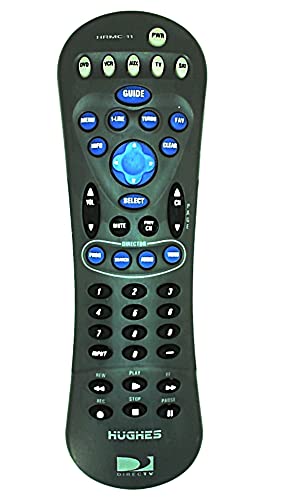
Figure 1: Front view of the Hughes HRMC-11 DirecTV Remote Control. This image displays the ergonomic design and button layout.
- POWER: Turns the DirecTV receiver on or off.
- SELECT/OK: Confirms selections or enters menus.
- GUIDE: Displays the program guide.
- MENU: Accesses the main menu.
- CHANNEL +/-: Changes channels up or down.
- VOLUME +/-: Adjusts the volume.
- MUTE: Silences the audio.
- ARROW BUTTONS (Up, Down, Left, Right): Navigates through menus and guides.
- NUMBER PAD (0-9): Directly enters channel numbers.
- RECORD: Initiates recording of the current program.
- PLAY/PAUSE, STOP, REW, FF: Controls playback of recorded content.
3. Setup
3.1 Battery Installation
- Locate the battery compartment cover on the back of the remote control.
- Slide the cover downwards or press the latch and lift to open.
- Insert two (2) AAA batteries (not included), ensuring the positive (+) and negative (-) terminals align with the indicators inside the compartment.
- Replace the battery compartment cover by sliding it back into place until it clicks securely.
3.2 Initial Programming (DirecTV Receiver)
The Hughes HRMC-11 remote control is typically pre-programmed to operate most DirecTV satellite receivers. For initial setup, ensure your DirecTV receiver is powered on and the remote has fresh batteries.
- Point the remote directly at your DirecTV receiver.
- Press any function button (e.g., CHANNEL UP, VOLUME UP). If the receiver responds, no further programming is required for basic DirecTV receiver control.
- If the receiver does not respond, refer to your DirecTV receiver's user manual for specific remote programming codes or steps, as some older or specific models may require manual code entry.
4. Operating Instructions
To operate your DirecTV receiver using the HRMC-11 remote control, ensure there is a clear line of sight between the remote's infrared emitter and the receiver's sensor.
- Power On/Off: Press the POWER button once to turn the receiver on or off.
- Changing Channels: Use the CHANNEL UP/DOWN buttons or enter the channel number directly using the number pad and then press SELECT/OK.
- Adjusting Volume: Press the VOLUME UP/DOWN buttons.
- Muting Audio: Press the MUTE button to toggle sound on or off.
- Accessing Guide/Menu: Press the GUIDE button for program listings or the MENU button for system settings and options. Use the arrow buttons to navigate and SELECT/OK to confirm.
- Playback Controls: Use the PLAY/PAUSE, STOP, REW (rewind), and FF (fast forward) buttons for controlling recorded programs.
5. Maintenance
- Cleaning: Wipe the remote control with a soft, dry cloth. For stubborn dirt, slightly dampen the cloth with water. Avoid using harsh chemicals or abrasive cleaners.
- Battery Replacement: Replace batteries when the remote's response becomes sluggish or stops working. Always replace both batteries at the same time with new AAA alkaline batteries. Do not mix old and new batteries or different types of batteries.
- Storage: Store the remote in a dry place, away from direct sunlight and extreme temperatures.
6. Troubleshooting
| Problem | Possible Cause | Solution |
|---|---|---|
| Remote not working. | Dead or incorrectly inserted batteries. | Replace batteries, ensuring correct polarity (+/-). |
| Remote has no effect on receiver. | No clear line of sight; remote not programmed correctly. | Ensure no obstructions between remote and receiver. Reprogram remote if necessary (refer to DirecTV receiver manual). |
| Buttons are unresponsive or sticky. | Dirt or debris under buttons. | Clean the remote control as described in the Maintenance section. |
| Remote controls some functions but not others. | Partial programming or compatibility issue. | Verify the remote is fully programmed for your specific DirecTV receiver model. Consult your DirecTV receiver manual for advanced programming. |
7. Specifications
- Model: HRMC-11 (also known as 4330255789)
- Brand: Hughes
- Connectivity Technology: Infrared
- Controller Type: Button Control
- Compatible Devices: DirecTV Satellite Box
- Special Feature: Ergonomic design
- Item Weight: 4 ounces (approx. 113 grams)
- Package Dimensions: 6.1 x 2.9 x 1.3 inches (approx. 15.5 x 7.4 x 3.3 cm)
- Power Source: 2 x AAA Batteries (not included)
8. Warranty and Support
For warranty information or technical support regarding your Hughes HRMC-11 DirecTV Remote Control, please refer to the documentation provided with your DirecTV receiver or contact Hughes customer service directly. Support contact details are typically available on the manufacturer's official website or within your DirecTV service agreement.


