
Introduction
This manual provides instructions for the Redi-Remote replacement remote control, model RTREMTDE2480. This remote is specifically designed to operate various GPX units, including models REMTDE2480, TDE2480B, TDE2480RS, and TDE2480. It is a custom-built replacement and does not require programming.
Safety Information
- Do not expose the remote control to direct sunlight, high humidity, or extreme temperatures.
- Avoid dropping the remote or subjecting it to strong impacts.
- Keep batteries out of reach of children.
- Dispose of used batteries according to local regulations.
Package Contents
- Redi-Remote Replacement Remote Control (Model RTREMTDE2480)
- 4 AAA Batteries (included)
Setup
Battery Installation
- Locate the battery compartment on the back of the remote control.
- Slide open the battery compartment cover.
- Insert four (4) AAA batteries, ensuring correct polarity (+ and -) as indicated inside the compartment.
- Close the battery compartment cover securely.
Note: This remote control does not require programming. It is ready for use once batteries are installed.
Operating Instructions
Basic Functions
Point the remote control directly at your GPX unit. Press the desired function buttons (e.g., Power, Volume Up/Down, Channel Up/Down, Menu, etc.) to control your device.
Accessing Lower Buttons
The remote features a sliding cover over the lower half of the buttons. To access these additional functions, gently slide the cover downwards.
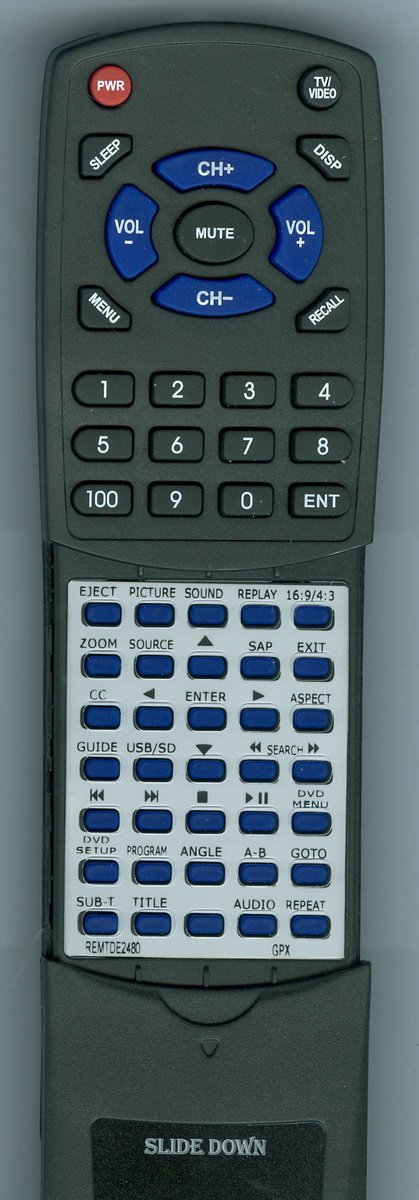
Image: Redi-Remote Replacement Remote Control. This image shows the overall design of the remote, including the button layout and the sliding cover for additional functions.
This remote is designed to perform every function for the specific GPX unit it is intended to control. It cannot be programmed to control auxiliary devices.
Maintenance
Cleaning
Wipe the remote control with a soft, dry cloth. Do not use liquid cleaners or abrasive materials.
Battery Replacement
If the remote control's range decreases or it becomes unresponsive, replace all four AAA batteries with new ones. Refer to the "Battery Installation" section for instructions.
Troubleshooting
- Remote not responding: Ensure batteries are installed correctly with the right polarity. Replace old batteries with new ones. Make sure there are no obstructions between the remote and the GPX unit.
- Limited range: Replace batteries. Ensure you are within the maximum operating range of 20 feet.
- Certain buttons not working: Check if the sliding cover is fully open to access all buttons.
Specifications
- Brand: Redi-Remote
- Model Number: RTREMTDE2480
- Compatible Devices: GPX Television units (REMTDE2480, TDE2480B, TDE2480RS, TDE2480)
- Connectivity Technology: Infrared
- Special Feature: No Programming Required
- Maximum Number of Supported Devices: 1
- Button Quantity: 58
- Maximum Range: 20 Feet
- Batteries: 4 AAA batteries (included)
- Item Weight: 4.5 Ounces
- Item Dimensions (L x W x H): 7.5" x 2.25" x 0.75"
Warranty and Support
For any concerns with the remote control after purchase, please contact the seller directly for support. Specific warranty details may vary and are typically provided at the point of purchase.