
Introduction
This Redi-Remote replacement remote control is specifically designed to operate NAXA models NX537, NX536, and NX541. It is a custom-built replacement remote, not an original NAXA product. This remote requires no programming and is ready for use immediately after battery installation.
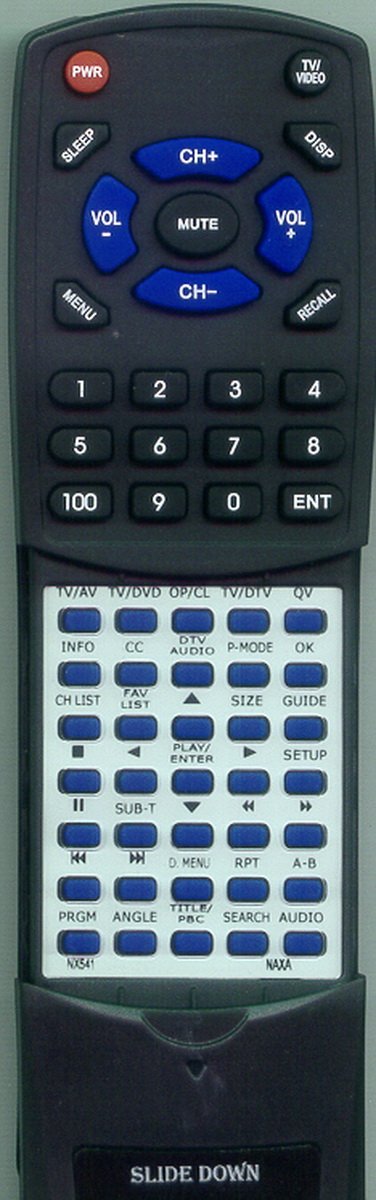
Figure 1: The Redi-Remote replacement remote control. This image displays the front view of the remote, highlighting its button layout and overall design, which is compatible with NAXA NX537, NX536, and NX541 units.
Setup
Battery Installation
- Locate the battery compartment on the back of the remote control.
- Slide open the battery compartment cover.
- Insert four (4) AAA batteries, ensuring correct polarity (+ and -) as indicated inside the compartment. Four AAA batteries are included with your remote.
- Close the battery compartment cover securely.
Note: There is a cover over the lower half of the remote. This cover slides down to reveal additional buttons for extended functionality.
Operating Instructions
Basic Operation
- Point the remote control directly at the NAXA unit you wish to control. Ensure there are no obstructions between the remote and the unit.
- Press the desired function button (e.g., Power, Volume Up/Down, Channel Up/Down, Play, Pause).
- This Redi-Remote is designed to perform every function for the specific NAXA unit it controls. It cannot be programmed to control any auxiliary devices.
Accessing Additional Functions
To access buttons located on the lower half of the remote, gently slide down the protective cover. This will reveal additional controls for advanced functions.
Maintenance
Cleaning the Remote
To clean the remote control, use a soft, dry cloth. For stubborn dirt, slightly dampen the cloth with water or a mild cleaning solution. Avoid using harsh chemicals or abrasive cleaners, as these can damage the remote's surface or internal components.
Battery Replacement
Replace the batteries when the remote's performance diminishes or if the NAXA unit no longer responds reliably. Always replace all four AAA batteries at the same time with new ones. Do not mix old and new batteries, or different types of batteries.
Storage
When not in use for extended periods, it is recommended to remove the batteries to prevent leakage and potential damage to the remote control.
Troubleshooting
- Remote not responding:
- Check if the batteries are inserted correctly with the proper polarity.
- Replace the batteries with fresh ones.
- Ensure there is a clear line of sight between the remote control and the NAXA unit. Remove any obstructions.
- Make sure you are pointing the remote directly at the infrared sensor of your NAXA unit.
- Some buttons not working:
- Clean the remote control, especially around the non-responsive buttons, to remove any dirt or debris that might be preventing proper contact.
- Ensure the sliding cover is fully open if you are trying to access buttons underneath it.
If you continue to experience issues after attempting these troubleshooting steps, please contact the seller for further assistance.
Specifications
| Model Number | RTNX541 |
| Compatibility | NAXA NX537, NX536, NX541 |
| Dimensions (L x W x H) | 7 1/2" x 2 1/4" x 3/4" (approx. 19.05 x 5.72 x 1.91 cm) |
| Weight | 4.5 ounces (approx. 127.57 grams) |
| Batteries Required | 4 x AAA (included) |
| Special Feature | No Programming Required |
| Max Supported Devices | 1 |
| Connectivity Technology | Infrared |
Customer Support
For any questions, concerns, or assistance with your Redi-Remote replacement remote control, please contact the seller directly through your purchase platform. They will be able to provide specific support related to your product.