
Product Overview
This document provides instructions for the Redi-Remote replacement remote control, designed for use with SUPERSCAN television models SSF420TR and NE236UD. This remote is a custom-built replacement and is not an original manufacturer's remote control. It is engineered to perform all functions of the specific unit it is designed to control without requiring additional programming.
Key features include:
- No programming required for operation.
- Dimensions: 7 1/2 inches (length) x 2 1/4 inches (width) x 3/4 inches (thickness).
- Equipped with a sliding cover to reveal lower half buttons.
- Does not include laser pointers or LED lights.
- Cannot be programmed to control auxiliary devices.
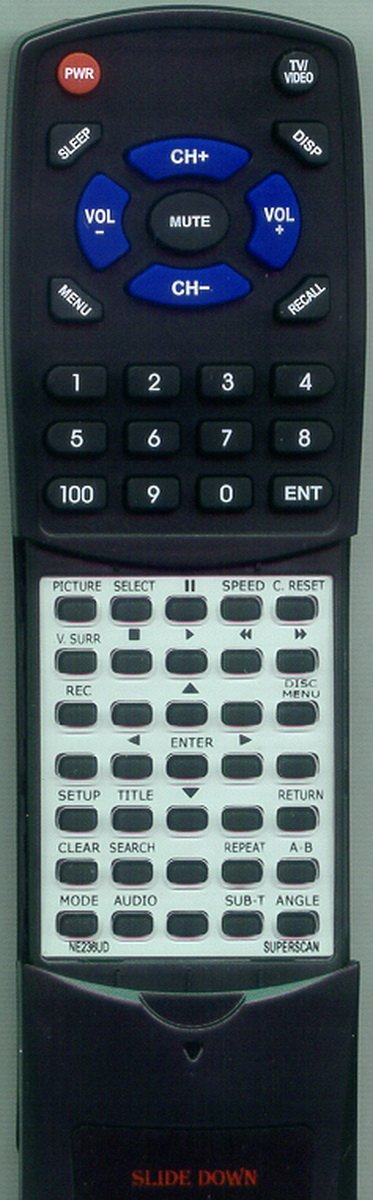
Figure 1: Redi-Remote Replacement Remote Control. This image displays the front view of the remote control, highlighting its ergonomic design and button layout. The remote is black with clearly labeled buttons for various functions.
Setup
The Redi-Remote replacement remote control requires 4 AAA batteries for operation. These batteries are included with the remote.
- Install Batteries: Locate the battery compartment on the back of the remote control. Slide open the battery cover. Insert 4 AAA batteries, ensuring correct polarity (+ and -) as indicated inside the compartment. Close the battery cover securely.
- Initial Use: No programming or setup is required. Once batteries are installed, the remote is ready for immediate use with compatible SUPERSCAN models SSF420TR and NE236UD.
Operating Instructions
This remote control functions identically to the original remote for your SUPERSCAN unit. Point the remote directly at your television or device's infrared receiver.
- Power On/Off: Press the POWER button to turn your SUPERSCAN unit on or off.
- Channel Selection: Use the number pad to enter channel numbers directly, or use the CHANNEL UP/DOWN buttons to navigate.
- Volume Control: Adjust the volume using the VOLUME UP/DOWN buttons.
- Input/Source: Press the INPUT or SOURCE button to cycle through available input sources (e.g., HDMI, AV).
- Menu Navigation: Use the MENU button to access the on-screen display menu. Navigate using the directional arrow buttons and confirm selections with the ENTER or OK button.
- Sliding Cover: The lower half of the remote features a sliding cover. Slide this cover down to access additional buttons, typically for advanced functions or specific modes.
Maintenance
- Battery Replacement: When the remote's performance degrades or it stops responding, replace all 4 AAA batteries with new ones. Always replace all batteries at the same time. Do not mix old and new batteries, or different types of batteries.
- Cleaning: To clean the remote, gently wipe its surface with a soft, dry cloth. For stubborn dirt, slightly dampen the cloth with water. Do not use harsh chemicals, abrasive cleaners, or immerse the remote in water.
- Storage: Store the remote in a dry place, away from direct sunlight and extreme temperatures. If the remote will not be used for an extended period, it is recommended to remove the batteries to prevent leakage.
Troubleshooting
| Problem | Possible Cause | Solution |
|---|---|---|
| Remote not responding. | Dead or incorrectly installed batteries. | Replace all 4 AAA batteries, ensuring correct polarity. |
| Remote has limited range or intermittent response. | Weak batteries; Obstruction between remote and device; Remote not pointed directly at device. | Replace batteries. Remove any obstructions. Ensure the remote is pointed directly at the device's infrared sensor. |
| Certain buttons do not work. | Remote malfunction; Button stuck. | Ensure the button is not physically stuck. If the issue persists after battery replacement, contact support. |
| Remote does not control other devices. | This remote is designed for a single device. | This remote cannot be programmed to control auxiliary devices. It is specifically for SUPERSCAN models SSF420TR and NE236UD. |
Specifications
- Brand: Redi-Remote
- Model Number: RTNE236UD
- Compatible Devices: SUPERSCAN SSF420TR, NE236UD (Television)
- Connectivity Technology: Infrared
- Power Source: 4 x AAA Batteries (included)
- Product Dimensions: 7 x 2.5 x 1 inches (approximately 7 1/2" x 2 1/4" x 3/4")
- Item Weight: 4.5 ounces
- Special Feature: No Programming Required
- Max Number of Supported Devices: 1
Support
For any concerns or questions regarding your Redi-Remote replacement remote control after purchase, please contact the seller directly. They can provide assistance with troubleshooting or product-related inquiries.
This product is designed for specific SUPERSCAN models and is not an original equipment manufacturer (OEM) part. Ensure compatibility with your device before use.