
Introduction
This manual provides comprehensive instructions for the Redi-Remote replacement remote control, specifically designed for use with Technics CD Changer models SLMC60, SLMC70, and SLMC350. This remote functions as a direct replacement for the original Technics remote control model EUR643808. It is a custom-built replacement and not an original Technics product. The remote is pre-programmed and requires no additional setup for compatible Technics CD changers.
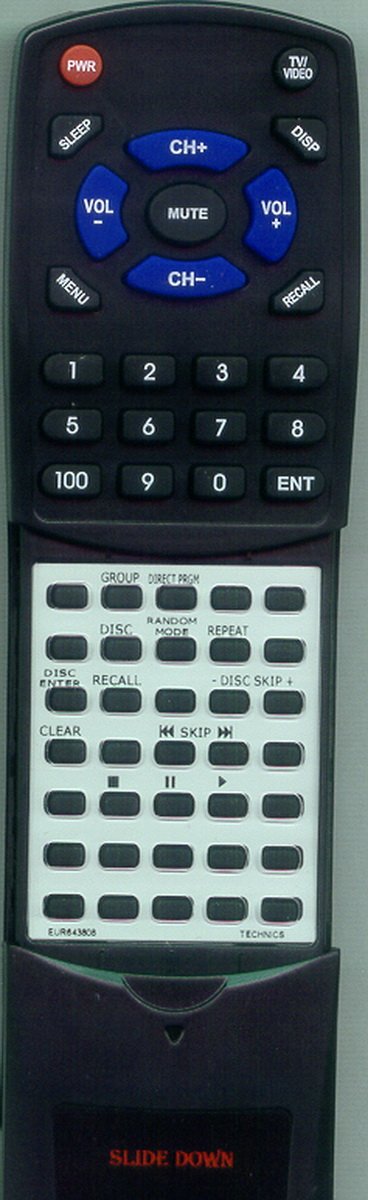
Figure 1: Redi-Remote replacement remote control. The remote is black with various function buttons, and a sliding cover is visible on the lower half, concealing additional controls.
Setup
1. Battery Installation
The remote control requires four (4) AAA batteries for operation. These batteries are included with your purchase.
- Locate the battery compartment cover on the back of the remote control.
- Slide the cover downwards or press the latch (if present) and lift to open the compartment.
- Insert four AAA batteries, ensuring the positive (+) and negative (-) terminals align correctly with the markings inside the compartment.
- Replace the battery compartment cover by sliding it back into place until it clicks securely.
Once batteries are installed, the remote control is ready for use with your compatible Technics CD Changer.
Operating Instructions
This Redi-Remote is pre-programmed to control your Technics CD Changer. No additional programming is required.
Basic Functions
- Power: Press the POWER button to turn the CD changer on or off.
- Play/Pause: Use the PLAY button to start playback and the PAUSE button to temporarily stop playback.
- Stop: Press the STOP button to halt playback.
- Track Selection: Use the SKIP buttons (forward/backward arrows) to navigate between tracks.
- Disc Selection: Utilize the dedicated disc selection buttons (if present) or navigation controls to choose specific discs within the changer.
- Volume: Adjust the audio output level using the VOLUME UP and VOLUME DOWN buttons.
Advanced Functions (Sliding Cover)
The remote control features a sliding cover on its lower half. This cover conceals additional buttons for advanced functions. To access these buttons:
- Gently slide the cover downwards to reveal the hidden buttons.
- After use, slide the cover upwards to protect the buttons.
Operational Range and Limitations
- The maximum operational range for this remote control is approximately 20 feet (6 meters). Ensure a clear line of sight between the remote and the CD changer's infrared receiver.
- This Redi-Remote is designed exclusively for controlling the specified Technics CD Changer models. It cannot be programmed to control auxiliary devices such as televisions, amplifiers, or other audio equipment.
- The remote control does not include laser pointers or LED lights.
Maintenance
Cleaning the Remote Control
To maintain the remote control's appearance and functionality:
- Wipe the surface with a soft, dry cloth.
- For stubborn dirt, slightly dampen the cloth with water or a mild, non-abrasive cleaner. Avoid excessive moisture.
- Do not use harsh chemicals, solvents, or abrasive cleaning pads, as these can damage the remote's finish or internal components.
Battery Replacement and Disposal
- Replace batteries when the remote's response becomes sluggish or stops functioning.
- Always replace all four AAA batteries at the same time with new ones. Do not mix old and new batteries, or different types of batteries.
- Dispose of used batteries according to local regulations. Do not dispose of them in household waste.
- If the remote will not be used for an extended period, remove the batteries to prevent leakage and potential damage.
Troubleshooting
If you encounter issues with your Redi-Remote, please refer to the following common solutions:
- Remote not responding:
- Check if the batteries are correctly inserted with the proper polarity (+/-).
- Replace all four AAA batteries with fresh ones.
- Ensure there is a clear line of sight between the remote control and the infrared receiver on your Technics CD Changer. Obstructions can block the signal.
- Verify you are within the operational range (approximately 20 feet).
- Remote controls some functions but not others:
- Ensure the sliding cover is fully open if you are trying to access advanced functions.
- Confirm that your Technics CD Changer model (SLMC60, SLMC70, or SLMC350) is compatible with this remote.
- Remember that this remote is designed only for the CD changer and cannot control other devices.
- Interference:
- Strong light sources, especially fluorescent lights or direct sunlight, can sometimes interfere with infrared signals. Try operating the remote in different lighting conditions.
If these steps do not resolve the issue, please refer to the Support section for further assistance.
Specifications
| Brand | Redi-Remote |
| Model Number | RTEUR643808 |
| Compatible Devices | Technics CD Changer (SLMC60, SLMC70, SLMC350) |
| Replaces Original Remote | Technics EUR643808 |
| Connectivity Technology | Infrared |
| Special Feature | No Programming Required |
| Maximum Number of Supported Devices | 1 |
| Button Quantity | 58 |
| Maximum Range | 20 Feet (approx. 6 meters) |
| Batteries Required | 4 AAA batteries (included) |
| Item Dimensions (L x W x H) | 7.5" x 2.25" x 0.75" (19.05 cm x 5.72 cm x 1.91 cm) |
| Item Weight | 4.5 Ounces (approx. 127.57 grams) |
| UPC | 791090923637 |
Warranty Information
Specific warranty details are not provided in this manual. For any concerns or issues with the remote control after purchase, please contact the seller directly. The seller is committed to addressing any problems you may encounter with the product.
Customer Support
For technical assistance, troubleshooting beyond this guide, or any product-related inquiries, please contact the seller, RemotesPro, through your purchase platform. Please refer to your order details for specific contact methods.
When contacting support, please have your product model number (RTEUR643808) and purchase date readily available.