
1. Product Overview
The Baomain CN101A Digital LCD Programmable Timer Switch is designed for precise control of electrical equipment and lighting systems. It operates with a 220V AC input and provides a 200-250V 16A AC output. This timer offers dual-mode programmable control with up to 28 ON/OFF settings for daily or weekly schedules, alongside instant manual control for flexibility.
Key Features:
- 220V AC Input/200-250V AC Output: Ensures safe operation and power delivery for various loads.
- Dual-Mode Programmable Control: Offers automatic scheduling with 28 ON/OFF settings or instant manual control.
- User-Friendly LCD Interface: Features a clear backlit LCD screen for easy programming and real-time status viewing.
- Standardized Panel-Mount Design: Equipped with a 4-pin configuration compatible with 1/4" female connectors for secure installation.
- Built-in Battery Backup: An integrated lithium battery preserves schedules and supports setup during power outages.
2. Safety Information
WARNING: Risk of electric shock. Ensure power to this time switch and the equipment it controls is turned off at the main panel before any wiring or servicing. Inform a qualified electrician if the wiring compartment insulator is missing or improperly installed.
This enclosure does not provide grounding between metallic conduit. Grounding type bushings and jumper wire to the control unit must be installed in accordance with national code requirements. The device may have exposed wire terminals; ensure it is installed within an appropriate enclosure to prevent accidental contact and meet safety standards.
3. Product Components and Dimensions
The Baomain CN101A timer features a compact design with an LCD display and multiple control buttons. Below are images illustrating its various views and dimensions.

Figure 1: Front view of the Baomain CN101A Digital LCD Programmable Timer Switch, showing the LCD screen and control buttons.

Figure 2: Side view of the timer switch, highlighting its slim profile suitable for panel mounting.

Figure 3: Angled view of the timer switch, providing a perspective of its overall structure.

Figure 4: Detailed dimensions of the timer switch: 1.26"D x 2.36"W x 2.36"H (32mm D x 60mm W x 60mm H), with mounting holes of Ø3.2mm (approx. 1/8").
4. Wiring Diagram
Proper wiring is crucial for the safe and effective operation of the Baomain CN101A timer switch. Refer to the diagram below for correct connections.

Figure 5: Wiring diagram for the Baomain CN101A timer switch. Terminals 1 and 2 are for 200-250V AC input power. Terminals 4 and 5 are for 200-250V AC 16A output to the device. Terminal 3 is not used.
Wiring Steps:
- Ensure all power is disconnected at the main panel before beginning installation.
- Connect the 200-250V AC input power to terminals 1 (Live/Line) and 2 (Neutral).
- Connect the device to be controlled to terminals 4 and 5. Terminal 4 is typically the switched live output, and terminal 5 is the neutral output.
- Ensure all connections are secure and insulated.
- If using metallic conduit, ensure proper grounding with grounding type bushings and jumper wire.
Video: BAOMAIN CN101A 220VAC Digital LCD Power Programmable Timer Switch. This video demonstrates the wiring and basic setup of the timer switch.
5. Initial Setup and Time Setting
Before programming, ensure the timer is reset and the current time is set accurately.
Resetting the Timer:
To clear all previous settings and restore factory defaults, press the 'C' (Reset) button using a pointed object (e.g., a toothpick). The LCD display will show '00:00'.
Setting Current Time:
- Press and hold the 'Clock' button (labeled with a clock icon).
- While holding 'Clock', press 'D+' to set the current day (MO, TU, WE, TH, FR, SA, SU).
- While holding 'Clock', press 'H+' to set the current hour (0-23 for 24-hour format).
- While holding 'Clock', press 'M+' to set the current minute (0-59).
- Release the 'Clock' button to save the current time.

Figure 6: Close-up of the LCD display showing day, hour, minute, and 'AUTO' mode indicator.
6. Programming ON/OFF Schedules
The timer allows setting up to 28 ON/OFF programs for daily or weekly operation.
Programming Steps:
- Press the 'P' (Program) button once. The display will show '1 ON' (Program 1 ON time).
- Press 'D+' to select the desired day(s) for this program. You can choose individual days, weekdays, weekends, or all days.
- Press 'H+' to set the ON hour and 'M+' to set the ON minute for Program 1.
- Press 'P' again. The display will show '1 OFF' (Program 1 OFF time).
- Press 'D+' to select the desired day(s) for this OFF program (usually matching the ON program).
- Press 'H+' to set the OFF hour and 'M+' to set the OFF minute for Program 1.
- Repeat steps 1-6 for additional ON/OFF programs (up to 28).
- After setting all desired programs, press the 'Clock' button to exit programming mode and save settings.
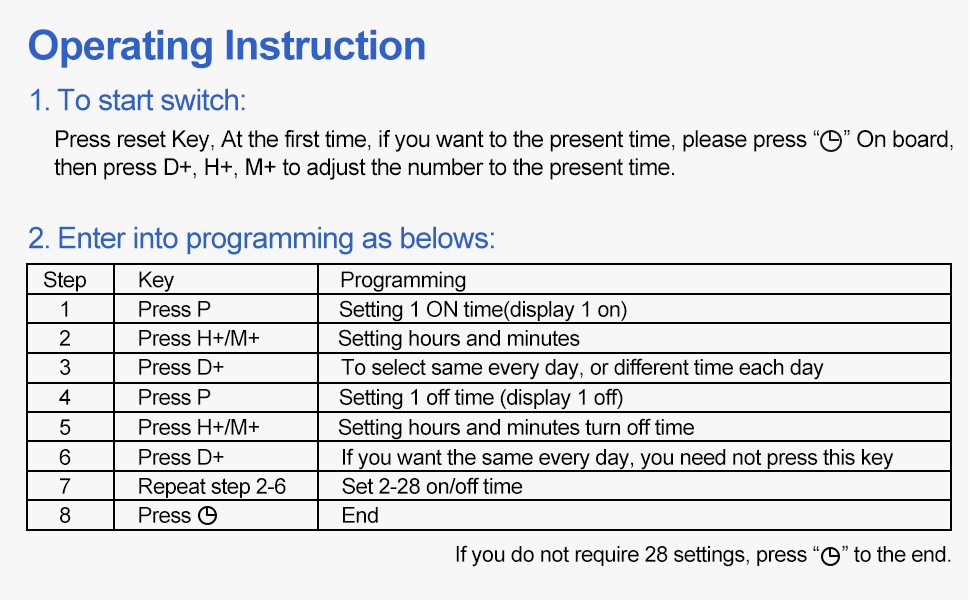
Figure 7: Operating instruction table detailing button functions and programming steps.
7. Special Button Functions
- Clock Button: Continue pressing the 'Clock' button 4 times to lock all buttons. The LCD screen will indicate 'a'. Press 'Clock' 4 times again to unlock.
- C/R Button: Press and hold the 'C/R' button for 5 seconds. The LCD display will flash, indicating a restore to factory settings.
- Manual Button: Press and hold the 'Manual' button for 5 seconds. The LCD screen will turn off, meaning the timer is turned off. To turn it back on, press and hold 'Manual' for 5 seconds again. The setting data will not be lost when the LCD screen is ON or OFF.
8. Battery Information
The Baomain CN101A timer includes a built-in lithium battery (CR2032 type) to maintain programmed settings during power outages. This battery is not rechargeable and is primarily for power-off memory, not for powering the control functions of the switch itself. If the battery needs replacement, carefully open the casing to access and replace the CR2032 battery.

Figure 8: Illustration showing the location of the CR2032 lithium battery within the timer casing.
9. Troubleshooting
- Display screen not turning on: If the display screen does not turn on, press the 'Manual' key for 5 seconds. If it still doesn't turn on, ensure proper voltage is applied or charge it for 10 minutes.
- Timer switch not energizing: Check the wiring according to the instruction type A and ensure the correct input voltage (220V AC) is applied.
- Setting errors (E1/E2 codes): If the LCD shows 'E1', it means the start time is not set. If it shows 'E2', the end time is not set. Review your programming to correct these errors.
- Buttons locked: If all buttons are locked and unresponsive, continue pressing the 'Clock' button 4 times to unlock them.
10. Specifications
| Attribute | Value |
|---|---|
| Brand | Baomain |
| Model Number | CN101A |
| Input Voltage | 220V AC |
| Output Voltage | 200-250V AC |
| Output Current | 16A |
| Frequency | 50/60Hz |
| Number of Programs | 28 (ON/OFF settings) |
| Dimensions (D x W x H) | 1.26" x 2.36" x 2.36" (32mm x 60mm x 60mm) |
| Item Weight | 70 Grams (2.47 ounces) |
| Material | Plastic |
| Color | White |
| Battery Type | CR2032 Lithium (for memory backup) |
11. Applications
The Baomain CN101A Digital LCD Programmable Timer Switch is suitable for a wide range of residential, commercial, and industrial applications, enabling automatic timed power conservation, safety protection, and simplified maintenance for various electrical equipment.

Figure 9: Examples of applications including lighting equipment, LED floodlights, aquariums, and agricultural cultivation.
12. Warranty and Support
For warranty information, technical support, or service inquiries, please refer to the product packaging or contact Baomain customer service directly. Keep your purchase receipt for warranty claims.