
Sharp R-92STW
Sharp R-92STW Microwave Oven User Manual
Model: R-92STW
Introduction
This manual provides detailed instructions for the safe and efficient operation of your Sharp R-92STW Microwave Oven. Please read this manual thoroughly before using the appliance and keep it for future reference.
The Sharp R-92STW is a versatile 28-liter microwave oven with a sleek stainless steel finish. It combines microwave, grill, and convection cooking functions, offering a wide range of cooking possibilities. Key features include 900W microwave power, 1100W grill power, 2500W convection power, 10 automatic cooking/reheating programs, and 2 defrost modes.
Important Safety Information
Always follow basic safety precautions when using electrical appliances to reduce the risk of fire, electric shock, injury to persons, or exposure to excessive microwave energy.
- Read all instructions before using the appliance.
- Ensure the appliance is properly grounded. Connect only to properly grounded outlets.
- Do not operate the oven when empty.
- Do not attempt to operate this oven with the door open or if the door seals are damaged.
- Do not place metal containers or foil inside the microwave during microwave cooking.
- Supervise children closely when the oven is in use.
- Do not use corrosive chemicals or vapors in this appliance.
- Always use oven mitts when handling hot dishes from the oven.
Product Overview
Components
- Turntable
- Turntable Support Ring
- Glass Turntable Tray
- Grill Rack (for grill/convection cooking)
- Instruction Manual
Product Images
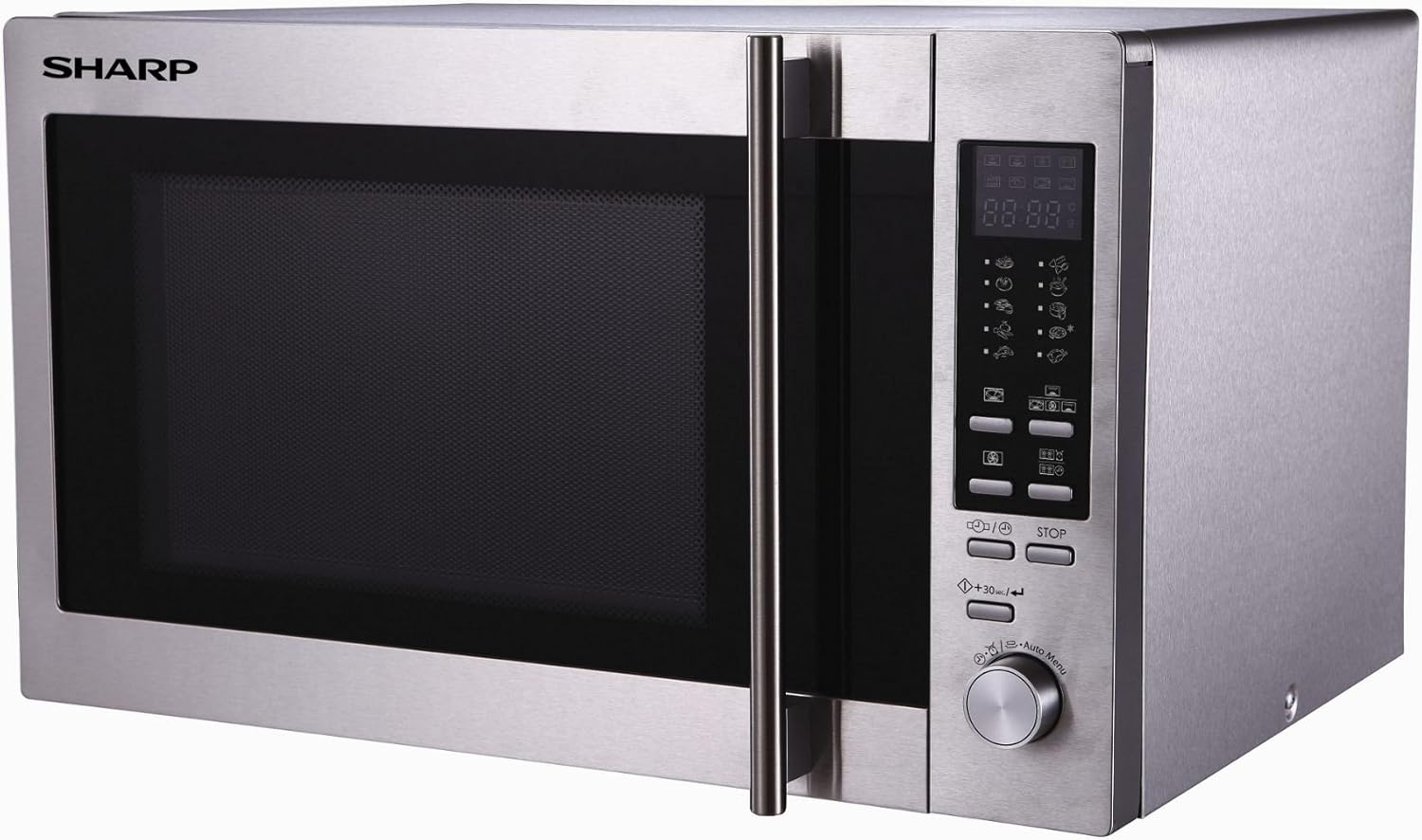
Front view of the Sharp R-92STW Microwave Oven, showcasing its stainless steel finish, control panel, and door handle.

The Sharp R-92STW Microwave Oven with its external dimensions: 52 cm width, 51 cm depth, and 33.5 cm height.
Setup and Installation
Unpacking
- Remove all packaging materials from inside and outside the oven.
- Check the oven for any damage, such as a misaligned or bent door, damaged door seals, or dents in the cavity. Do not operate the oven if any damage is present.
Placement
- Place the oven on a flat, stable surface that can support its weight and the heaviest food likely to be cooked in it.
- Ensure adequate ventilation. Leave a minimum of 10 cm (4 inches) of space at the rear, 20 cm (8 inches) at the top, and 5 cm (2 inches) on each side for proper airflow.
- Keep the oven away from heat sources and strong magnetic fields.
Power Connection
Plug the power cord into a standard 230V, 50Hz, AC outlet. Ensure the outlet is properly grounded. Do not use extension cords or adapters.
Operating Instructions
Control Panel Overview
The control panel features a digital display, function buttons, power level settings, and a rotary dial for time and menu selection. Familiarize yourself with the layout before operation.
Microwave Cooking
- Place food in a microwave-safe container on the glass turntable.
- Close the oven door.
- Press the 'Microwave' button.
- Use the rotary dial to select the desired cooking time and power level.
- Press 'Start' to begin cooking.
Grill Cooking
- Place food on the grill rack.
- Press the 'Grill' button.
- Use the rotary dial to set the grilling time.
- Press 'Start'.
Convection Cooking
- Press the 'Convection' button.
- Use the rotary dial to select the desired temperature.
- Press 'Start' to preheat the oven.
- Once preheated, place food inside and set the cooking time.
- Press 'Start' to begin cooking.
Automatic Programs
The oven features 10 automatic cooking/reheating programs. Refer to the specific program chart in your detailed manual for weight and food type guidelines.
- Press the 'Auto Menu' button repeatedly or use the rotary dial to select the desired program number.
- Enter the food weight if prompted.
- Press 'Start'.
Defrosting
The oven offers 2 defrost modes: Defrost by Weight and Defrost by Time.
- Place frozen food on the turntable.
- Press the 'Defrost' button.
- Select the defrost mode and enter the weight or time using the rotary dial.
- Press 'Start'.
Setting the Clock
- Press the 'Clock' button.
- Use the rotary dial to set the hour. Press 'Clock' again.
- Use the rotary dial to set the minutes. Press 'Clock' to confirm.
Child Lock
To activate the child lock, press and hold the 'Stop/Clear' button for 3 seconds until a lock indicator appears on the display. To deactivate, repeat the process.
Maintenance and Cleaning
Interior Cleaning
Clean the oven cavity regularly, especially after spills. Use a damp cloth with mild detergent. For stubborn stains, place a bowl of water with lemon slices inside and microwave for a few minutes to loosen residue.
Exterior Cleaning
Wipe the exterior surfaces with a soft, damp cloth. Avoid abrasive cleaners or scouring pads that could scratch the stainless steel finish.
Turntable Care
The glass turntable and support ring can be removed for cleaning. Wash them in warm, soapy water or in a dishwasher. Ensure they are completely dry before placing them back in the oven.
Troubleshooting
| Problem | Possible Cause | Solution |
|---|---|---|
| Oven does not start | Power cord not plugged in; Door not closed properly; Fuse blown or circuit breaker tripped. | Ensure plug is firmly in outlet; Close door securely; Check household fuse/circuit breaker. |
| Food not heating | Door not closed properly; Incorrect cooking time/power level set. | Close door securely; Adjust cooking time and power level. |
| Turntable not rotating | Turntable not properly placed; Turntable support dirty or damaged. | Ensure turntable and support are correctly positioned; Clean turntable support and roller ring. |
| Oven light not working | Light bulb burned out. | Contact qualified service personnel for replacement. |
Technical Specifications
| Feature | Specification |
|---|---|
| Brand | Sharp |
| Model | R-92STW |
| Capacity | 28 Liters |
| Microwave Power | 900 Watts |
| Grill Power | 1100 Watts |
| Convection Power | 2500 Watts |
| Voltage | 230 Volts |
| Material | Stainless Steel |
| Installation Type | Freestanding |
| Product Dimensions (L x W x H) | 51 x 52 x 33.5 cm |
| Item Weight | 19.9 Kilograms |
| Special Features | Defrost function, Automatic programs |
| Controller Type | Button, Rotary Dial |
Warranty and Customer Support
Your Sharp R-92STW Microwave Oven comes with a manufacturer's warranty. Please refer to the warranty card included with your purchase for specific terms and conditions, including the warranty period and coverage details.
For technical assistance, troubleshooting beyond this manual, or to inquire about warranty service, please contact Sharp customer support. Contact information can typically be found on the Sharp official website or on your product's packaging.
Related documentsR-92STW


Ask a question about this manual
Ask about setup, troubleshooting, compatibility, parts, safety, or missing instructions. Manuals+ will review the question and use this page’s manual context to help answer it.