
Tamron A009E
Tamron SP 70-200MM F/2.8 DI VC USD Telephoto Zoom Lens User Manual
Model: A009E
Introduction
This manual provides essential information for the proper use and care of your Tamron SP 70-200MM F/2.8 DI VC USD Telephoto Zoom Lens. Please read this manual thoroughly before using the lens to ensure optimal performance and longevity.
Product Overview
The Tamron SP 70-200mm F/2.8 DI VC USD is a high-performance telephoto zoom lens designed for Canon EF cameras. It features Vibration Compensation (VC) for image stabilization and an Ultrasonic Silent Drive (USD) motor for fast and quiet autofocus.
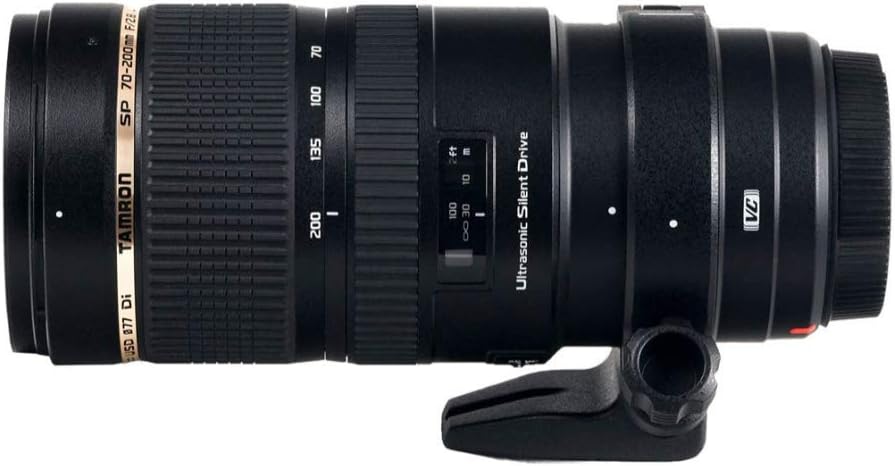
Figure 1: Front view of the Tamron SP 70-200mm F/2.8 DI VC USD lens, showcasing its robust build and zoom/focus rings.
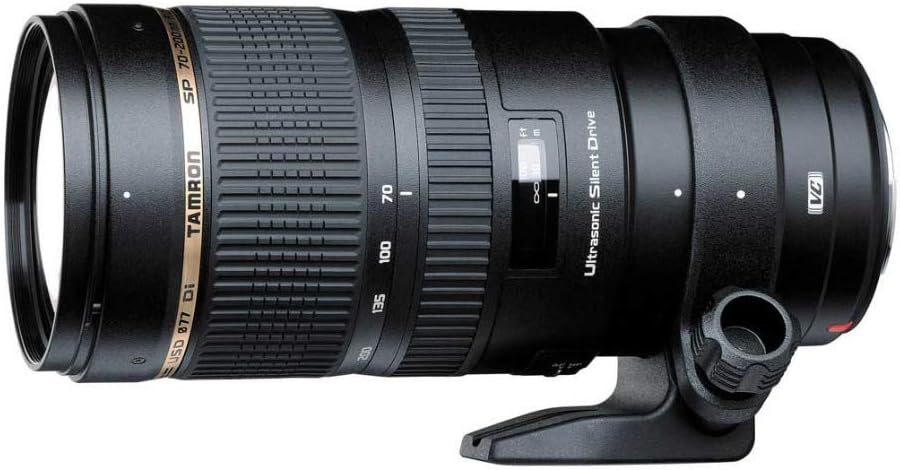
Figure 2: Side view of the Tamron SP 70-200mm F/2.8 DI VC USD lens, highlighting the tripod collar attachment point.

Figure 3: The Tamron SP 70-200mm F/2.8 DI VC USD lens with its dedicated lens hood attached, providing protection from flare and impact.

Figure 4: Close-up view of the detachable tripod collar for the Tamron SP 70-200mm F/2.8 DI VC USD lens, designed for stable mounting.

Figure 5: The petal-shaped lens hood for the Tamron SP 70-200mm F/2.8 DI VC USD lens, designed to block stray light.
Setup
Attaching the Lens
- Ensure your camera is turned off.
- Align the mounting index on the lens with the corresponding index on your camera body.
- Rotate the lens clockwise (for Canon EF mount) until it clicks into place.
- Attach the lens hood by aligning its mark with the mark on the front of the lens and twisting until it locks.
Detaching the Lens
- Turn off your camera.
- Press and hold the lens release button on the camera body.
- Rotate the lens counter-clockwise until it detaches from the camera body.
- Place the rear lens cap on the lens and the body cap on the camera immediately to protect from dust.
Operating the Lens
Autofocus (AF) and Manual Focus (MF)
The lens features a switch to select between autofocus and manual focus modes. The USD (Ultrasonic Silent Drive) motor provides fast and quiet autofocus operation.
- AF Mode: Set the switch to "AF". The lens will automatically focus when the camera's shutter button is half-pressed.
- MF Mode: Set the switch to "MF". Rotate the focus ring to manually adjust focus.
- Full-time Manual Focus Override: In AF mode, you can still fine-tune focus manually by rotating the focus ring after autofocus has been achieved.
Vibration Compensation (VC)
The VC mechanism helps reduce camera shake, allowing for sharper images, especially in low light or at longer focal lengths. It has a dedicated ON/OFF switch.
- VC ON: Set the switch to "VC ON" to activate image stabilization. This is recommended for handheld shooting.
- VC OFF: Set the switch to "VC OFF" when using a tripod or when shutter speeds are fast enough to prevent blur.
Zooming
Rotate the zoom ring to adjust the focal length between 70mm and 200mm. The focal length markings are visible on the lens barrel.
Maintenance
- Cleaning the Lens: Use a soft, clean microfiber cloth to gently wipe dust and smudges from the lens elements. For stubborn marks, use a lens cleaning solution specifically designed for optical surfaces.
- Cleaning the Lens Body: Wipe the lens body with a dry, soft cloth. Avoid using harsh chemicals or solvents.
- Storage: When not in use, store the lens with both front and rear caps attached in a cool, dry place away from direct sunlight and extreme temperatures. Consider using a desiccant to prevent mold growth in humid environments.
- Moisture Resistance: While the lens features moisture-resistant construction, it is not waterproof. Avoid exposing the lens to heavy rain or submersion in water.
Troubleshooting
| Problem | Possible Cause | Solution |
|---|---|---|
| Lens not focusing (AF) | AF/MF switch set to MF; insufficient light; camera settings. | Set switch to AF. Ensure adequate lighting. Check camera's focus mode settings. |
| Images are blurry (VC ON) | VC not fully engaged; extreme camera shake; subject movement. | Allow VC to stabilize for a moment after half-pressing shutter. Use faster shutter speed. |
| Lens not attaching to camera | Incorrect alignment; obstruction on mount. | Re-align lens and camera mounting marks. Check for debris on mount. |
Specifications
| Feature | Detail |
|---|---|
| Model | A009E |
| Focal Length | 70-200mm |
| Maximum Aperture | F/2.8 |
| Angle of View (Diagonal) | 34°21′ - 12°21′ (Full-size SLR); 22°33′ - 7°59′ (APS-C) |
| Lens Construction | 23 elements in 17 groups |
| Minimum Focus Distance | 51.2 inches (1.3m) |
| Maximum Magnification Ratio | 1:8 (at f=200mm: MFD 51.2") |
| Filter Size | Ø77mm |
| Length | 7.4 inches (188.3mm) |
| Entire Length | 7.7 inches (196.7mm) |
| Item Weight | 3.24 pounds |
| Compatible Mountings | Canon EF |
| Features | VC (Vibration Compensation), USD (Ultrasonic Silent Drive), Moisture-resistant construction |
Warranty and Support
For detailed warranty information, please refer to the warranty card included with your product or visit the official Tamron website. For technical support or service inquiries, please contact Tamron customer service.
Additional resources:
Related documentsA009E


Ask a question about this manual
Ask about setup, troubleshooting, compatibility, parts, safety, or missing instructions. Manuals+ will review the question and use this page’s manual context to help answer it.