
Introduction
Thank you for choosing the Zebronics ZEB-SW2800RUCF Hero 2.1 Speaker System. This manual provides essential information for the proper setup, operation, and maintenance of your speaker system. Please read this manual thoroughly before using the product to ensure optimal performance and longevity.
Product Overview
The Zebronics ZEB-SW2800RUCF Hero is a 2.1 channel multimedia speaker system designed to deliver clear and powerful audio. It features a subwoofer for deep bass and two satellite speakers for balanced sound. The system includes multiple connectivity options and an integrated FM radio.
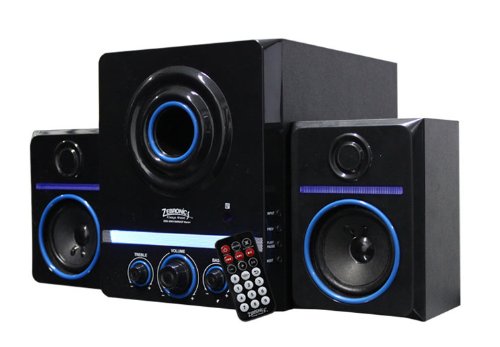
This image displays the Zebronics ZEB-SW2800RUCF Hero 2.1 speaker system. It features a central subwoofer unit with a large speaker and control knobs for treble, volume, and bass. Two satellite speakers are positioned on either side of the subwoofer. A remote control is also visible in the foreground.
Key Features
- 2.1 Channel Audio: Provides a balanced sound experience with a dedicated subwoofer and two satellite speakers.
- Powerful Output: Total output power of 38 Watts (18W Subwoofer + 10W x 2 Satellites).
- Integrated FM Radio: Enjoy your favorite radio stations directly through the speaker system.
- Multimedia Support: Supports USB pen drives and SD/MMC memory cards for direct playback of MP3 and WMA audio files.
- User Controls: Features on/off switch, volume, bass, and treble controls for personalized audio.
- Remote Control: Convenient operation from a distance.
- Driver Units: 4-inch magnetically shielded subwoofer driver and 3 x 2-inch full-range magnetically shielded satellite drivers.
- High Signal-to-Noise Ratio: ≥80dB for clear audio.
- Low Distortion: ≤0.3% at 1W output @1KHz.
Setup Instructions
- Unpacking: Carefully remove all components from the packaging. Ensure all parts are present: one subwoofer unit, two satellite speakers, and a remote control.
- Placement: Position the subwoofer on a stable surface, preferably on the floor for optimal bass. Place the satellite speakers on either side of your listening area, ensuring they are facing towards you for the best stereo effect.
- Connect Satellite Speakers: Connect the cables from the two satellite speakers to the corresponding output ports on the rear panel of the subwoofer unit. Ensure a secure connection.
- Connect Audio Source (Optional): If connecting an external audio device (e.g., computer, smartphone, TV), use an appropriate audio cable (not included) to connect its audio output to the input port on the subwoofer.
- Power Connection: Plug the power cord of the subwoofer unit into a standard electrical outlet.
- Power On: Turn on the main power switch, usually located on the rear or front panel of the subwoofer.
Operating Instructions
Basic Operation
- Power On/Off: Use the power switch on the subwoofer or the remote control to turn the system on or off.
- Volume Control: Adjust the main volume knob on the subwoofer or use the volume buttons on the remote control.
- Bass Control: Use the bass knob on the subwoofer to adjust the level of low-frequency sound.
- Treble Control: Use the treble knob on the subwoofer to adjust the level of high-frequency sound.
Input Modes
The speaker system supports various input sources. Use the "Mode" button on the subwoofer or remote control to switch between them.
- USB Mode: Insert a USB pen drive into the USB port on the subwoofer. The system will automatically detect and play supported audio files (MP3, WMA).
- SD/MMC Card Mode: Insert an SD or MMC memory card into the card slot on the subwoofer. The system will automatically detect and play supported audio files (MP3, WMA).
- FM Radio Mode: Switch to FM mode. The system will automatically scan and store available radio stations. Use the previous/next track buttons on the remote or subwoofer to navigate between stations.
- AUX Mode: If an external device is connected via the AUX input, switch to AUX mode to play audio from that device.
Remote Control Functions
The remote control provides convenient access to all major functions:
- Power: Turn the system on/off.
- Mode: Switch between USB, SD/MMC, FM, and AUX inputs.
- Volume +/-: Adjust the master volume.
- Play/Pause: Play or pause audio playback in USB/SD mode.
- Previous/Next: Skip tracks in USB/SD mode or change FM stations.
- Mute: Mute or unmute the audio output.
- EQ: (If available) Cycle through equalizer presets.
Maintenance
- Cleaning: Use a soft, dry cloth to clean the speaker surfaces. Do not use liquid cleaners or abrasive materials, as they may damage the finish.
- Ventilation: Ensure the subwoofer and satellite speakers have adequate ventilation. Do not block any vents.
- Environment: Avoid exposing the speakers to direct sunlight, high temperatures, humidity, or dusty environments.
- Power Off: Always turn off and unplug the speaker system from the power outlet when not in use for extended periods or during electrical storms.
Troubleshooting
| Problem | Possible Cause | Solution |
|---|---|---|
| No power | Power cord not connected; Power switch off; Power outlet faulty. | Ensure power cord is securely plugged in; Turn on the power switch; Test the power outlet with another device. |
| No sound | Volume too low; Mute function active; Incorrect input mode; Audio cables not connected properly. | Increase volume; Deactivate mute; Select the correct input mode (USB, SD, FM, AUX); Check all audio cable connections. |
| Distorted sound | Volume too high; Source audio quality poor; Speaker placement issues. | Reduce volume; Try a different audio source; Adjust speaker placement. |
| USB/SD card not playing | Incorrect file format; USB/SD card not inserted correctly; Corrupted files. | Ensure files are MP3 or WMA format; Reinsert USB/SD card; Try a different USB/SD card or files. |
| FM radio poor reception | Weak signal; Antenna not extended. | Adjust the position of the speaker system; Extend the FM antenna fully; Perform an auto-scan for stations again. |
Specifications
| Feature | Detail |
|---|---|
| Speaker Type | Satellite, Subwoofer |
| Surround Sound Channel Configuration | 2.1 |
| Output Power (RMS) | 38 Watts (Subwoofer: 18W, Satellites: 10W x 2) |
| Subwoofer Driver Unit | 4-inches, magnetically shielded |
| Satellite Driver Unit | 3 x 2-inches full range, magnetically shielded |
| Signal-to-Noise Ratio (S/N) | ≥80dB |
| Distortion | ≤0.3% at 1W output @1KHz |
| Controls | On/Off switch, Volume, Bass, Treble |
| Connectivity Technology | USB |
| Supported Media | USB pen drive, SD/MMC memory cards |
| Supported Audio Formats | MP3, WMA |
| Special Features | Built-in FM radio, Remote controller |
| Compatible Devices | FM Radio, MP3 Player, Smartphone, Tablet, Television |
| Recommended Uses | For Smartphones or Tablets, For Televisions, Home Entertainment, Portable Audio |
| Manufacturer | Zebronics |
| Model Number | ZEB-SW2800RUCF Hero |
| Date First Available | 2 November 2012 |
Warranty and Support
For warranty information and technical support, please refer to the warranty card included with your product or visit the official Zebronics website. Keep your purchase receipt for warranty claims.
For further assistance, you may contact Zebronics customer service through their official channels.


