
Introduction
This instruction manual provides essential information for the installation, operation, and maintenance of the Black & Decker 286303-00 Clamp Knob Assembly. This component is a replacement part designed for use with various scroll saw models, including Dewalt DW788 type 1 and compatible Delta scroll saws. It is crucial for securing the scroll saw blade.
Product Overview
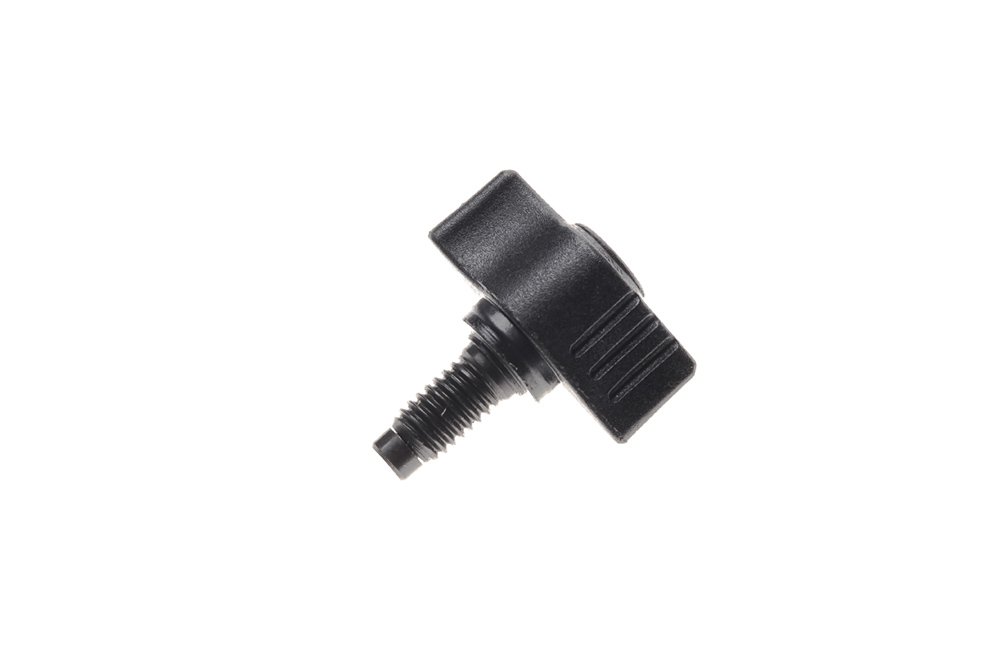
Figure 1: The Black & Decker 286303-00 Clamp Knob Assembly. This image shows the complete knob assembly, which includes the threaded shaft and the ergonomic knob for manual tightening.
The 286303-00 Clamp Knob Assembly is a critical component for maintaining proper blade tension and security on your scroll saw. It is designed for easy hand-tightening and loosening, facilitating quick blade changes and adjustments. The assembly measures approximately 8 inches long, 2 inches wide, and 1 inch high, with a package weight of 0.32 ounces.
Setup and Installation
Follow these steps to properly install the Black & Decker 286303-00 Clamp Knob Assembly:
- Safety First: Ensure your scroll saw is unplugged from the power source before attempting any installation or maintenance.
- Identify the Blade Clamp Area: Locate the upper and lower blade clamp mechanisms on your scroll saw. The clamp knob assembly typically secures the blade in either the upper or lower arm, or both, depending on your saw model. This specific part is often associated with the blade clamp itself.
- Remove Old or Damaged Part: If replacing an existing knob, carefully unscrew and remove the old or damaged clamp knob assembly. Keep any associated washers or nuts if they are not part of the new assembly.
- Insert New Assembly: Thread the new 286303-00 Clamp Knob Assembly into the designated hole on the blade clamp mechanism. Ensure it threads smoothly without forcing.
- Secure the Blade: Once the knob is installed, insert a scroll saw blade into the clamp. Use the knob to tighten the clamp securely around the blade, ensuring the blade is held firmly and is properly tensioned. Do not overtighten, but ensure there is no slippage.
- Test Functionality: After installation, manually check the blade's security and tension. Re-plug the saw and perform a brief test cut on scrap material to confirm proper blade operation before regular use.
This part is compatible with Dewalt DW788 type 1 and various Delta scroll saw models. Verify your saw's model number for compatibility.
Operating the Clamp Knob
The clamp knob assembly is designed for manual operation to facilitate blade changes and adjustments. To use:
- To Loosen: Turn the knob counter-clockwise to release the tension on the blade clamp, allowing for blade removal or adjustment.
- To Tighten: Turn the knob clockwise to secure the blade within the clamp. Ensure the blade is held firmly to prevent movement during operation, which can lead to inaccurate cuts or blade breakage.
Always ensure the blade is properly seated and tensioned before operating the scroll saw.
Maintenance
Regular maintenance of the clamp knob assembly ensures its longevity and proper function:
- Cleaning: Periodically clean the knob and its threads to remove sawdust and debris. A dry brush or compressed air can be used. Avoid using solvents that may damage the material.
- Lubrication: A small amount of dry lubricant (e.g., graphite or PTFE spray) can be applied to the threads if the knob becomes difficult to turn. Avoid wet lubricants that can attract sawdust.
- Inspection: Regularly inspect the knob for signs of wear, cracking, or damage. If the knob becomes stripped or difficult to operate, replace it immediately to ensure safe and effective scroll saw operation.
Troubleshooting
| Problem | Possible Cause | Solution |
|---|---|---|
| Knob is difficult to turn. | Accumulated sawdust/debris in threads; dry threads. | Clean threads with a brush. Apply a small amount of dry lubricant. |
| Blade slips or is not held securely. | Knob not tightened sufficiently; worn clamp mechanism; stripped threads on knob or saw. | Ensure knob is tightened firmly. Inspect blade clamp for wear. If threads are stripped, replace the clamp knob assembly. |
| Knob is loose or falls off. | Stripped threads; incorrect size. | Verify the correct model number for your saw. Replace the clamp knob assembly if threads are stripped. |
Specifications
- Part Number: 286303-00
- Manufacturer: Black & Decker
- Item Weight: Approximately 0.32 ounces
- Product Dimensions: Approximately 8 x 2 x 1 inches
- Compatibility: Dewalt DW788 type 1, various Delta scroll saw models
- Material: Durable plastic knob with metal threaded insert/shaft.
Warranty and Support
For information regarding warranty coverage or technical support for your Black & Decker 286303-00 Clamp Knob Assembly, please refer to the documentation provided with your original scroll saw or contact Black & Decker customer service directly. Keep your purchase receipt as proof of purchase.
For further assistance, you may visit the official Black & Decker website or contact their authorized service centers.