
Introduction
Thank you for choosing the Beetel M75N Corded Phone. This manual provides detailed instructions to help you set up, operate, and maintain your new telephone. Please read this manual thoroughly before using the phone to ensure proper functionality and to take full advantage of its features.

Figure 1: Beetel M75N Corded Phone, showing the handset, keypad, and display from a top-down perspective.
Key Features
- 16-digit large backlit LCD display for clear visibility.
- Phonebook memory for up to 99 numbers with names.
- Call Log: Stores 80 incoming and 50 outgoing call records.
- Speed Dial: 10 one-touch and 10 two-touch memory locations.
- CLI (Caller Line Identification) announcement feature for incoming numbers.
- Outgoing Message Number (OGM) announcement.
- Reject number setting (Blacklist function) to block unwanted calls.
- Multiple Ringing Tones: 8 normal and 10 music ringing tones.
- 10 kinds of hold music for selection.
- 5 sets of alarm clocks with daily or one-time options.
- Adjustable LCD contrast.
- Mute function for privacy during calls.
- Programmable Flash and Pause functions.
- Tone/Pulse dialing mode compatibility.
- Adjustable ringing volume.
- Anti-stealing dialing function.
- Dual Mode FSK/DTMF CLI compatibility.
- Electronic lock for restricted dialing.
- Room temperature display.
Setup Instructions
- Unpacking: Carefully remove all components from the packaging. Ensure you have the telephone base, handset, coiled handset cord, and line cord.
- Connect Handset: Plug one end of the coiled handset cord into the handset and the other end into the jack labeled HANDSET on the side of the telephone base.
- Connect Line Cord: Plug one end of the line cord into the jack labeled LINE on the back of the telephone base and the other end into your telephone wall jack.
- Power Connection: This phone is corded and draws power from the telephone line. No external power adapter is typically required.
- Initial Setup: Once connected, the LCD display should activate. You may need to set the current date and time. Refer to the "Setting Date and Time" section under Operating Instructions.

Figure 2: Angled view of the Beetel M75N Corded Phone, highlighting the phone's profile and button layout.
Operating Instructions
Basic Call Functions
- Making a Call: Lift the handset or press the SPEAKER button. Dial the desired number.
- Answering a Call: When the phone rings, lift the handset or press the SPEAKER button.
- Ending a Call: Place the handset back on the cradle or press the SPEAKER button again.
- Redial: Lift the handset and press the RD/P button to redial the last number called.
- Flash Function: During a call, press the FLASH/EXIT button for call waiting or transferring calls (if supported by your service provider).
- Mute Function: During a call, press the MUTE button to temporarily disable your microphone. Press again to unmute.
Phonebook and Memory Dialing
- Storing Numbers (Phonebook):
- Press STORE.
- Enter the phone number using the keypad.
- Press STORE again.
- Enter the name using the keypad (multi-tap for letters).
- Press STORE to save.
- Dialing from Phonebook:
- Press BOOK.
- Use UP/CID or DOWN/OUT to scroll through entries.
- Lift the handset or press SPEAKER to dial the selected number.
- One-Touch/Two-Touch Memory:
- Storing: Press STORE, dial the number, press STORE, then press a memory key (M1-M10).
- Dialing: Lift handset, press the desired memory key (M1-M10).
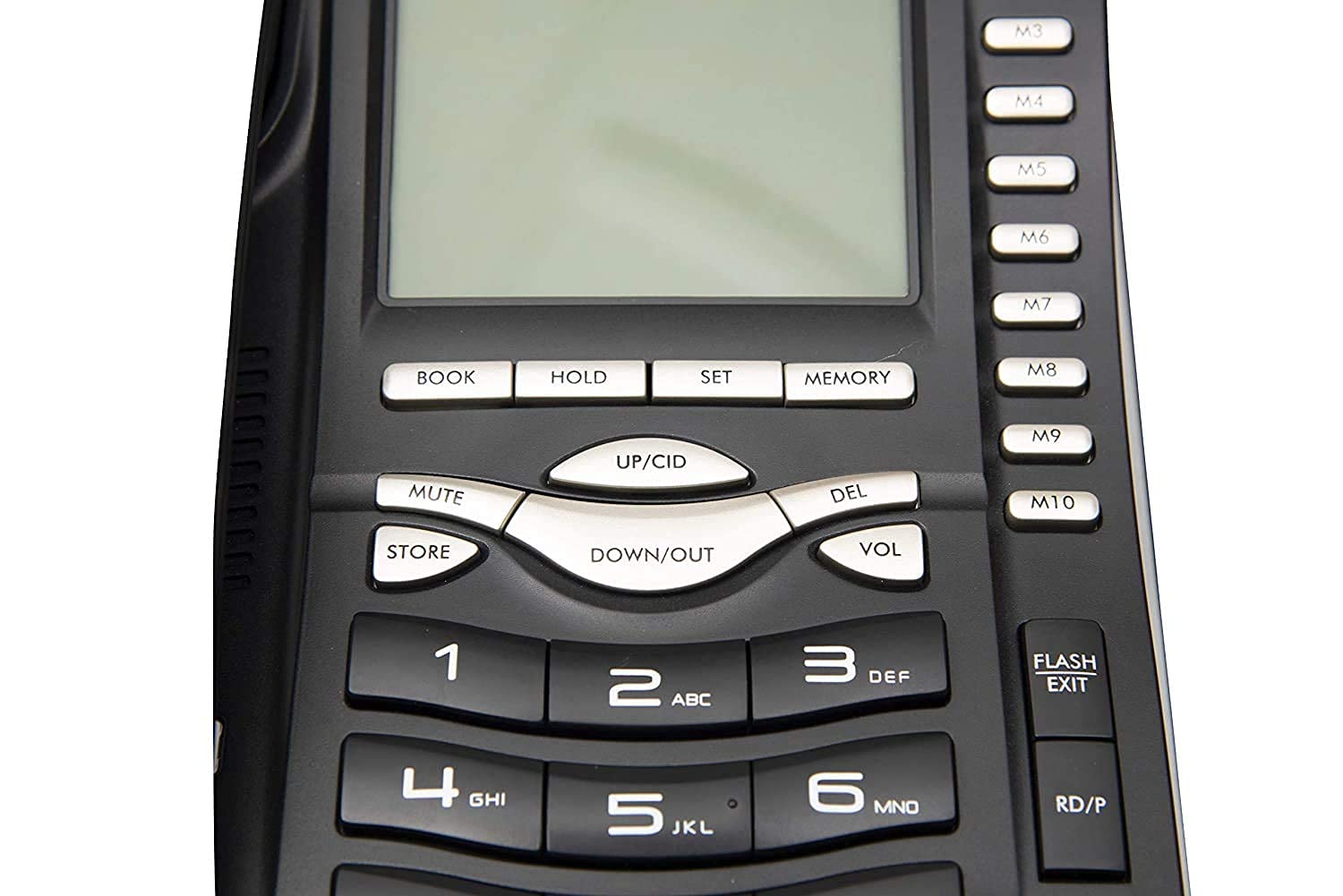
Figure 3: Close-up view of the Beetel M75N's keypad and LCD display, showing button labels and screen details.
Caller ID (CLI) and Call Logs
- Viewing Incoming Calls: Press UP/CID or DOWN/OUT to scroll through the incoming call list.
- Viewing Outgoing Calls: Press DOWN/OUT repeatedly to view outgoing call records.
- CLI Announcement: The phone will announce incoming numbers if this feature is enabled. Refer to settings for activation.
- Blacklist Function: To block unwanted numbers, navigate to the incoming call log, select the number, and follow the on-screen prompts or refer to the "Settings" section to add it to the blacklist.
Settings and Customization
- Setting Date and Time:
- Press SET.
- Use UP/CID or DOWN/OUT to navigate to the time/date setting.
- Use the keypad to enter values and SET to confirm.
- Ringing Tone Selection:
- Press SET.
- Navigate to the ringtone setting.
- Use UP/CID or DOWN/OUT to preview and select a tone.
- Press SET to confirm.
- Ringing Volume Adjustment: Press the VOL button during an incoming call or navigate through settings to adjust the ringing volume.
- LCD Contrast: Access this setting via the SET menu to adjust the display's contrast level.
- Alarm Clock: Set up to 5 alarms via the SET menu, choosing between daily or one-time activation.
- Electronic Lock: This feature prevents unauthorized outgoing calls. Activate and deactivate it through the SET menu, usually requiring a PIN.
Maintenance
- Cleaning: Use a soft, slightly damp cloth to clean the phone's surface. Avoid abrasive cleaners or solvents.
- Location: Place the phone on a stable surface, away from direct sunlight, heat sources, and moisture.
- Cord Care: Avoid tangling or stretching the handset and line cords excessively to prevent damage.
Troubleshooting
| Problem | Possible Solution |
|---|---|
| No dial tone. | Check if the line cord is securely connected to both the phone and the wall jack. Test with another phone if available. Contact your service provider if the issue persists. |
| Cannot make or receive calls. | Ensure the handset is properly seated. Check if the electronic lock is activated. Verify line cord connections. |
| Caller ID not displaying. | Ensure you have Caller ID service from your telephone provider. Check phone settings to ensure CLI display is enabled. |
| Display is blank or dim. | Adjust the LCD contrast setting in the menu. Ensure the phone is properly connected to the telephone line. |
| Ringing volume is too low/high. | Press the VOL button during an incoming call or adjust the ringing volume in the settings menu. |
Specifications
| Feature | Detail |
|---|---|
| Model Number | M75N |
| Product Dimensions | 28 x 15 x 5 cm |
| Item Weight | 860 g |
| Display | 16-digit large backlit LCD |
| Phonebook Memory | 99 numbers |
| Incoming Call Memory | 80 numbers |
| Outgoing Call Memory | 50 numbers |
| Speed Dial Memory | 10 one-touch, 10 two-touch |
| Ringtone Options | 8 normal, 10 music (18 total) |
| CLI Compatibility | FSK/DTMF Dual Mode |
| Power Source | Corded Electric (Line Powered) |
| Color | Black |
Warranty and Support
The Beetel M75N Corded Phone comes with a 12-month Beetel Warranty from the date of purchase. For warranty claims or technical support, please contact Beetel customer service. Keep your purchase receipt as proof of purchase.
For further assistance, please visit the official Beetel website or refer to the contact information provided with your product packaging.

