
1. Introduction
The YATO YT-8310 Battery Tester is a reliable tool designed for quick and accurate assessment of 6V and 12V lead-acid automotive batteries and their charging systems. This manual provides essential information for the safe and effective use of your battery tester.

Figure 1: YATO YT-8310 Battery Tester. This image shows the main unit of the battery tester, featuring a central analog display, a red load button, and attached red and black battery clamps.
2. Safety Information
Always observe the following safety precautions when using the battery tester:
- Eye Protection: Always wear ANSI-approved eye protection when working near batteries.
- Ventilation: Ensure adequate ventilation. Batteries can produce explosive gases.
- Avoid Sparks: Do not smoke or allow sparks or flames in the vicinity of the battery.
- Correct Polarity: Connect the clamps to the correct battery terminals (red to positive, black to negative). Incorrect connection can damage the tester or battery.
- Test Duration: Do not apply the load for more than 10 seconds to prevent overheating of the tester and battery. Allow a cool-down period between tests.
- Insulation: Ensure the tester's cables and clamps are not damaged and are properly insulated.
3. Package Contents
The YATO YT-8310 Battery Tester package typically includes:
- 1 x YATO YT-8310 Battery Tester unit with integrated cables and clamps.

Figure 2: Retail packaging of the YATO YT-8310 Battery Tester. The image displays the product box, showing the tester unit and key specifications like 6V/12V compatibility and CCA range.
4. Product Overview
Familiarize yourself with the components of your YATO YT-8310 Battery Tester:
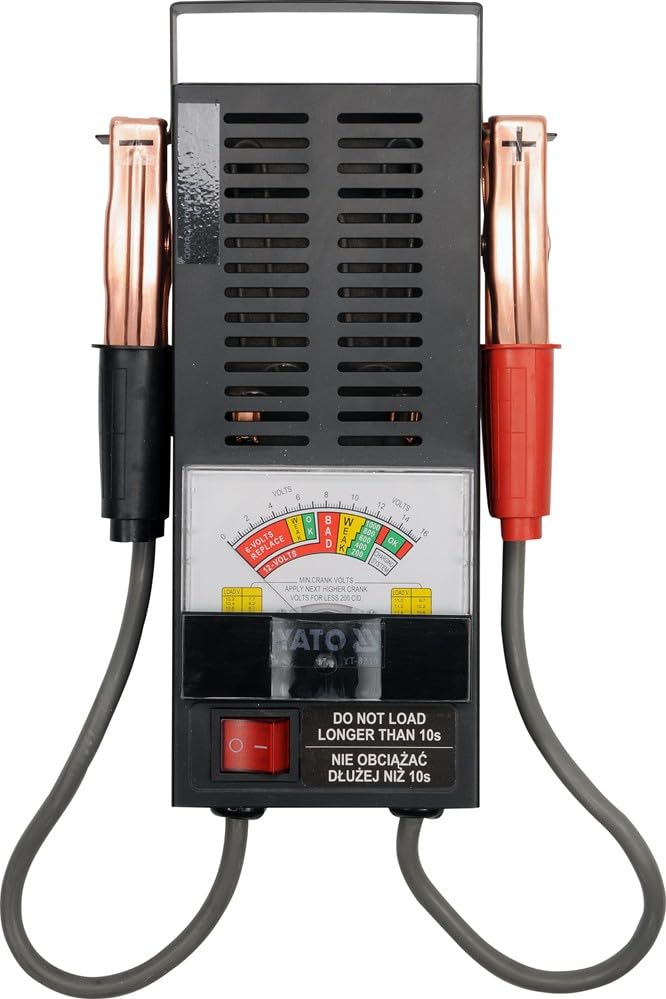
Figure 3: Front view of the YATO YT-8310. This image highlights the analog display with voltage and condition indicators, and the red load button at the bottom.
- Analog Display: Shows battery voltage, condition (Weak, OK, Bad), and charging system status.
- Load Button: Activates the load test. Press and hold for testing.
- Battery Clamps: Red for positive (+), Black for negative (-).
- Ventilation Slots: Located on the sides of the unit to dissipate heat during testing.
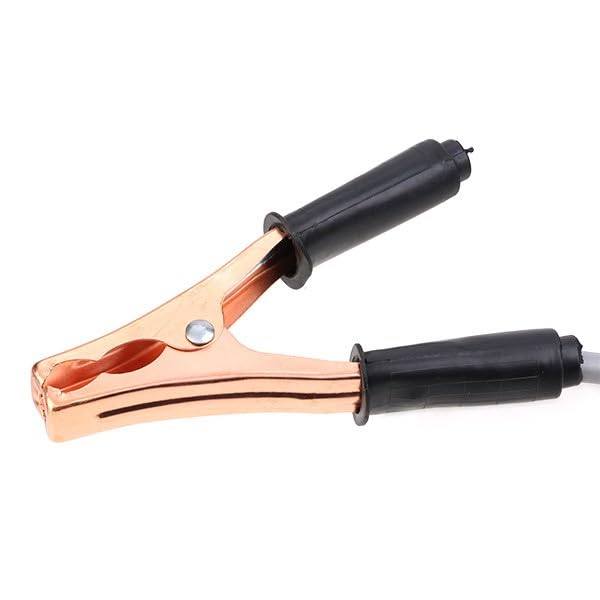
Figure 4: Close-up of a battery clamp. This image provides a detailed view of the robust, copper-plated battery clamp with its insulated handle, designed for secure connection to battery terminals.
5. Setup
Before performing any tests, ensure the battery terminals are clean and free of corrosion for accurate readings.
- Connect the Red Clamp: Attach the red positive (+) clamp to the positive (+) terminal of the battery.
- Connect the Black Clamp: Attach the black negative (-) clamp to the negative (-) terminal of the battery.
- Verify Connection: Ensure both clamps have a firm and secure connection to the battery terminals.
6. Operating Instructions
The YATO YT-8310 can perform two primary tests: a battery load test and a charging system test.
6.1. Battery Load Test
- Ensure the tester is correctly connected to the battery as described in Section 5.
- Press and hold the red load button on the front of the tester.
- Observe the analog display. The needle will drop and then stabilize.
- After no more than 10 seconds, release the load button.
- Interpret the results based on the display (see Section 7).
- Allow the tester to cool down for at least one minute before performing another load test.
6.2. Charging System Test
- Ensure the tester is correctly connected to the battery.
- Start the vehicle engine and let it idle.
- Observe the analog display. The needle should indicate a voltage within the "Charging System OK" range (typically around 13.5V to 14.5V for a 12V system).
- If the voltage is too low or too high, it may indicate an issue with the vehicle's alternator or voltage regulator.
7. Reading the Display and Results Interpretation
The analog display provides visual indications of battery and charging system health.
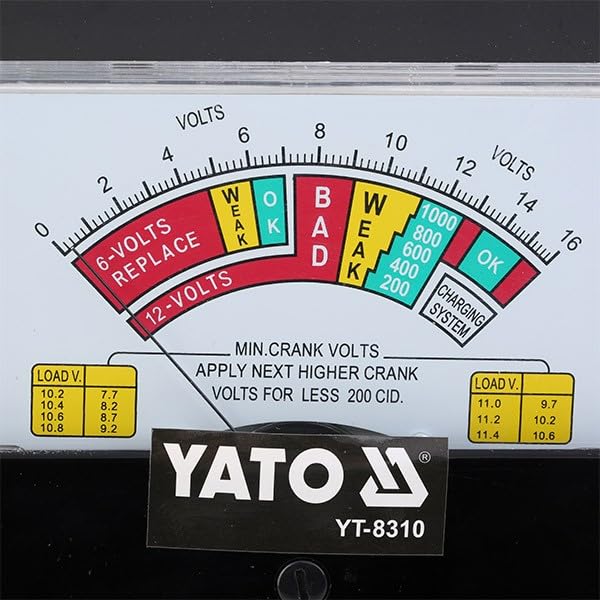
Figure 5: Detailed view of the analog display. This image clearly shows the voltage scale, the colored zones for battery condition (6-Volts Replace, Weak, OK, Bad), the CCA scale, and the 'Charging System OK' indicator.
- Voltage Scale (0-16 Volts): The top scale indicates the battery's voltage.
- Battery Condition Indicators:
- 6-Volts REPLACE (Red): Indicates a severely discharged or faulty 6V battery.
- WEAK (Yellow): Battery is weak and may need charging or replacement.
- OK (Green): Battery is in good condition.
- BAD (Red): Indicates a severely discharged or faulty 12V battery.
- CCA Scale (200-1000A): Provides an approximate indication of Cold Cranking Amps under load.
- Charging System OK: This section indicates if the vehicle's charging system is functioning correctly.
- MIN. CRANK VOLTS Table: This table provides reference values for minimum cranking volts. For example, if your battery's CCA is 200, and the voltage drops below 7.7V during cranking, it might indicate an issue.
8. Maintenance
To ensure the longevity and accuracy of your YATO YT-8310 Battery Tester:
- Cleaning: Wipe the unit with a dry, soft cloth after each use. Do not use abrasive cleaners or solvents.
- Storage: Store the tester in a clean, dry place, away from direct sunlight and extreme temperatures.
- Cable Inspection: Regularly inspect the cables and clamps for any signs of damage, fraying, or corrosion. Replace if necessary.
9. Troubleshooting
If you encounter issues with your battery tester, consider the following:
- No Reading/Inaccurate Reading:
- Ensure clamps are securely connected to clean battery terminals.
- Check for proper polarity (red to positive, black to negative).
- Verify the battery voltage is within the tester's operating range (6V or 12V).
- Tester Overheating:
- Ensure you are not holding the load button for more than 10 seconds.
- Allow sufficient cool-down time between tests.
10. Specifications
| Feature | Specification |
|---|---|
| Brand | Yato |
| Model Number | YT-8310 |
| Measurement Type | Ammeter (Load Tester) |
| Maximum Operating Voltage | 12 Volts |
| Power Source | Battery Powered (from tested battery) |
| Item Dimensions (L x W x H) | 31.6 x 18 x 9.7 cm |
| Item Weight | 967 grams |
| Color | Black |
| International Article Code | 05906083983108 |

