
1. Introduction
This manual provides comprehensive instructions for the installation, operation, maintenance, and troubleshooting of the Lowell CS6-SS Program Selector. The CS6-SS is a robust 6-source selector switch designed for industrial and commercial audio applications, allowing users to easily switch between multiple audio input sources. Please read this manual thoroughly before attempting to install or operate the device.
2. Safety Information
WARNING: To prevent fire or shock hazard, do not expose this appliance to rain or moisture. Do not open the casing; refer all servicing to qualified personnel.
- Always disconnect power before making any connections or performing maintenance.
- Ensure proper grounding to prevent electrical shock.
- Do not operate the device if it has been damaged in any way.
- Installation should be performed by qualified personnel in accordance with all local and national electrical codes.
3. Package Contents
Verify that all items are present in the package:
- Lowell CS6-SS Program Selector Unit
- Mounting Hardware (screws, washers, nuts)
- Instruction Manual (this document)
Note: The provided product data indicated "Funnel" as a package content, which is likely an error for this type of product. The above list reflects typical contents for a selector switch.
4. Setup and Installation
The Lowell CS6-SS is designed for panel mounting. Follow these steps for proper installation:
- Panel Preparation: Cut an appropriate opening in the mounting panel according to the dimensions provided in the specifications section. Ensure sufficient clearance for wiring at the rear of the unit.
- Mounting the Unit: Insert the CS6-SS unit into the prepared opening from the front of the panel. Secure it using the provided mounting hardware (screws, washers, and nuts) from the rear of the panel. Tighten securely but do not overtighten.
- Wiring Connections:
- Identify the input terminals for each of the 6 sources and the output terminals.
- Connect your audio input sources (e.g., CD player, tuner, microphone mixer) to the corresponding input terminals. Ensure correct polarity for balanced or unbalanced connections as required by your system.
- Connect the output terminals of the CS6-SS to your amplifier or distribution system.
- Ensure all connections are secure and properly insulated to prevent short circuits.
- Final Check: Before applying power to your audio system, double-check all wiring connections for correctness and security.
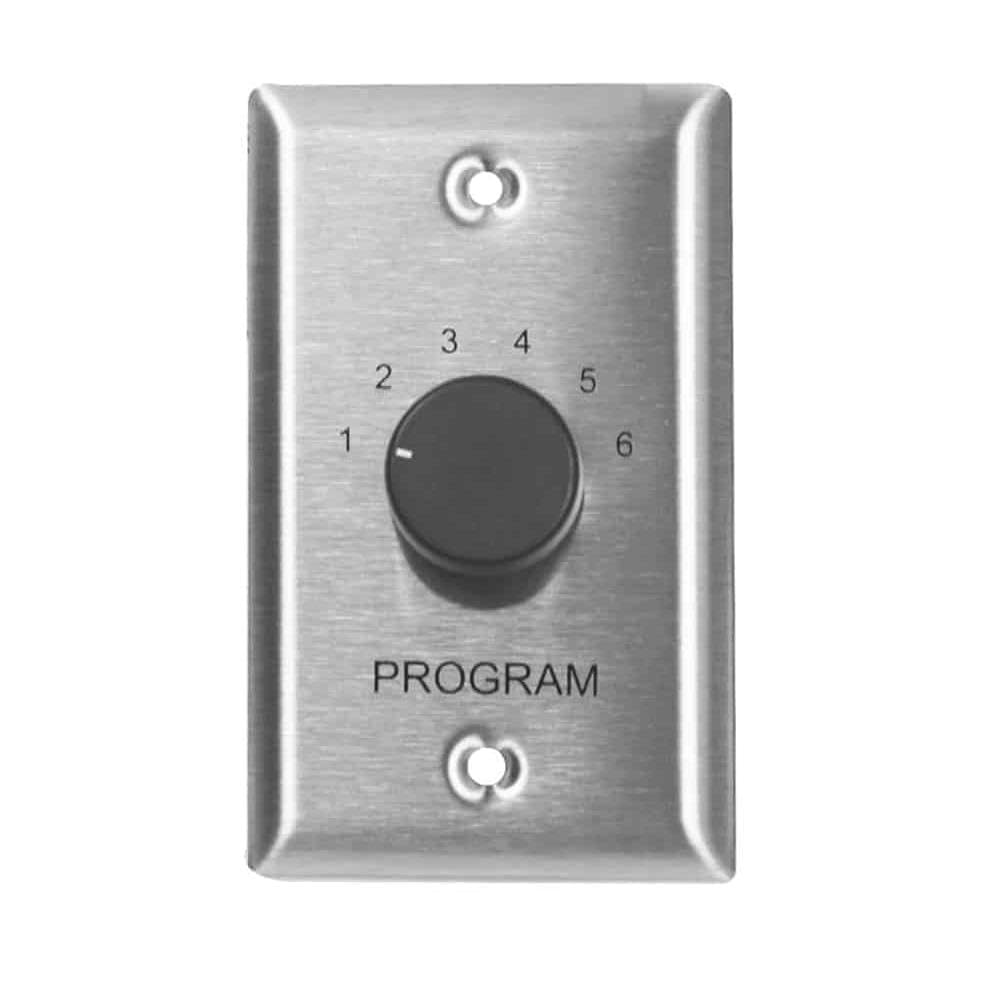
The image displays the front view of the Lowell CS6-SS Program Selector, featuring a rotary switch and input labels for up to six audio sources. This view is typical for panel mounting.
5. Operating Instructions
The Lowell CS6-SS Program Selector is straightforward to operate:
- Power On: Ensure your audio system, including the amplifier, is powered on.
- Source Selection: Rotate the front panel knob to select the desired audio input source (1 through 6). The knob will click into place for each selection, indicating a positive engagement.
- Audio Output: The audio signal from the selected source will be routed to the output terminals, and subsequently to your connected amplifier or distribution system.
- Changing Sources: To switch to a different source, simply rotate the knob to the new desired position.
Ensure that only one source is selected at a time to prevent signal interference or damage to connected equipment.
6. Maintenance
The Lowell CS6-SS Program Selector requires minimal maintenance to ensure long-term reliable operation.
- Cleaning: Periodically wipe the front panel with a soft, dry cloth to remove dust and grime. Do not use abrasive cleaners or solvents, as these may damage the finish.
- Inspection: Annually inspect all wiring connections at the rear of the unit to ensure they remain secure. Check for any signs of corrosion or wear on the terminals.
- Environmental Conditions: Ensure the unit is operated within its specified temperature and humidity ranges. Avoid exposure to excessive moisture or extreme temperatures.
7. Troubleshooting
If you encounter issues with your Lowell CS6-SS Program Selector, refer to the following troubleshooting guide:
| Problem | Possible Cause | Solution |
|---|---|---|
| No audio output from any source. | Incorrect wiring; amplifier off; faulty input source. | Verify all wiring connections. Ensure amplifier is powered on and functioning. Test input sources directly if possible. |
| Audio output from only one or some sources. | Incorrect wiring for specific sources; faulty input source. | Check wiring for the non-working sources. Test the specific input sources. |
| Distorted or noisy audio. | Poor connections; ground loop; faulty source. | Ensure all connections are tight. Check for proper grounding. Isolate and test input sources. |
| Knob does not turn smoothly or clicks. | Physical obstruction; internal damage. | Do not force the knob. If obstructed, inspect for external debris. If internal damage is suspected, contact support. |
If the problem persists after following these steps, please contact Lowell technical support for further assistance.
8. Specifications
| Feature | Detail |
|---|---|
| Model Number | CS6-SS |
| Brand | Lowell |
| Item Weight | 1 pound |
| Package Dimensions | 10 x 10 x 10 inches |
| Color | Stainless-Steel |
| Number of Sources | 6 |
| UPC | 811859033985 |
| Manufacturer | Lowell |
| First Available | October 16, 2012 |
9. Warranty Information
Lowell products are typically covered by a manufacturer's warranty against defects in materials and workmanship. Specific warranty terms and duration may vary. Please refer to the warranty card included with your product or visit the official Lowell Manufacturing website for detailed warranty information and registration procedures.
Retain your proof of purchase for warranty claims.
10. Customer Support
For technical assistance, service, or questions regarding your Lowell CS6-SS Program Selector, please contact Lowell Manufacturing customer support:
- Website: Visit the official Lowell Manufacturing website for FAQs, product documentation, and contact forms.
- Contact Information: Refer to the Lowell Manufacturing website or product packaging for current phone numbers and email addresses for customer service.
- When contacting support, please have your product model number (CS6-SS) and purchase date available.