
1. Introduction
This manual provides detailed instructions for the operation and maintenance of your Craig Electronics CR45365 AM/FM Projection Alarm Clock Radio. Please read this manual thoroughly before using the device to ensure proper function and to maximize your user experience. Keep this manual for future reference.
2. Safety Information
- Do not expose this unit to rain or moisture to prevent fire or shock hazards.
- Do not expose this unit to direct sunlight or extreme temperatures.
- Ensure proper ventilation; do not block ventilation openings.
- Use only the specified power adapter.
- Do not attempt to disassemble or modify the unit. Refer all servicing to qualified personnel.
- Dispose of batteries properly, following local regulations.
3. Product Overview
The Craig CR45365 is an AM/FM projection alarm clock radio designed to provide time, alarm, radio, and temperature functions. Key features include:
- Projection alarm clock
- LCD display with blue backlight
- Calendar and temperature display
- Wake to buzzer or music (7 built-in musical tunes)
- AM/FM radio tuner
3.1. Unit Components
Refer to the image below for a visual guide to the unit's components.
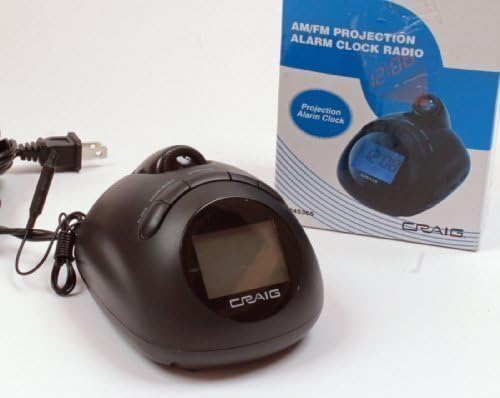
Figure 1: Craig Electronics CR45365 AM/FM Projection Alarm Clock Radio. This image shows the black clock radio unit next to its product box. The clock features a front-facing LCD display and a projection lens on its top surface. The power cord is connected to the unit.
While specific button labels are not provided, typical controls include:
- LCD Display: Shows time, date, and temperature.
- Projection Lens: Projects time onto a surface.
- Time Set Button: Used to adjust the main clock time.
- Alarm Set Button(s): Used to set alarm times and modes.
- Snooze/Light Button: Temporarily silences the alarm and activates backlight.
- Radio On/Off/Band Selector: Turns radio on/off and switches between AM/FM.
- Tuning Dial/Buttons: Adjusts radio frequency.
- Volume Control: Adjusts audio output level.
- Projection On/Off/Focus: Controls the projection feature and its clarity.
4. Setup
4.1. Power Connection
- Plug the AC power adapter into a standard wall outlet.
- Connect the other end of the adapter to the DC input jack on the back of the unit.
- The unit will power on, and the display may flash, indicating it's ready for time setting.
4.2. Battery Backup Installation
For memory retention during power outages, install backup batteries.
- Locate the battery compartment on the bottom of the unit.
- Open the battery compartment cover.
- Insert 3 AA batteries (not included), ensuring correct polarity (+/-).
- Close the battery compartment cover securely.
- Note: Batteries are for backup only and will not power the main functions of the clock radio.
5. Basic Operation
5.1. Setting the Time
- Press and hold the TIME SET button (or similar) until the time display flashes.
- Use the HOUR and MINUTE buttons (or +/- buttons) to adjust the hour and minute. Pay attention to AM/PM indicators.
- Press TIME SET again to confirm and exit time setting mode.
5.2. Setting the Date and Calendar
- Press the DATE SET button (or similar) to enter date setting mode. The year may flash.
- Use the adjustment buttons to set the year, month, and day.
- Press DATE SET repeatedly to cycle through and confirm each setting.
- The display will show the current date and day of the week.
5.3. Temperature Display
The unit automatically displays the indoor temperature. No specific setting is required for this feature.
6. Alarm Functions
The CR45365 features an alarm function with options to wake to a buzzer, radio, or built-in musical tunes.
6.1. Setting the Alarm Time
- Press and hold the ALARM SET button (or AL1/AL2 button) until the alarm time flashes.
- Use the HOUR and MINUTE buttons to set the desired alarm time.
- Press ALARM SET again to confirm the time.
6.2. Selecting Alarm Mode
- After setting the alarm time, press ALARM SET again to cycle through alarm modes: Buzzer, Radio, or Music.
- If selecting Radio, ensure the radio is tuned to your preferred station before the alarm activates.
- If selecting Music, the unit will play one of the 7 built-in musical tunes.
- The alarm icon will appear on the display, indicating the alarm is active.
6.3. Deactivating/Activating the Alarm
To turn the alarm off for the day, press the ALARM OFF button (or repeatedly press ALARM SET until the alarm icon disappears). To reactivate, follow the alarm setting steps.
6.4. Snooze Function
When the alarm sounds, press the SNOOZE button to temporarily silence it. The alarm will sound again after a few minutes (typically 9 minutes).
7. Radio Operation
7.1. Tuning the Radio
- Press the RADIO ON/OFF button to turn on the radio.
- Select the desired band (AM or FM) using the BAND switch or button.
- Use the TUNING dial or buttons to scan for your desired radio station.
- Adjust the VOLUME control to a comfortable listening level.
7.2. Antenna Adjustment
- For FM reception, extend the telescopic antenna fully.
- For AM reception, the unit has a built-in ferrite bar antenna. Rotate the unit for optimal reception.
8. Projection Feature
The CR45365 can project the time onto a wall or ceiling.
8.1. Activating and Adjusting Projection
- Locate the PROJECTION ON/OFF switch or button. Turn it to the "ON" position.
- Adjust the angle of the projection lens to direct the time display onto your desired surface (e.g., ceiling or wall).
- Rotate the FOCUS ring around the projection lens until the projected time is clear and sharp.
- Important Note: The projection clock may need to be set separately from the main LCD display clock. Refer to the specific instructions for setting the projection time, usually found near the projection controls. Ensure the unit is positioned correctly for the projection to appear right-side up.
9. Maintenance
- Cleaning: Wipe the unit with a soft, dry cloth. Do not use abrasive cleaners or solvents.
- Lens Care: Gently clean the projection lens with a soft, lint-free cloth if dust accumulates.
- Battery Replacement: Replace backup batteries annually or when the low battery indicator appears.
10. Troubleshooting
| Problem | Possible Cause | Solution |
|---|---|---|
| Unit does not power on. | Power adapter not connected or faulty outlet. | Ensure AC adapter is securely plugged into the unit and a working wall outlet. |
| LCD display is blank or dim. | Power issue or backlight setting. | Check power connection. Press the SNOOZE/LIGHT button to activate backlight. |
| Alarm does not sound. | Alarm not set, alarm volume too low, or alarm mode incorrect. | Verify alarm time and mode are set correctly. Increase volume if using radio alarm. Ensure alarm is activated (icon visible). |
| Radio reception is poor. | Antenna not extended/positioned correctly, or interference. | Extend FM antenna. Rotate unit for AM reception. Move away from other electronic devices. |
| Projected time is blurry. | Projection focus not adjusted. | Rotate the FOCUS ring on the projection lens until the image is clear. |
| Projected time is upside down. | Unit orientation or projection setting. | Adjust the unit's position or the projection lens angle. Some units may have a projection rotation setting. |
| Time/settings reset after power outage. | Backup batteries are dead or not installed. | Install fresh AA batteries in the backup compartment. |
11. Specifications
- Brand: Craig
- Model: CR45365
- Display Type: LCD with Blue Backlight
- Power Source: AC (Electrical Operation)
- Battery Backup: 3 AA batteries (not included)
- Features: AM/FM Radio, Projection Clock, Alarm, Calendar, Temperature Display
- Product Dimensions: 5 x 4 x 3.25 inches
- Item Weight: 1 pound
- Manufacturer: Craig Electronics
- UPC: 731398453658
12. Warranty and Support
For warranty information or technical support, please refer to the documentation included with your purchase or contact Craig Electronics customer service directly. Keep your proof of purchase for warranty claims.
For further assistance, visit the official Craig website or contact their support channels.


