
Introduction
The Aquascape AquaForce 4000-8000 GPH Adjustable Flow Solids-Handling Pond Pump is designed for use in ponds, pondless waterfalls, and other water features. This submersible pump features an asynchronous motor for energy efficiency, a protective pre-filter cage to handle solids up to 1/4-inch, and a remote control for wireless flow adjustment. Its robust design ensures reliable operation and reduced maintenance.
Important Safety Information
Read all instructions carefully before installation and operation. Failure to follow these instructions may result in electric shock, fire, or serious injury. Keep this manual for future reference.
- Always disconnect the pump from the power supply before handling or performing any maintenance.
- Ensure the power cord and plug are in good condition. Do not operate if damaged.
- Connect to a properly grounded, ground-fault circuit interrupter (GFCI) protected outlet.
- Do not run the pump dry. Ensure it is fully submerged in water during operation.
- Keep children and pets away from the pond and pump during operation.
- Do not use the pump for purposes other than those specified in this manual.
Setup and Installation
Follow these steps for proper installation of your AquaForce pump:
- Placement: Position the pump directly into the pond or water feature. The wide, flat base provides stability. For optimal water circulation, place the pump at the end opposite where water returns to the pond.
- Fittings Connection: Attach the appropriate hose fittings to the pump's discharge. The included rotational ball output allows for easy adjustment of the discharge position to direct water flow as needed. Secure all connections to prevent leaks.

Image: Side view of the Aquascape AquaForce pump, illustrating the output connection point.

Image: Close-up of hands adjusting the rotational ball output, which allows for easy direction of water flow.
- Power Connection: Route the 20-foot power cord to a GFCI-protected electrical outlet. Ensure the cord is not pinched or damaged.
- Smart Control Receiver: Connect the pump to the included Smart Control Receiver. This receiver enables wireless control of the pump via the Aquascape Smart Control App or its onboard controls. Refer to the Smart Control Receiver's separate instructions for pairing and app setup.

Image: Depiction of the Aquascape Smart Control App interface on multiple smartphones, showing various control options for pond devices.
Operation
Once installed and connected, the AquaForce pump is ready for operation.
- Power On: Plug the pump into the GFCI-protected outlet. The pump will begin operating.
- Adjustable Flow: Use the remote control or the Aquascape Smart Control App to adjust the water flow rate between 4000 and 8000 GPH. This allows customization of the water feature's sound and appearance.
- Solids Handling: The pump's protective pre-filter cage is designed to handle solids up to 1/4-inch in size, reducing the frequency of cleaning and preventing clogging.
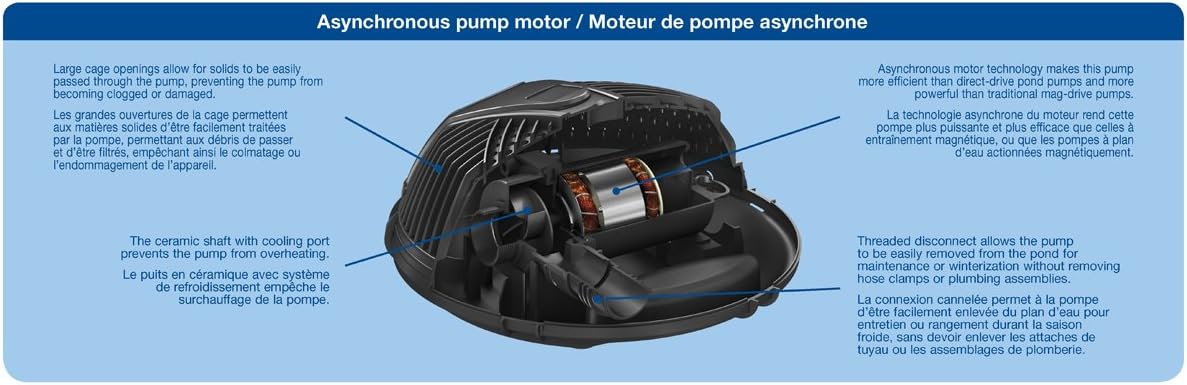
Image: The Aquascape AquaForce pump operating while submerged in a pond, circulating water.
Maintenance
Regular maintenance ensures optimal performance and longevity of your pump.
- Cleaning the Pre-Filter Cage: Periodically remove the pump from the pond and clean any debris accumulated on the pre-filter cage. Unclip the four clips that hold the two halves of the cage together to access the interior for thorough cleaning. Rinse with clean water.
- Impeller Inspection: The pump features a threaded disconnect for easy removal, allowing access to the impeller for inspection and cleaning without requiring hose clamps or plumbing assemblies. Ensure the impeller is free of debris and rotates smoothly.
- Oil-Free Design: This pump has an oil-free design, eliminating the need for lubrication.
- Winterization: In freezing conditions, remove the pump from the pond to prevent damage. Clean it thoroughly, allow it to air dry, and store it in a frost-free location.

Image: An exploded view diagram of the AquaForce pump, highlighting the asynchronous motor, ceramic shaft, and threaded disconnect for maintenance.
Troubleshooting
If you encounter issues with your AquaForce pump, refer to the following common problems and solutions:
| Problem | Possible Cause | Solution |
|---|---|---|
| Pump not running | No power; GFCI tripped; Impeller jammed | Check power connection; Reset GFCI; Disconnect power and clear impeller |
| Reduced water flow | Clogged pre-filter cage; Debris in impeller; Kinked hose | Clean pre-filter cage; Disconnect power and clear impeller; Inspect and straighten hose |
| Remote control not connecting/working | Receiver not paired; Battery low; Interference | Refer to Smart Control Receiver manual for pairing instructions; Replace remote battery; Reduce distance or interference sources |
| Pump making unusual noise | Debris in impeller; Pump running dry | Disconnect power and clear impeller; Ensure pump is fully submerged |
Specifications
| Feature | Detail |
|---|---|
| Model Number | 91104 |
| Flow Rate | 4000-8000 GPH (Adjustable) |
| Maximum Head Height | 28 feet |
| Power Source | AC |
| Wattage | 500-660 W |
| Cord Length | 20 feet |
| Product Dimensions (L x W x H) | 14" x 14" x 6.5" |
| Item Weight | 16.4 pounds |
| Material | Metal, Plastic |
| Solids Handling | Up to 1/4-inch |
Warranty Information
The Aquascape AquaForce 4000-8000 GPH Pond Pump is backed by a 3-year limited warranty. This warranty covers defects in materials and workmanship under normal use. Please retain your proof of purchase for warranty claims. For full terms and conditions, refer to the warranty documentation included with your product or visit the official Aquascape website.
Customer Support
For technical assistance, replacement parts, or further inquiries regarding your Aquascape AquaForce pump, please contact Aquascape customer support. Contact information can typically be found on the product packaging or the official Aquascape website.


