
Mr. Coffee BVMC-SJX36GT
Mr. Coffee BVMC-SJX36GT 12 Cup Programmable Coffeemaker Instruction Manual
Model: BVMC-SJX36GT
Introduction
Welcome to the Mr. Coffee BVMC-SJX36GT 12 Cup Programmable Coffeemaker instruction manual. This guide provides essential information for the safe and efficient operation, maintenance, and care of your new coffeemaker. Please read all instructions carefully before first use and retain this manual for future reference.

Image: Front view of the Mr. Coffee BVMC-SJX36GT 12 Cup Programmable Coffeemaker, showcasing its red and black design with the digital display and control panel.
Setup
Unpacking and Initial Cleaning
- Carefully remove all packaging materials and promotional labels from your coffeemaker.
- Wash the carafe, lid, and filter basket in warm, soapy water. Rinse thoroughly and dry.
- Wipe the exterior of the coffeemaker with a soft, damp cloth.
First Brew Cycle (Cleaning Cycle)
Before brewing coffee for consumption, perform a cleaning cycle to remove any manufacturing residues.
- Fill the water reservoir with 12 cups of clean water.
- Place an empty paper filter (or the reusable filter, if included) into the filter basket.
- Place the empty carafe with its lid on the warming plate.
- Press the 'Brew Now' button to start the cycle.
- Once the cycle is complete, discard the water from the carafe and the filter.
- Repeat this process once more with fresh water. Your coffeemaker is now ready for use.
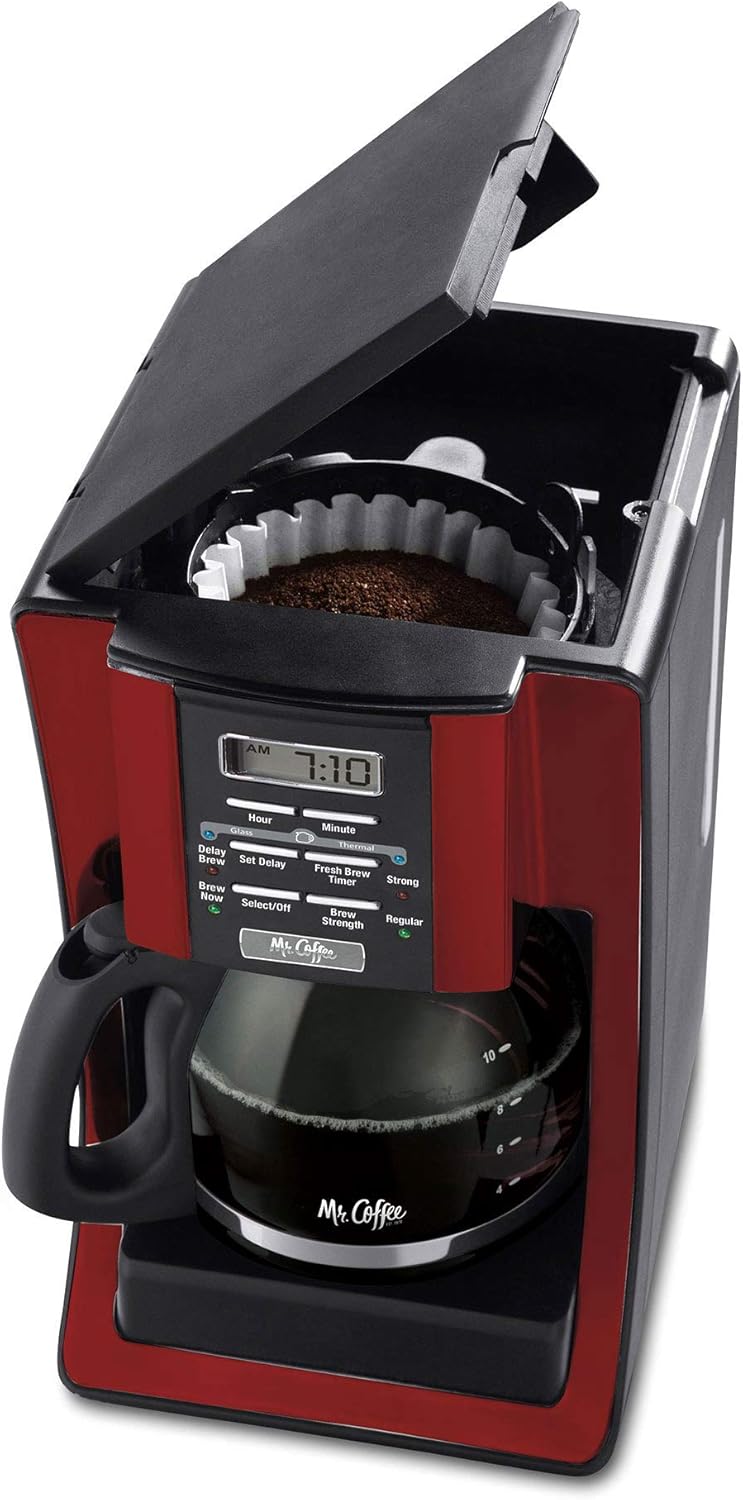
Image: Top view of the coffeemaker with the lid open, showing the water reservoir and the filter basket ready for coffee grounds and water.
Operating Instructions
Brewing Coffee
- Open the top lid and fill the water reservoir with the desired amount of fresh, cold water. Refer to the water level markings on the side of the coffeemaker.
- Insert a paper filter into the filter basket or ensure the reusable filter is properly seated.
- Add the desired amount of ground coffee to the filter. A general guideline is one tablespoon of coffee per cup of water, but adjust to your taste.
- Close the top lid securely.
- Place the empty carafe with its lid on the warming plate.
- Press the 'Brew Now' button to begin brewing. The 'Brew Now' indicator light will illuminate.
Programming Delay Brew
The delay brew feature allows you to set a specific time for your coffeemaker to start brewing automatically.
- Prepare the coffeemaker with water and coffee grounds as described in the 'Brewing Coffee' section.
- Press the 'Set Delay' button. The 'Delay Brew' indicator light will flash.
- Use the 'Hour' and 'Minute' buttons to set your desired brew time.
- Press the 'Set Delay' button again to confirm the setting. The 'Delay Brew' indicator light will remain illuminated, indicating the delay brew is active.
Adjusting Brew Strength
You can choose between 'Regular' and 'Strong' brew strengths.
- Before brewing, press the 'Brew Strength' button to toggle between 'Regular' and 'Strong'. The corresponding indicator light will illuminate.
Pause 'n Serve Feature
This feature allows you to pour a cup of coffee before the entire brewing cycle is complete.
- During the brewing cycle, you can temporarily remove the carafe to pour a cup. The brewing will pause automatically.
- Return the carafe to the warming plate within 20 seconds to prevent overflow and resume brewing.

Image: The Mr. Coffee BVMC-SJX36GT coffeemaker on a kitchen counter, with a full carafe of brewed coffee and a matching red mug beside it.
Maintenance
Daily Cleaning
- Always unplug the coffeemaker before cleaning.
- Discard used coffee grounds and paper filter.
- Wash the carafe, lid, and filter basket in warm, soapy water. These parts are top-rack dishwasher safe.
- Wipe the exterior surfaces with a soft, damp cloth. Do not use abrasive cleaners or scouring pads.
Decalcification (Mineral Deposit Removal)
Mineral deposits (calcium and lime) can build up in your coffeemaker over time, affecting its performance. Decalcify your coffeemaker every 80 brew cycles or monthly, depending on water hardness.
- Pour 4 cups of undiluted white household vinegar into the water reservoir.
- Place an empty paper filter in the filter basket and close the lid.
- Place the empty carafe with its lid on the warming plate.
- Press the 'Brew Now' button and allow half of the vinegar solution to brew into the carafe.
- Turn off the coffeemaker and let it soak for at least 30 minutes.
- Turn the coffeemaker back on and allow the remaining vinegar solution to brew through.
- Discard the vinegar solution and rinse the carafe and filter basket.
- Fill the water reservoir with 12 cups of fresh, clean water and run two full brew cycles to flush out any remaining vinegar.
Troubleshooting
| Problem | Possible Cause | Solution |
|---|---|---|
| Coffeemaker does not brew. | Not plugged in; 'Brew Now' not selected; Delay Brew active. | Ensure unit is plugged in. Press 'Brew Now'. Check if 'Delay Brew' is set. |
| Coffee is too weak or too strong. | Incorrect coffee-to-water ratio; Brew Strength setting. | Adjust coffee grounds amount. Select 'Strong' or 'Regular' brew strength. |
| Water overflows from filter basket. | Too much coffee grounds; filter not seated correctly; carafe not on warming plate. | Reduce coffee grounds. Ensure filter is properly placed. Confirm carafe is fully on warming plate. |
| Coffee tastes bad. | Unit needs cleaning; stale coffee; poor water quality. | Perform decalcification. Use fresh coffee. Use filtered water. |
Specifications
- Brand: Mr. Coffee
- Model: BVMC-SJX36GT
- Capacity: 12 Cups
- Color: Red
- Product Dimensions: 11.4"D x 18.3"W x 14.5"H
- Special Feature: Programmable, Thermal
- Coffee Maker Type: Drip Coffee Machine
- Operation Mode: Fully Automatic
- Coffee Input Type: Ground
- Item Weight: 6.9 pounds
- Date First Available: October 13, 2012

Image: Side view of the Mr. Coffee BVMC-SJX36GT coffeemaker with its depth, width, and height dimensions clearly labeled.
Warranty and Support
For detailed warranty information, please refer to the warranty card included with your product packaging or visit the official Mr. Coffee website. If you require technical assistance or have questions regarding your coffeemaker, please contact Mr. Coffee customer support.
- Online Support: Visit the Mr. Coffee Store on Amazon for product information and FAQs.
- Customer Service: Refer to your product documentation for specific contact numbers and hours of operation.
Related documentsBVMC-SJX36GT


Ask a question about this manual
Ask about setup, troubleshooting, compatibility, parts, safety, or missing instructions. Manuals+ will review the question and use this page’s manual context to help answer it.