
1. Introduction
This manual provides comprehensive instructions for the safe installation, operation, and maintenance of the WAC Lighting TK-103 Line Voltage Track Head. This fixture is designed for use with 120V J Track systems and includes an 8W GU10 LED bulb. Please read these instructions thoroughly before installation and retain them for future reference.
The TK-103LED-BK track head offers a sleek design and efficient lighting for various indoor applications. It features a GU10 lamp base, allowing for easy bulb replacement without specialized tools.
2. Safety Information
WARNING: Risk of electric shock. Disconnect power at the fuse or circuit breaker before installing or servicing. All electrical connections must be in accordance with local codes, ordinances, or the National Electric Code (NEC).
- Ensure the power supply is turned off before installation, removal, or maintenance.
- This product is intended for indoor use only in dry locations.
- Do not attempt to modify the fixture. Any modifications may void the warranty and create safety hazards.
- Consult a qualified electrician if you are unsure about the installation process.
- Do not exceed the maximum wattage specified for the bulb type.
- Keep flammable materials away from the light fixture.
Proposition 65 Warning: This product may contain chemicals known to the State of California to cause cancer and birth defects or other reproductive harm. For more information, go to www.P65Warnings.ca.gov.
3. Package Contents
- WAC Lighting TK-103 Line Voltage Track Head (JTK-103LED-BK)
- 8W GU10 LED Bulb (pre-installed)
- Installation Instructions
4. Specifications
| Feature | Specification |
|---|---|
| Model Number | JTK-103LED-BK |
| Brand | WAC Lighting |
| Color | Black |
| Material | Aluminum, Glass |
| Style | J Track |
| Power Source | AC |
| Voltage | 120 Volts |
| Light Source Type | LED |
| Bulb Base | GU10 |
| Wattage | 8 watts |
| Brightness | 470 Lumens |
| Color Temperature | 3000 Kelvin |
| Dimensions (Product) | 2.68 x 3.07 x 5.45 inches |
| Item Weight | 4.3 ounces |
| Horizontal Rotation | 350 degrees |
| Vertical Aiming | 90 degrees |
| Dimming | 100% - 1% (with compatible dimmer) |
| Certifications | UL & CUL listed for dry locations |

Figure 1: Technical dimensions of the TK-103 track head. The fixture measures approximately 5 7/16 inches in height, 3 1/16 inches in width, and 2 5/8 inches in depth.
5. Setup and Installation
The WAC Lighting TK-103 track head is designed for easy installation onto a 120V J Track system. Ensure the track system is properly installed and powered off before proceeding.
- Turn Off Power: Locate the circuit breaker or fuse box and turn off the power supply to the track lighting system. Verify power is off using a voltage tester.
- Identify Track Type: Confirm your track system is a J Track (also known as J2 or Juno track). This fixture is specifically designed for J Track configurations.
- Insert Track Adaptor: Align the track adaptor on the fixture with the track channel. The adaptor has a specific orientation; ensure the polarity tab aligns with the track's neutral conductor.
- Secure Fixture: Push the track head firmly into the track channel and rotate the adaptor's locking tab (if present) or twist the entire fixture clockwise until it locks securely into place. The fixture should make solid electrical contact with the track conductors.
- Adjust Aiming: Once secured, the fixture can be adjusted. It offers 350 degrees of horizontal rotation and 90 degrees of vertical aiming. Loosen the aiming screws, position the light as desired, and then tighten the screws to hold the position.
- Restore Power: Once all fixtures are installed and secured, restore power to the track lighting system at the circuit breaker.
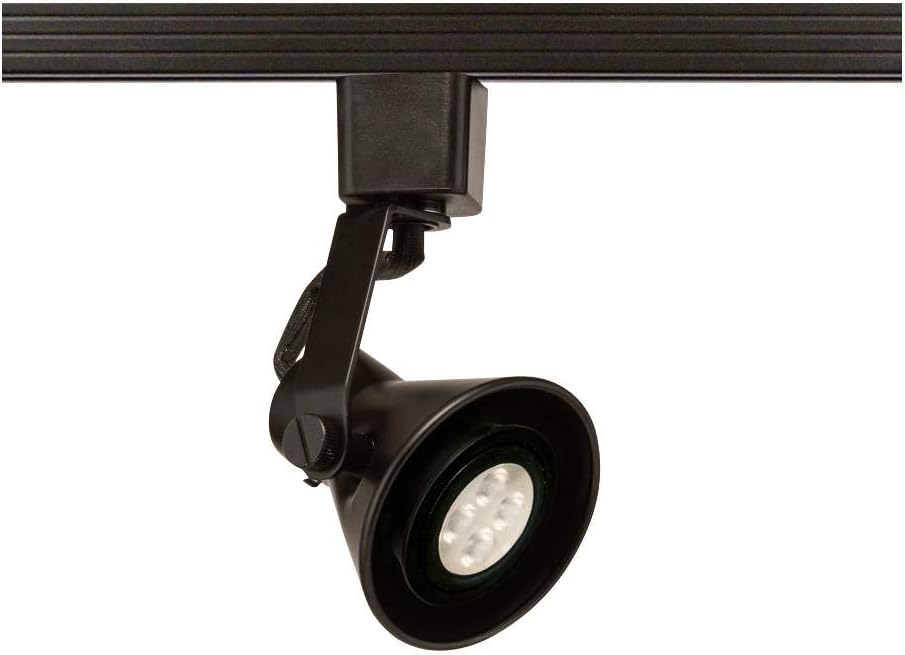
Figure 2: The WAC Lighting TK-103 track head installed on a compatible J track. The fixture is black with a black track adaptor and a visible LED bulb.
6. Operating Instructions
The TK-103 track head operates directly from the 120V track system. Once installed and power is restored, the light will illuminate when the track system is switched on.
- On/Off Control: The light is controlled by the wall switch connected to your track lighting system.
- Dimming: This LED fixture is designed for smooth and continuous dimming from 100% down to 1% when used with a compatible electronic low voltage (ELV) dimmer. Ensure your dimmer is suitable for LED loads.
- Aiming Adjustment: The fixture allows for precise light direction. Loosen the aiming screws to adjust the horizontal rotation (350 degrees) and vertical tilt (90 degrees) of the light head. Tighten the screws after adjustment to secure the position.
7. Maintenance
Regular maintenance ensures optimal performance and longevity of your track head.
- Cleaning: Disconnect power before cleaning. Wipe the fixture with a soft, dry cloth. Do not use abrasive cleaners or solvents, as they may damage the finish.
- Bulb Replacement: The GU10 LED bulb can be easily replaced from the front without the use of tools.
- Turn off power to the fixture.
- Gently twist and pull the existing GU10 bulb to remove it.
- Insert a new GU10 LED bulb (maximum 8W LED or 50W Halogen, if using the non-LED version) by aligning the pins and pushing it into the socket, then twisting slightly to secure.
- Restore power.
- Inspection: Periodically inspect the fixture and track for any signs of damage or loose connections. Address any issues promptly.
8. Troubleshooting
If you encounter issues with your WAC Lighting TK-103 track head, refer to the following common troubleshooting steps:
| Problem | Possible Cause | Solution |
|---|---|---|
| Light does not turn on. | No power to the track; loose connection; faulty bulb. | Check circuit breaker/fuse. Ensure fixture is securely seated in the track. Replace bulb. |
| Light flickers. | Incompatible dimmer; loose bulb; unstable power. | Ensure dimmer is LED compatible (ELV). Re-seat or replace bulb. Consult electrician for power issues. |
| Fixture is loose in track. | Not properly locked into place. | Ensure the track adaptor is fully inserted and twisted clockwise to lock. |
If the problem persists after attempting these solutions, contact WAC Lighting customer support or a qualified electrician.
9. Warranty and Support
Warranty: WAC Lighting provides a 5-year functional warranty and a 2-year finish warranty for this product. This warranty covers defects in materials and workmanship under normal use. Please retain your proof of purchase for warranty claims.
For warranty service or technical support, please visit the official WAC Lighting website or contact their customer service department. Contact information can typically be found on the WAC Lighting website or product packaging.
Manufacturer: WAC Lighting
Website: www.waclighting.com


