
1. Introduction
Thank you for purchasing the Absolute USPRO15BT 15-inch Active Powered Amplified Loudspeaker. This versatile speaker system is designed for professional audio applications, including PA, DJ, and karaoke, offering robust sound output and multiple connectivity options. This manual provides essential information for safe operation, setup, and maintenance of your new speaker.
2. Safety Instructions
To ensure safe operation and prolong the life of your USPRO15BT speaker, please observe the following precautions:
- Power Source: Connect the unit only to an AC power source within the specified voltage range. Ensure the power cord is not pinched or walked on.
- Ventilation: Do not block any ventilation openings. Install in accordance with the manufacturer's instructions.
- Water and Moisture: Do not expose this apparatus to rain or moisture. Do not place objects filled with liquids, such as vases, on the apparatus.
- Heat: Do not install near any heat sources such as radiators, heat registers, stoves, or other apparatus (including amplifiers) that produce heat.
- Cleaning: Clean only with a dry cloth. Unplug the unit from the power outlet before cleaning.
- Servicing: Do not attempt to service this product yourself. Refer all servicing to qualified service personnel. Servicing is required when the apparatus has been damaged in any way, such as power-supply cord or plug is damaged, liquid has been spilled or objects have fallen into the apparatus, the apparatus has been exposed to rain or moisture, does not operate normally, or has been dropped.
- Placement: Place the speaker on a stable, level surface to prevent tipping.
3. Product Features
The Absolute USPRO15BT speaker is equipped with the following key features:
- 2-Way 15-Inch Portable Active PA Speaker with 2500 Watts P.M.P.O. output.
- Integrated MP3 Player with built-in Bluetooth connectivity and an LCD Display.
- SD Card Slot and USB Connection for direct media playback.
- Equalizer (EQ) with Bass and Treble Level Controllers for sound customization.
- Equipped with a 1-Inch Titanium Dome Horn Driver for clear high frequencies.
4. Component Identification

Figure 4.1: Front View
This image displays the front of the USPRO15BT speaker, highlighting the 15-inch woofer and the horn driver for high frequencies. The robust grille protects the speaker components.

Figure 4.2: Rear Control Panel
This image shows the rear panel of the speaker, featuring the MP3 control and digital display, various input/output ports (XLR, RCA), volume controls, EQ knobs, USB and SD card slots, FM antenna, and the power input.
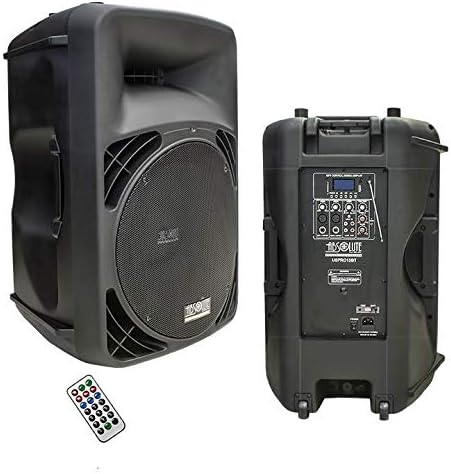
Figure 4.3: Speaker with Remote Control
A view of the speaker from the front and back, alongside the included remote control. The remote allows for convenient operation of the MP3 player and other functions from a distance.
5. Setup
- Unpacking: Carefully remove the speaker from its packaging. Retain the packaging for future transport or storage.
- Placement: Place the speaker on a stable, flat surface or mount it on a compatible speaker stand. Ensure adequate ventilation around the unit.
- Power Connection: Ensure the speaker's power switch is in the "OFF" position. Connect the supplied AC power cord to the speaker's power input on the rear panel, then plug the other end into a suitable AC power outlet.
- Initial Volume Setting: Before powering on, turn all volume knobs (Master, Mic, Line) to their minimum (counter-clockwise) position to prevent sudden loud sounds.
6. Operating Instructions
6.1 Power On/Off
After connecting the power cord, flip the power switch on the rear panel to the "ON" position. The LCD display will illuminate, indicating the unit is powered on.
6.2 Input Selection
Use the "MODE" button on the MP3 control panel (or remote) to cycle through available input sources: Bluetooth, FM Radio, USB, SD Card, and Line Input (Aux/RCA/XLR).
6.3 Bluetooth Connectivity
- Switch the speaker to Bluetooth mode using the "MODE" button. The LCD display will show "BLUETOOTH" or a similar indicator.
- On your Bluetooth-enabled device (smartphone, tablet, etc.), enable Bluetooth and scan for available devices.
- Select "USPRO15BT" from the list of found devices.
- Once paired, the speaker will emit a confirmation tone, and the display may indicate a successful connection.
- You can now play audio from your device through the speaker. Adjust volume on both your device and the speaker.
6.4 FM Radio Operation
- Switch the speaker to FM Radio mode using the "MODE" button.
- Extend the FM antenna on the rear panel for better reception.
- Press the "PLAY/PAUSE" button (or scan button on remote) to initiate an automatic scan for available FM stations. The speaker will save detected stations.
- Use the "PREV" and "NEXT" buttons to navigate through the saved stations.
6.5 USB/SD Card Playback
- Insert a USB flash drive into the USB port or an SD card into the SD card slot on the rear panel.
- The speaker should automatically switch to USB or SD mode and begin playing compatible audio files. If not, use the "MODE" button to select the correct source.
- Use the "PLAY/PAUSE", "PREV", and "NEXT" buttons on the control panel or remote to control playback.
6.6 Microphone and Line Inputs (Karaoke)
- Connect microphones to the XLR or 1/4" TRS microphone inputs.
- Connect external audio sources (e.g., mixer, CD player) to the RCA or XLR line inputs.
- Adjust the individual "MIC VOL" and "LINE VOL" knobs on the rear panel to set the desired levels for each input.
- Use the "MASTER VOL" knob to control the overall output volume of the speaker.
6.7 Equalizer (EQ) Adjustment
The speaker features Bass and Treble EQ controls on the rear panel. Rotate these knobs to adjust the low and high frequencies of the audio output to suit your preference or the acoustics of the environment.
7. Maintenance
- Cleaning: Use a soft, dry cloth to clean the exterior of the speaker. Do not use liquid cleaners or aerosols, as they may damage the finish or internal components.
- Storage: When not in use for extended periods, store the speaker in a cool, dry place, away from direct sunlight and extreme temperatures. It is recommended to use the original packaging for storage.
- Ventilation: Regularly check that the ventilation openings are clear of dust and debris to prevent overheating.
8. Troubleshooting
| Problem | Possible Cause | Solution |
|---|---|---|
| No power | Power cord not connected; Power outlet faulty; Power switch off. | Ensure power cord is securely plugged in; Test outlet with another device; Turn power switch to "ON". |
| No sound output | Master volume too low; Incorrect input selected; Source device volume too low; Cables not connected properly. | Increase Master Volume; Select correct input mode (Bluetooth, USB, Aux); Increase volume on source device; Check all audio cable connections. |
| Bluetooth not connecting | Speaker not in Bluetooth mode; Device too far; Device already connected to another speaker; Interference. | Ensure speaker is in Bluetooth mode; Move device closer to speaker; Disconnect from other devices; Reduce interference from other wireless devices. |
| Poor sound quality (e.g., no bass, distorted highs) | EQ settings incorrect; Source audio quality poor; Speaker overload/damage. | Adjust Bass and Treble EQ knobs; Try a different audio source; Reduce volume to prevent distortion. If issues persist, contact customer support. |
| USB/SD playback issues | Unsupported file format; Corrupted files; Drive/card not properly inserted. | Ensure audio files are in a supported format (e.g., MP3); Reformat or use a different USB drive/SD card; Reinsert the drive/card firmly. |
9. Specifications
| Feature | Detail |
|---|---|
| Model Number | USPRO15BT |
| Brand | Absolute USA |
| Mounting Type | Portable |
| Speaker Amplification Type | Active |
| Output Wattage | 2500 Watts P.M.P.O. |
| Number of Channels | 2 |
| Audio Input | XLR, RCA, Bluetooth, USB, SD Card |
| Connectivity Technology | Bluetooth, USB |
| Compatible Devices | MP3 Player, Smartphone |
| Item Weight | 40 Pounds (approx. 18.14 kg) |
| Product Dimensions (L x W x H) | 30 x 20 x 17 inches (approx. 76.2 x 50.8 x 43.2 cm) |
| UPC | 847169012525 |
10. Warranty and Support
For information regarding warranty coverage and terms for your Absolute USPRO15BT speaker, please refer to the warranty card included with your product or visit the official Absolute USA website. For technical support, troubleshooting assistance beyond this manual, or service inquiries, please contact Absolute USA Inc. customer service directly.
Note: Keep your purchase receipt as proof of purchase for warranty claims.