
Introduction
Thank you for choosing the LD Systems LDWSECO2X2R2 Double Receiver. This manual provides essential information for the safe and efficient operation of your device. Please read it thoroughly before use and keep it for future reference.
Important Safety Instructions
- Read these instructions: All safety and operating instructions should be read before the product is operated.
- Keep these instructions: The safety and operating instructions should be retained for future reference.
- Heed all warnings: All warnings on the product and in the operating instructions should be adhered to.
- Follow all instructions: All operating and use instructions should be followed.
- Do not use this apparatus near water: Do not use this product near water or moisture.
- Clean only with dry cloth: Unplug this product from the wall outlet before cleaning.
- Ventilation: Do not block any ventilation openings. Install in accordance with the manufacturer's instructions.
- Power Sources: Operate this product only from the type of power source indicated on the marking label.
- Servicing: Do not attempt to service this product yourself as opening or removing covers may expose you to dangerous voltage or other hazards. Refer all servicing to qualified service personnel.
Package Contents
Please check that all items listed below are included in your package:
- LD Systems LDWSECO2X2R2 Double Receiver Unit
- Power Adapter (12-18V DC, 300mA)
- User Manual (this document)
- Antennas (quantity may vary based on model variant)
Product Overview
The LD Systems LDWSECO2X2R2 is a double receiver designed for wireless audio transmission. It operates on frequencies 863.900 MHz and 864.900 MHz, providing reliable signal reception for professional audio applications.
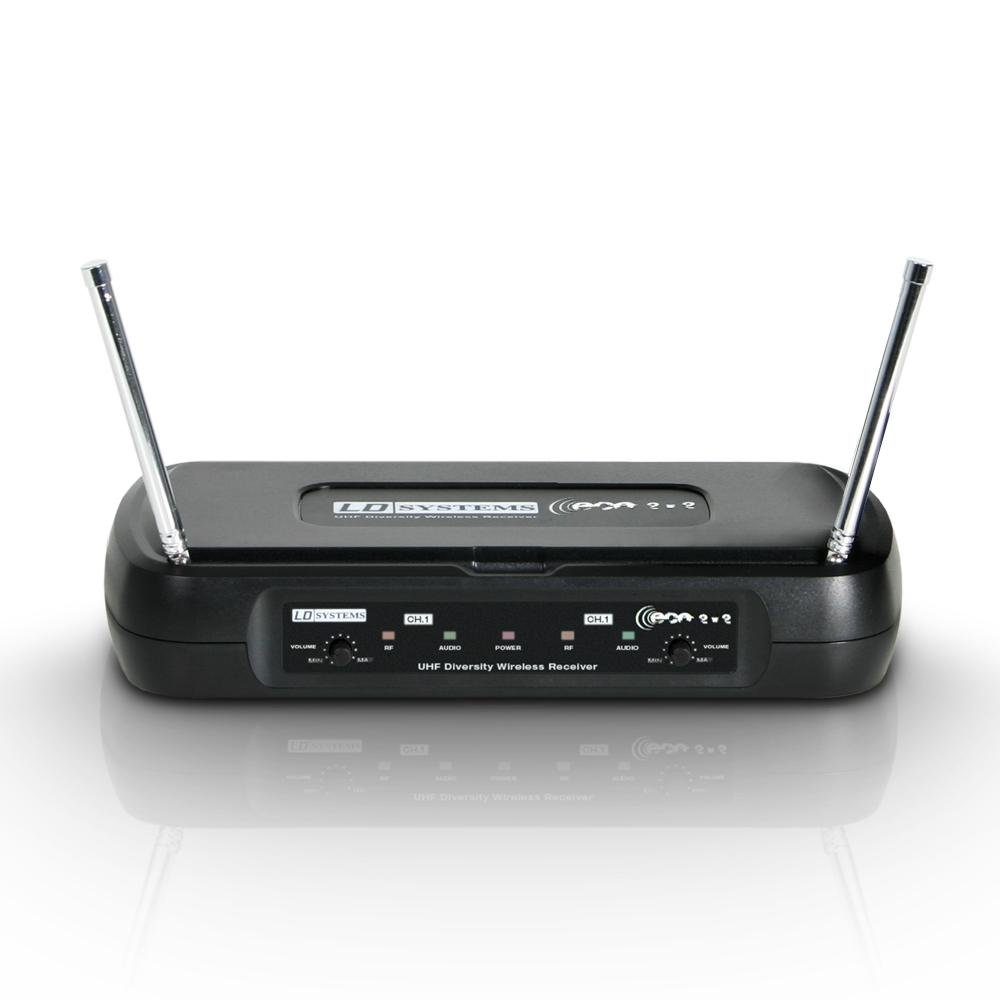
Image: Front view of the LD Systems LDWSECO2X2R2 Double Receiver, showing controls and display.
Front Panel Controls:
- Power Button: Turns the unit on or off.
- Channel Display: Shows the currently selected channel for each receiver.
- Volume Controls: Independent volume adjustment for each receiver channel.
- RF/AF Indicators: LEDs indicating RF signal presence and AF audio level.
Rear Panel Connections:
- Antenna Inputs: Connect the supplied antennas.
- Balanced XLR Outputs: For connecting to professional audio mixers or amplifiers.
- Unbalanced 1/4" Jack Outputs: Alternative audio output connections.
- DC Power Input: Connect the provided power adapter.
Setup Guide
Follow these steps to set up your LD Systems LDWSECO2X2R2 Double Receiver:
- Unpack the Receiver: Carefully remove all components from the packaging.
- Connect Antennas: Screw the supplied antennas onto the antenna inputs located on the rear panel. Ensure they are securely fastened.
- Position the Receiver: Place the receiver in a stable location, away from potential sources of interference (e.g., computers, Wi-Fi routers). Ensure good line-of-sight to the intended transmitter.
- Connect Audio Outputs:
- For balanced connections, use XLR cables to connect the receiver's XLR outputs to your mixer or amplifier.
- For unbalanced connections, use 1/4" jack cables to connect the receiver's 1/4" outputs to your audio equipment.
- Connect Power: Connect the provided DC power adapter to the receiver's DC power input. Plug the adapter into a suitable power outlet.
- Power On: Press the power button on the front panel to turn on the receiver. The display should illuminate.
- Pair with Transmitters: Refer to your transmitter's manual for instructions on how to pair it with the receiver. Ensure the transmitter and receiver are set to the same frequency/channel.
Operating Instructions
- Power On: Ensure both the receiver and your wireless transmitters are powered on.
- Check Signal: Observe the RF (Radio Frequency) indicator on the receiver. It should illuminate steadily when a signal from the paired transmitter is detected.
- Adjust Volume: Use the independent volume controls on the front panel to set the desired audio output level for each channel. Start with a low volume and gradually increase it to avoid sudden loud sounds.
- Monitor Audio: The AF (Audio Frequency) indicator will light up when audio is being received. Ensure your audio equipment (mixer, amplifier) is also properly configured to receive the signal.
- Channel Selection (if applicable): If your model supports manual channel selection, refer to the specific instructions for changing frequencies to avoid interference. The LDWSECO2X2R2 operates on fixed frequencies 863.900 MHz and 864.900 MHz.
- Power Off: When finished, power off your transmitters first, then power off the receiver.
Maintenance
- Cleaning: Disconnect the power before cleaning. Use a soft, dry cloth to wipe the exterior of the receiver. Do not use liquid cleaners or aerosol sprays.
- Storage: When not in use for extended periods, store the receiver in a cool, dry place, away from direct sunlight and extreme temperatures.
- Antennas: Ensure antennas are not bent or damaged. Replace if necessary to maintain optimal signal reception.
- Power Adapter: Regularly inspect the power adapter and cable for any signs of damage. Do not use a damaged adapter.
Troubleshooting
| Problem | Possible Cause | Solution |
|---|---|---|
| No power | Power adapter not connected or faulty. | Ensure power adapter is securely connected to the receiver and a working power outlet. Check the adapter for damage. |
| No audio output |
|
|
| Poor audio quality / Interference |
|
|
Specifications
| Feature | Detail |
|---|---|
| Model | LDWSECO2X2R2 |
| Brand | LD Systems |
| Frequency Range | 863.900 MHz / 864.900 MHz |
| Frequency Response | 60 - 16,000 Hz |
| Audio Output Level (balanced) | 250 mV |
| Power Supply | 12 ~ 18 V DC, 300 mA |
| Number of Channels | 2 |
| Control Type | Manual Control |
| Dimensions (Package) | 53.4 x 28 x 9.2 cm |
| Weight (Item) | 500 g |
| International Article Code (EAN) | 04049521138928 |
Warranty and Support
LD Systems products are designed for reliability and performance. For specific warranty information, please refer to the warranty card included with your product or visit the official LD Systems website. For technical support, troubleshooting assistance beyond this manual, or spare parts inquiries, please contact your local dealer or the LD Systems customer service department.
Note: Information regarding spare parts availability is not provided in the product details.


