
Introduction
This instruction manual provides essential information for the setup, operation, maintenance, and troubleshooting of your Redi-Remote replacement remote control. This remote is specifically designed to be compatible with Jensen VM9021TS Main units, model number 3070127. It is a custom-built replacement and not an original Jensen product.
Product Overview
The Redi-Remote replacement control offers full functionality for your Jensen VM9021TS Main unit. It is designed for ease of use and immediate operation without complex programming.
- Redi-Remotes are designed to control the specific unit they are intended for and cannot be programmed for auxiliary devices.
- The remote measures approximately 7.5 inches (L) x 2.25 inches (W) x 0.75 inches (H).
- This remote does not feature laser pointers or LED lights.
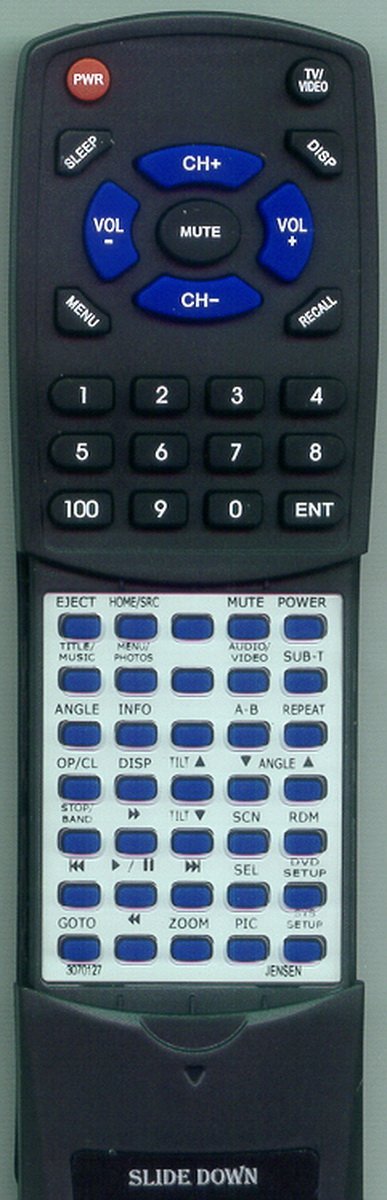
- A sliding cover conceals the lower half of the buttons, which can be revealed by sliding it down.
Setup
Your Redi-Remote is designed to work immediately with your Jensen VM9021TS Main unit without any programming. Simply install the batteries to begin use.
Battery Installation
- Locate the battery compartment on the back of the remote control.
- Slide the battery compartment cover downwards or press the latch and lift to open.
- Insert four (4) AAA batteries, ensuring the positive (+) and negative (-) terminals align correctly with the markings inside the compartment. Four AAA batteries are included with your remote.
- Replace the battery compartment cover, ensuring it clicks securely into place.
The remote is now ready for use.
Operating Instructions
To operate your Jensen VM9021TS Main unit with the Redi-Remote, point the remote directly at the unit and press the desired function button.
Basic Operation
- Ensure there are no obstructions between the remote control and the Jensen unit.
- Press the 'Power' button to turn the unit on or off.
- Use the 'Volume Up' and 'Volume Down' buttons to adjust the audio level.
- Navigate through menus and selections using the directional arrow buttons and the 'Enter' or 'OK' button.
- For additional functions, slide down the cover on the lower half of the remote to access more buttons.
Refer to your Jensen VM9021TS Main unit's original manual for specific functions and their corresponding buttons.
Maintenance
Proper care and maintenance will ensure the longevity and optimal performance of your remote control.
Cleaning
- Wipe the remote control with a soft, dry cloth.
- Do not use abrasive cleaners, solvents, or chemical sprays, as these can damage the remote's surface or internal components.
Battery Replacement
- When the remote's range decreases or buttons become unresponsive, it is likely time to replace the batteries.
- Always replace all four (4) AAA batteries at the same time. Do not mix old and new batteries, or different types of batteries.
- Dispose of used batteries according to local regulations.
Troubleshooting
If you experience issues with your remote control, please refer to the following common problems and solutions:
| Problem | Possible Cause | Solution |
|---|---|---|
| Remote not responding | Dead or incorrectly installed batteries | Replace batteries with new AAA batteries, ensuring correct polarity. |
| Remote has short range | Weak batteries | Replace batteries with new AAA batteries. |
| Remote not controlling unit | Obstruction between remote and unit; remote not pointed correctly | Ensure a clear line of sight to the Jensen unit. Point the remote directly at the unit. |
| Some buttons not working | Sliding cover is not fully open | Slide down the cover on the lower half of the remote to reveal all buttons. |
Specifications
| Feature | Detail |
|---|---|
| Brand | Redi-Remote |
| Model Number | RT3070127 |
| Compatible Devices | Jensen VM9021TS Main (3070127) Car DVD Receiver |
| Connectivity Technology | Infrared |
| Special Feature | Ergonomic design |
| Maximum Number of Supported Devices | 1 |
| Button Quantity | 58 |
| Controller Type | Button Control |
| Maximum Range | 20 Feet |
| Batteries Required | 4 AAA batteries (included) |
| Item Weight | 4.5 Ounces |
| Item Dimensions (L x W x H) | 7.5" x 2.25" x 0.75" |
Warranty and Support
For specific warranty information regarding your Redi-Remote replacement control, please refer to the documentation provided at the time of purchase or contact the seller directly. As a custom-built replacement, warranty terms may vary.
Customer Support
If you encounter any issues or have questions about your Redi-Remote after purchase, it is recommended to contact the seller or manufacturer for assistance. They can provide specialized support for your specific replacement remote control.