
Introduction
This manual provides instructions for the Redi-Remote replacement remote control, designed to operate specific Technics audio system models. This remote is a custom-built replacement and is not an original Technics product. It is engineered to perform all functions of the original remote for the compatible units.
Compatible Technics Models:
- RAKSA008MH
- SCS2450
- SAGX350
- SDS2400
- RAKSA006MH
Key Features:
- No programming required; ready to use with compatible units.
- Measures approximately 7.5 inches (L) x 2.25 inches (W) x 0.75 inches (H).
- Operates via infrared technology.
- Does not include laser pointers or LED lights.
- Cannot be programmed to control auxiliary devices.
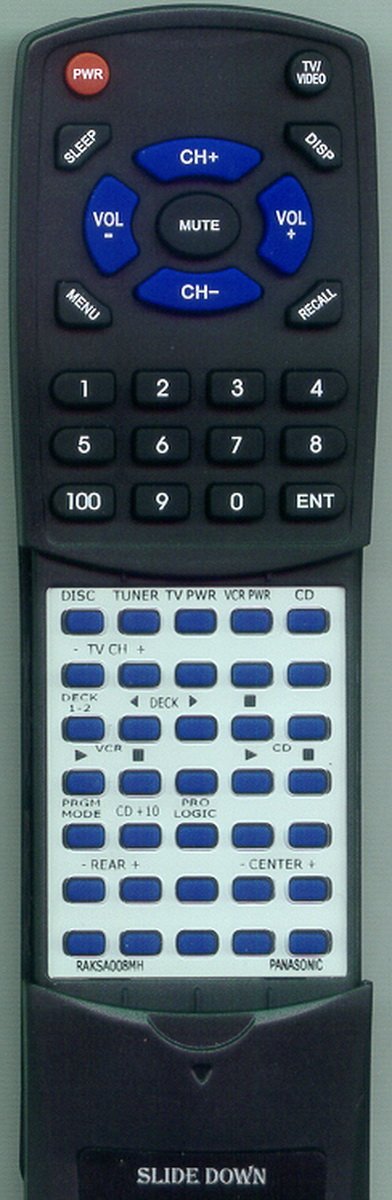
Image of the Redi-Remote replacement remote control, showing its full layout and design.
Setup
Battery Installation
- Locate the battery compartment on the back of the remote control.
- Slide open the battery compartment cover.
- Insert four (4) AAA batteries, ensuring correct polarity (+ and -) as indicated inside the compartment.
- Close the battery compartment cover securely.
The remote control comes with batteries included.
Initial Use
This Redi-Remote replacement control requires no programming. Once batteries are installed, it is ready for immediate use with your compatible Technics audio system.
Operating Instructions
Point the remote control directly at your Technics audio system. The maximum effective range is approximately 20 feet.
Button Functions
The remote features 58 buttons, providing comprehensive control over your compatible Technics unit. A cover is present over the lower half of the remote. Slide this cover down to access additional buttons and functions.
Refer to your Technics audio system's original manual for specific functions of each button if you are unfamiliar with them. Common functions include:
- Power: Turns the unit on or off.
- Volume Up/Down: Adjusts the audio output level.
- Mute: Silences the audio output.
- Input/Source Selection: Switches between different audio inputs (e.g., CD, Tuner, Aux).
- Playback Controls: Play, Pause, Stop, Fast Forward, Rewind, Skip Track (for CD players).
- Numeric Keypad: For direct track selection or tuner presets.
Maintenance
Battery Replacement
Replace all four AAA batteries when the remote's performance diminishes or it stops responding. Always replace with new, high-quality AAA batteries. Do not mix old and new batteries, or different types of batteries.
Cleaning
To clean the remote control, use a soft, dry cloth. For stubborn dirt, lightly dampen the cloth with water. Avoid using harsh chemicals, abrasive cleaners, or excessive moisture, as these can damage the remote's surface or internal components.
Troubleshooting
- Remote not responding:
- Check if the batteries are correctly installed with the proper polarity.
- Replace old batteries with new ones.
- Ensure there are no obstructions between the remote and the audio system's infrared receiver.
- Verify that the remote is pointed directly at the audio system.
- Some functions do not work:
- While this remote is designed to replicate all original functions, some specific or less common functions (e.g., certain VCR options if your system is configured in a unique way) may not be fully supported.
- Ensure the sliding cover is fully open to reveal all buttons.
- Confirm your Technics unit is one of the explicitly listed compatible models.
- Short operating range:
- Replace batteries.
- Ensure no strong light sources (like direct sunlight) are interfering with the infrared signal.
Specifications
| Brand | Redi-Remote |
| Model Number | RTRAKSA008MH |
| Compatible Devices | Technics Stereo System (Models: RAKSA008MH, SCS2450, SAGX350, SDS2400, RAKSA006MH) |
| Connectivity Technology | Infrared |
| Special Feature | No Programming Required |
| Maximum Number of Supported Devices | 1 |
| Button Quantity | 58 |
| Maximum Range | 20 Feet |
| Batteries Required | 4 AAA batteries (included) |
| Item Weight | 4.5 Ounces |
| Item Dimensions (L x W x H) | 7.5" x 2.25" x 0.75" |
Warranty Information
Specific warranty details for this Redi-Remote replacement control are not available in the provided product data. Please refer to the seller's return policy or contact the manufacturer, Redi-Remote, directly for warranty inquiries.
Support
For further assistance or if you have concerns regarding the remote control after purchase, please contact the seller, RemotesPro, or the manufacturer, Redi-Remote. Contact information can typically be found on your purchase receipt or the seller's platform page.