
1. Introduction and Overview
This document provides instructions for the Redi-Remote replacement remote control, specifically designed for the Digital Labs DT191SA unit. This is a custom-built replacement remote and is not an original Digital Labs product. It is engineered to perform all functions for the specified DT191SA unit without requiring any programming.
Important Note: Redi-Remotes are designed to control the specific unit they are made for and cannot be programmed to control any auxiliary devices, such as a television set directly. This remote does not feature laser pointers or LED lights.
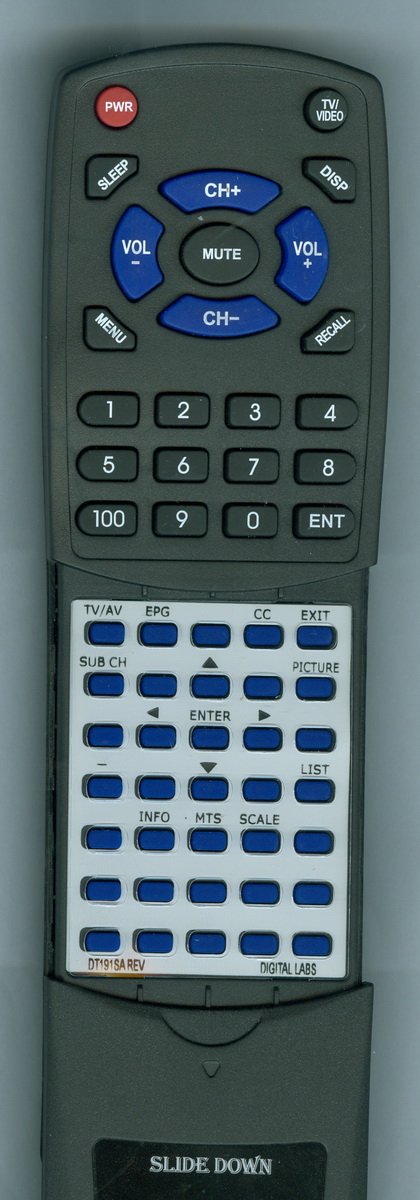
Image 1.1: The Redi-Remote Replacement Remote Control for Digital Labs DT191SA. This image displays the front view of the remote control, highlighting its button layout and ergonomic design.
The remote features a sliding cover over its lower half. This cover can be slid down to reveal additional buttons for extended functionality.
2. Setup
2.1 Battery Installation
The remote control requires four (4) AAA batteries, which are included with the product. To install the batteries:
- Locate the battery compartment cover on the back of the remote control.
- Slide the cover downwards or press the latch (if present) to open the compartment.
- Insert four AAA batteries, ensuring the positive (+) and negative (-) terminals align correctly with the markings inside the compartment.
- Replace the battery compartment cover by sliding it back into place until it clicks securely.
Once batteries are installed, the remote is ready for use with your Digital Labs DT191SA unit.
3. Operating Instructions
This Redi-Remote is pre-programmed to operate your Digital Labs DT191SA unit immediately after battery installation. No additional setup or code entry is required.
3.1 Basic Functions
- Power: Press the POWER button to turn the DT191SA unit on or off.
- Channel Selection: Use the CHANNEL UP/DOWN buttons to navigate through channels or inputs on your DT191SA. Numeric buttons can be used for direct channel entry.
- Volume Control: Adjust the audio output of the DT191SA using the VOLUME UP/DOWN buttons.
- Menu Navigation: Access and navigate the DT191SA's on-screen menu using the MENU, ARROW, and OK/ENTER buttons.
3.2 Accessing Lower Buttons
To access additional functions, slide the cover located on the lower half of the remote control downwards. This will reveal a set of secondary buttons for advanced operations specific to the Digital Labs DT191SA.
4. Maintenance
4.1 Cleaning the Remote
To clean your remote control, use a soft, dry cloth. For stubborn dirt, lightly dampen the cloth with water or a mild, non-abrasive cleaner. Avoid using harsh chemicals or excessive moisture, as these can damage the remote's electronics or finish.
4.2 Battery Replacement
Replace batteries when the remote's performance diminishes or if it stops responding. Always replace all four AAA batteries at the same time with new ones. Do not mix old and new batteries, or different types of batteries, as this can lead to leakage or improper operation. Dispose of used batteries according to local regulations.
5. Troubleshooting
- Remote is not responding:
- Ensure there is a clear line of sight between the remote and the Digital Labs DT191SA unit.
- Check the batteries. Replace them if they are old or incorrectly inserted.
- Verify that the DT191SA unit is powered on.
- Remote does not turn on the TV:
- This Redi-Remote is designed exclusively for the Digital Labs DT191SA unit. It is not a universal remote and cannot directly control a television set. Please use your television's original remote control to power on the TV.
- Once your TV is on and set to the correct input for the DT191SA, this remote will control the functions of the DT191SA unit.
- Some buttons are not working:
- Ensure the sliding cover is fully open if you are trying to use the lower-half buttons.
- Clean the remote control, especially around the buttons, to remove any debris that might be obstructing them.
- Replace the batteries.
6. Specifications
| Model Number | RTDT191SA |
| Product Dimensions | 7 x 2.5 x 1 inches (17.8 x 6.4 x 2.5 cm) |
| Item Weight | 4.5 ounces (127.6 grams) |
| Batteries Required | 4 x AAA (included) |
| Connectivity Technology | Infrared (IR) |
| Max Number of Supported Devices | 1 (Digital Labs DT191SA) |
| Special Feature | No Programming Required |
7. Warranty Information
Specific warranty details for this Redi-Remote product are not provided within this manual. For information regarding warranty coverage, terms, and conditions, please refer to the product packaging or contact the manufacturer directly.
8. Support
Should you encounter any issues or have questions regarding your Redi-Remote replacement control for Digital Labs DT191SA, please contact the seller or manufacturer for assistance. The manufacturer is Redi-Remote.