
Redi-Remote RTBZ684424
Instruction Manual
Redi-Remote Replacement Remote Control
Model: RTBZ684424
1. Overview
This manual provides instructions for the Redi-Remote replacement remote control, designed for specific Toshiba VCR units. This remote is a custom-built replacement and is not an original Toshiba product. It is engineered to perform all essential functions for the compatible Toshiba models without requiring additional programming.
2. Product Diagram
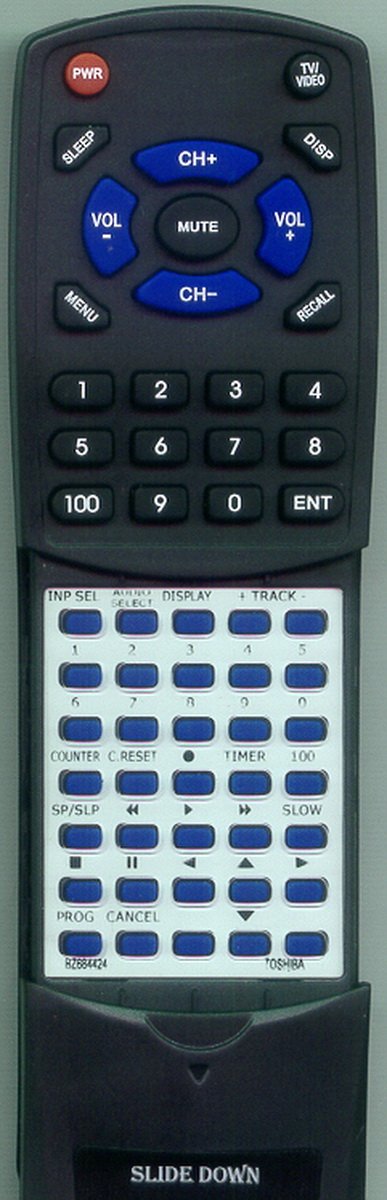
Figure 2.1: Redi-Remote Replacement Remote Control
The image displays the Redi-Remote replacement remote control. It is black with blue and red buttons. The upper section features power, volume, channel, mute, menu, TV/Video, display, and recall buttons, along with a numeric keypad (0-9, 100, ENT). The lower section, which is revealed by sliding down a cover, contains additional function buttons for input selection, counter reset, timer, playback controls (play, pause, fast forward, rewind), and program/cancel buttons. The model number BZ684424 is visible on the lower section.
3. Setup
3.1 Battery Installation
The remote control requires four (4) AAA batteries, which are included with the product. Follow these steps to install the batteries:
- Locate the battery compartment on the back of the remote control.
- Slide open the battery compartment cover.
- Insert the four AAA batteries, ensuring the positive (+) and negative (-) terminals align correctly with the indicators inside the compartment.
- Close the battery compartment cover securely.
3.2 Initial Use
This Redi-Remote replacement control is designed for immediate use with compatible Toshiba VCR models. No programming or code entry is required. Simply install the batteries, and the remote is ready to operate your device.
4. Operating Instructions
The remote control features two main sections: an upper panel with frequently used buttons and a lower panel with advanced functions, accessible by sliding down the cover.
4.1 Upper Panel Functions
- PWR (Power): Turns the connected Toshiba VCR unit on or off.
- SLEEP: Activates the sleep timer function on the VCR.
- TVI/VIDEO: Switches between TV and Video input modes.
- DISP (Display): Toggles on-screen display information.
- VOL + / VOL - (Volume): Increases or decreases the audio volume.
- MUTE: Mutes or unmutes the audio.
- CH+ / CH- (Channel): Changes the channel up or down.
- MENU: Accesses the VCR's on-screen menu.
- RECALL: Recalls the previously viewed channel.
- Numeric Keypad (0-9, 100): Used for direct channel entry or inputting numbers.
- ENT (Enter): Confirms numeric entries.
4.2 Lower Panel Functions (Slide Down Cover)
Slide the lower cover downwards to reveal these additional controls, primarily for VCR playback and recording functions:
- INP SEL (Input Select): Selects video input sources.
- AUDIO SELECT: Selects audio output options.
- DISPLAY: Additional display options.
- + TRACK -: Adjusts tracking during VCR playback.
- COUNTER RESET: Resets the tape counter.
- TIMER: Accesses timer recording settings.
- 100: Specific function button, often for quick access or numerical input.
- SP/SLP: Switches between Standard Play (SP) and Super Long Play (SLP) recording/playback speeds.
- Playback Controls (Rewind, Play, Fast Forward, Pause, Stop): Standard VCR transport controls.
- PROG (Program): Initiates programming functions.
- CANCEL: Cancels current operation or menu selection.
- SLOW: Activates slow-motion playback.
- Arrow Buttons (Up, Down, Left, Right): Navigation within menus.
5. Maintenance
5.1 Cleaning
To maintain the remote control's appearance and functionality, wipe it regularly with a soft, dry cloth. For stubborn dirt, slightly dampen the cloth with water. Avoid using harsh chemicals, abrasive cleaners, or solvents, as these can damage the remote's surface or internal components.
5.2 Battery Replacement
Replace the batteries when the remote's response becomes sluggish or it ceases to function. Always replace all four AAA batteries at the same time with new ones. Do not mix old and new batteries, or different types of batteries, as this can lead to leakage or damage.
6. Troubleshooting
- Remote not responding: Ensure the batteries are correctly installed and are not depleted. Replace batteries if necessary. Verify there are no obstructions between the remote and the VCR's infrared sensor.
- Limited range: Ensure the remote is pointed directly at the VCR. Strong light sources or other infrared devices can interfere with the signal.
- Specific functions not working: Confirm that the Toshiba VCR model is listed as compatible with this remote. While this remote is designed to perform all functions of the original, some advanced or auxiliary device controls may not be supported.
7. Specifications
| Model Number | RTBZ684424 |
| Product Dimensions | 7 x 2.5 x 1 inches |
| Item Weight | 4.5 ounces |
| Batteries | 4 AAA batteries (included) |
| Connectivity Technology | Infrared |
| Compatible Devices | Toshiba VCRs (M625, BZ684424, W603C, M624, W603, VC624, M635, BY634278) |
| Special Feature | No Programming Required |
| Max Number of Supported Devices | 1 |
8. Support
For any concerns or questions regarding your Redi-Remote replacement control after purchase, please contact the seller directly. The seller, RemotesPro, is available to assist with product-related inquiries.
Ask a question about this manual
Ask about setup, troubleshooting, compatibility, parts, safety, or missing instructions. Manuals+ will review the question and use this page’s manual context to help answer it.