
1. Introduction
This Redi-Remote replacement remote control is specifically designed to operate Emerson television models LD195EMX and NF607UD. It provides full functionality for these units without requiring any programming. This remote is a custom replacement and not an original Emerson product.
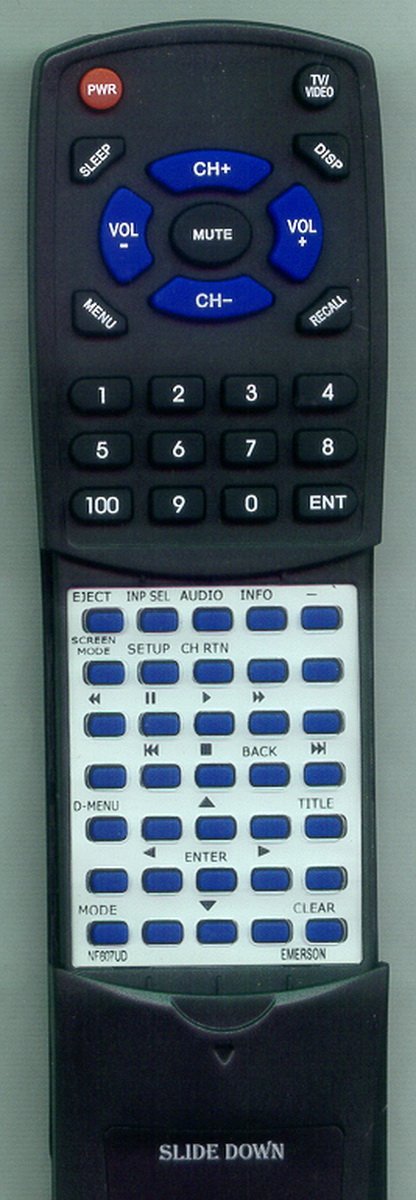
This image shows the Redi-Remote replacement remote control, designed for Emerson LD195EMX and NF607UD televisions. The remote features a standard button layout and a sliding cover for additional controls.
2. Setup
2.1 Battery Installation
- Locate the battery compartment on the back of the remote control.
- Slide open the battery compartment cover.
- Insert four (4) AAA batteries, ensuring the positive (+) and negative (-) terminals align correctly with the markings inside the compartment. Note: Batteries are included with the remote.
- Close the battery compartment cover securely.
2.2 Initial Use
Once batteries are installed, the remote control is ready for immediate use. No programming or pairing is required. Simply point the remote at your Emerson LD195EMX or NF607UD television and begin operating it.
3. Operating Instructions
The Redi-Remote replacement remote control functions identically to your original Emerson remote. Below are common functions:
- Power Button: Turns the television on or off.
- Volume Up/Down: Adjusts the sound level.
- Channel Up/Down: Changes television channels.
- Number Buttons (0-9): Directly select channels.
- Input/Source: Switches between different video inputs (e.g., HDMI, AV).
- Menu: Accesses the television's on-screen menu.
- Navigation Buttons (Arrow Keys, OK/Enter): Navigate through menus and confirm selections.
- Sliding Cover: The lower half of the remote features a sliding cover. Slide this cover down to reveal additional buttons for advanced functions, such as playback controls or specific menu options.
4. Maintenance
4.1 Battery Replacement
Replace batteries when the remote's performance degrades or it stops responding. Always replace all four AAA batteries at the same time with new ones. Do not mix old and new batteries or different types of batteries.
4.2 Cleaning
To clean the remote, use a soft, dry cloth. For stubborn dirt, lightly dampen the cloth with water. Avoid using harsh chemicals or abrasive cleaners, as these can damage the remote's surface or internal components.
4.3 Storage
Store the remote control in a cool, dry place away from direct sunlight and extreme temperatures. If the remote will not be used for an extended period, it is recommended to remove the batteries to prevent leakage.
5. Troubleshooting
- Remote not responding:
- Check if the batteries are inserted correctly with the correct polarity.
- Replace the batteries with fresh ones.
- Ensure there is a clear line of sight between the remote and the television's infrared sensor. Remove any obstructions.
- Make sure you are within the effective range of the remote control.
- Some buttons not working:
- This could indicate low battery power. Try replacing the batteries.
- Ensure the sliding cover is fully open or closed if you are trying to access buttons underneath it.
If issues persist after following these steps, please refer to the support section.
6. Specifications
| Feature | Detail |
|---|---|
| Product Dimensions | 7 x 2.5 x 1 inches |
| Item Weight | 4.5 ounces |
| Model Number | RTNF607UD |
| Batteries Required | 4 AAA batteries (included) |
| Special Feature | No Programming Required |
| Max Number of Supported Devices | 1 |
| Compatible Devices | Television (Emerson LD195EMX, NF607UD) |
| Connectivity Technology | Infrared |
7. Warranty and Support
This Redi-Remote replacement remote control is designed for reliable performance. While specific warranty details are not provided, if you encounter any concerns or issues with the remote after purchase, please contact the seller directly for assistance. They can provide support and guidance for troubleshooting or potential replacements.