
1. Introduction
This manual provides instructions for the Redi-Remote replacement remote control, designed for use with specific ONKYO audio/video receiver models. This remote offers full functionality for the designated ONKYO unit without requiring programming.
Compatible ONKYO Models: RC283S, 24140223Y, RC223S, TX910, 24140283Y, TX930, TX910BHBLK, TX903.
2. Setup
2.1 Battery Installation
The remote control requires four (4) AAA batteries for operation. These batteries are typically included with your purchase.
- Locate the battery compartment cover on the back of the remote control.
- Slide or press the latch to open the battery compartment.
- Insert four AAA batteries, ensuring the positive (+) and negative (-) terminals align correctly with the markings inside the compartment.
- Close the battery compartment cover securely until it clicks into place.
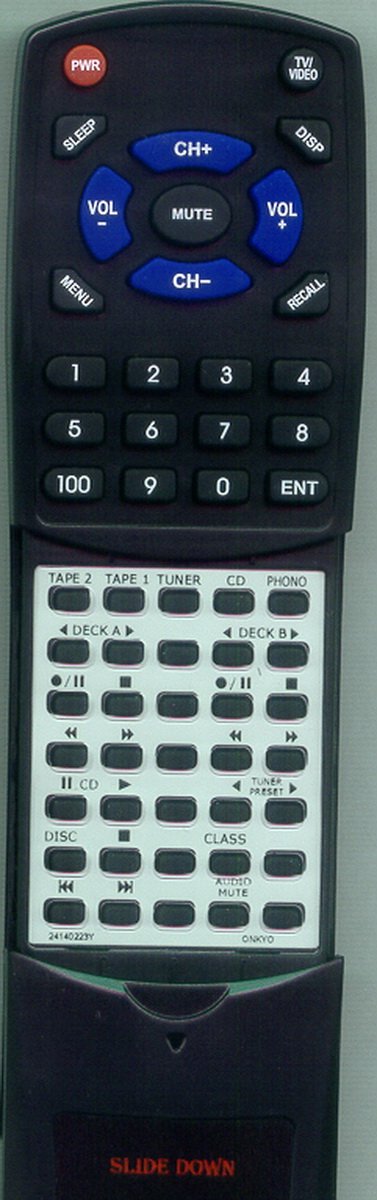
Image 1: Front view of the Redi-Remote replacement remote control. This image shows the layout of the primary control buttons and the upper section of the remote.
3. Operating Instructions
3.1 Basic Functions
Once batteries are installed, the remote is ready for immediate use with your compatible ONKYO unit. Point the remote directly at the ONKYO receiver and press the desired function button.
- Power Button: Turns the ONKYO unit on or off.
- Volume Up/Down: Adjusts the audio output level.
- Input Selector: Cycles through available audio/video inputs.
- Mute Button: Toggles audio mute on or off.
3.2 Advanced Functions (Sliding Cover)
The lower half of the remote control features a sliding cover. To access additional functions and buttons, gently slide this cover downwards. This will reveal a secondary set of controls for more advanced operations specific to your ONKYO unit.
Note: This Redi-Remote is designed exclusively for controlling the specified ONKYO unit. It cannot be programmed to control auxiliary devices such as televisions or DVD players.
4. Maintenance
4.1 Cleaning
To clean the remote control, use a soft, dry cloth. For stubborn dirt, slightly dampen the cloth with water. Avoid using harsh chemicals, abrasive cleaners, or solvents, as these can damage the remote's surface or internal components.
4.2 Battery Replacement
Replace the batteries when the remote's response becomes sluggish or stops functioning. Always replace all four AAA batteries at the same time with new ones. Do not mix old and new batteries, or different types of batteries.
5. Troubleshooting
| Problem | Possible Cause | Solution |
|---|---|---|
| Remote not responding. | Dead or incorrectly inserted batteries. | Check battery orientation. Replace all four AAA batteries. |
| Weak or intermittent response. | Low battery power; obstruction between remote and receiver. | Replace batteries. Ensure clear line of sight to the ONKYO receiver's infrared sensor. |
| Remote controls other devices. | Not applicable. This remote is designed only for specific ONKYO units and cannot be programmed for auxiliary devices. | Ensure you are using the correct remote for the intended device. |
6. Specifications
- Model Number: RT24140223Y
- Brand: Redi-Remote
- Product Dimensions: 7 x 2.5 x 1 inches (approximately)
- Item Weight: 4.5 ounces (approximately)
- Batteries Required: 4 x AAA (included)
- Connectivity Technology: Infrared (IR)
- Max Number of Supported Devices: 1 (specific ONKYO unit)
- Compatible Devices: ONKYO Receivers (Models: RC283S, 24140223Y, RC223S, TX910, 24140283Y, TX930, TX910BHBLK, TX903)
7. Warranty and Support
As a replacement remote control, specific warranty details may vary. For information regarding warranty coverage, returns, or technical support, please refer to the original seller or retailer from whom the product was purchased. Keep your purchase receipt for any warranty claims.